
FreeFileSync is a free, open source file synchronization and folder backup tool for Windows that helps you compare, synchronize, mirror, and back up files between folders, hard drives, SSDs, USB flash drives, NAS devices, and network shares. Before copying any data, FreeFileSync intelligently compares files using timestamps, file sizes, or binary content to accurately detect changes and synchronize only what is needed.
Unlike basic copy utilities, it is designed for speed, reliability, and large data sets. It supports automation, batch jobs, versioning, real-time synchronization, and portable operation, making it an excellent choice for home users, IT professionals, photographers, developers, and anyone who needs dependable file synchronization.
FreeFileSync | Free File Synchronization & Backup Software
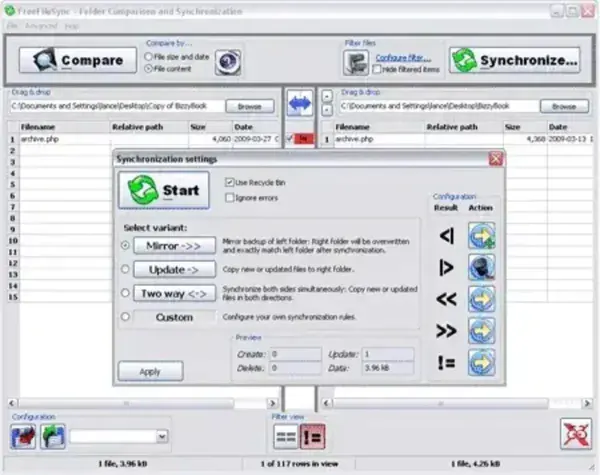
FreeFileSync features an intuitive graphical interface that lets you compare two folders before synchronizing them. Every change is previewed before execution, allowing you to review additions, deletions, updates, and conflicts before any files are modified.
Whether you're keeping folders synchronized between computers, maintaining backups on an external drive, or mirroring important data to a NAS device, FreeFileSync provides complete control over every synchronization operation.
Complete Feature List
- Compare files by modification date and time.
- Compare files by size.
- Compare files using binary content.
- Mirror synchronization.
- Two-way synchronization.
- Update synchronization.
- Custom synchronization rules.
- Real-time folder monitoring.
- Automatic synchronization when changes occur.
- Batch job processing.
- Command-line support.
- Save reusable synchronization configurations.
- Versioning for deleted and replaced files.
- Recycle Bin support during synchronization.
- Conflict detection and resolution.
- Preview changes before synchronizing.
- Detailed synchronization logs.
- Email notification support.
- Copy locked files using Volume Shadow Copy.
- Long filename support.
- Large file support (4 GB+).
- Network share synchronization.
- NAS synchronization.
- External USB drive synchronization.
- Portable operation without installation.
- Optimized multithreaded file copying.
- Symbolic link handling.
- Folder filtering and exclusion rules.
- File extension filters.
- Unicode filename support.
- Cross-platform compatibility (Windows, Linux, macOS).
- Open source GPL licensing.
Synchronization Modes Explained
Two-Way Synchronization
Keeps both folders synchronized by copying newer files in either direction while preserving changes made on both sides.
Mirror Synchronization
Creates an exact copy of the source folder. Files removed from the source are also removed from the destination, making this mode ideal for maintaining mirrored backups.
Update Synchronization
Copies only new and modified files from the source to the destination without deleting existing files.
Custom Synchronization
Allows advanced users to define their own synchronization rules for specialized backup and workflow scenarios.
Why Choose FreeFileSync?
Many synchronization programs are either overly simplistic or unnecessarily complex. FreeFileSync strikes an excellent balance by providing professional-grade synchronization capabilities through an interface that remains approachable for beginners.
It is especially useful for:
- Backing up important documents.
- Synchronizing work files between desktop and laptop.
- Keeping USB flash drives updated.
- Maintaining mirrored backup drives.
- Synchronizing NAS storage.
- Protecting photographs and media collections.
- Automating recurring backup jobs.
- Migrating files between computers.
How to Synchronize Files
- Download FreeFileSync.
- Launch the portable application.
- Select your source folder.
- Select your destination folder.
- Click Compare to preview changes.
- Select your preferred synchronization mode.
- Review the results.
- Click Synchronize to begin copying files.
- Save the job for future automated synchronization if desired.
Pros and Cons
Pros
- Completely free and open source.
- Excellent synchronization performance.
- Supports extremely large folders.
- Reliable conflict detection.
- Flexible synchronization modes.
- Automation and batch processing.
- Portable version available.
- Cross-platform support.
- Clean, modern interface.
Cons
- Advanced synchronization options require some learning.
- Real-time synchronization uses a separate monitoring component.
- Binary comparison can be slower on very large datasets.
Specifications | Official Site | Download
- Author's Website: Official FreeFileSync Project
- Developer: Zenju
- License: GNU GPL Open Source
- Supported Operating Systems: Windows 11, Windows 10, Windows 8, Windows 7, Linux, macOS
- Application Category: File Synchronization, Backup Utility
- Editor's Rating: ★★★★★
- Download: Download FreeFileSync
Frequently Asked Questions
Is FreeFileSync really free?
Yes. FreeFileSync is completely free and open source software released under the GNU GPL license.
Can FreeFileSync create backups?
Yes. It supports mirror synchronization, update synchronization, versioning, and custom backup configurations, making it an excellent backup solution.
Does FreeFileSync support external USB drives?
Yes. It works with USB flash drives, external hard drives, SSDs, memory cards, network shares, and NAS devices.
Can I automate synchronization jobs?
Yes. Synchronization configurations can be saved and executed manually, through scheduled tasks, batch jobs, or command-line automation.
Is FreeFileSync portable?
Yes. A portable edition is available that runs without installation, making it ideal for technicians and portable software collections.
How is FreeFileSync different from Windows copy?
Instead of copying every file, FreeFileSync compares folders first and transfers only changed files, making synchronization significantly faster and more efficient.
Related Tools
If you frequently compare or synchronize files, you may also be interested in our reviews of WinMerge Portable for detailed file comparison, Synkron for cross-platform folder synchronization, and ViceVersa for advanced Windows backup and synchronization.
Final Thoughts
FreeFileSync has earned its reputation as one of the best free file synchronization tools available. Its powerful comparison engine, flexible synchronization modes, automation capabilities, and portable design make it suitable for everything from simple folder backups to complex synchronization workflows across multiple devices.
Whether you need to mirror folders, back up important documents, synchronize files between computers, or keep USB drives up to date, FreeFileSync delivers professional-grade performance without the cost. It remains one of the first utilities we recommend for reliable file synchronization and portable backup management.
