
WinSpy++ is a free and lightweight Windows inspection tool that helps developers, programmers, testers, and system administrators examine running applications. It can display detailed information about windows, controls, processes, and user interface elements, making it useful for debugging software, analyzing application behavior, and troubleshooting Windows programs. Because it is portable and extremely small, it can be carried on a USB flash drive and launched without installation.
WinSpy++ | Free Windows Inspection and Debugging Tool
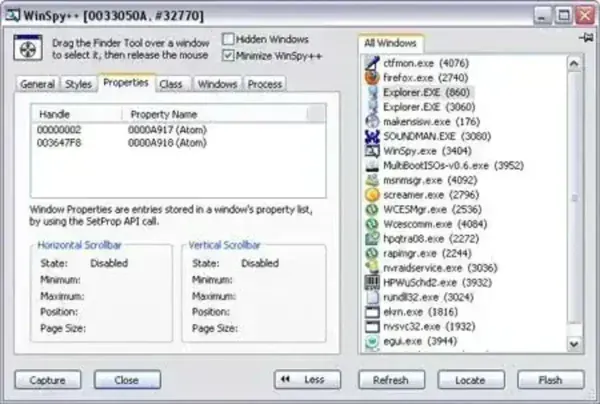
What is WinSpy++?
WinSpy++ is a Windows property viewer and inspection utility that reveals information normally hidden behind graphical user interface elements. It allows users to examine windows, controls, class names, styles, handles, and relationships between application components.
Developers often use it to investigate how applications are structured, while system administrators and support technicians may use it to troubleshoot interface problems or identify application details.
Key Features
- Window Inspection: View window handles, captions, class names, styles, and properties.
- Control Analysis: Examine buttons, menus, text fields, and other interface elements.
- Window Hierarchy Viewing: Explore parent and child window relationships.
- Message Monitoring: Observe messages exchanged between windows and controls.
- Window Enumeration: Display information about open windows running on the system.
- Property Inspection: View detailed attributes associated with application windows.
- Portable Operation: Run directly without a traditional installation process.
Common Uses
WinSpy++ can be useful in a variety of situations:
- Debugging Windows applications
- Inspecting user interface elements
- Troubleshooting application behavior
- Learning how Windows controls interact
- Analyzing third-party software interfaces
- Building portable developer and technician toolkits
Portable Usage
One of the biggest advantages of WinSpy++ is its small size. At only around 140 KB, the utility can easily be stored on a USB flash drive and launched whenever needed.
Benefits include:
- No installation required
- Minimal storage footprint
- Fast startup
- Convenient for portable troubleshooting kits
- Suitable for older and newer Windows systems
Specifications and Download
- Project Page: WinSpy++ Project Page
- Developer: Originally created by Catch22
- License: Freeware
- Extracted Size: Approximately 140 KB
- Supported Operating Systems: Windows
- Category: Developer Tools, System Utilities
- Editor Rating: 4 Star
- Download: Download WinSpy++
Pros and Cons
Pros
- Extremely small and lightweight
- No installation required
- Useful for developers and power users
- Provides detailed window and control information
- Free to use
Cons
- Interface appears dated by modern standards
- Primarily intended for technical users
- Limited usefulness for casual users
Final Thoughts
WinSpy++ remains a useful utility for anyone who needs to inspect Windows applications, analyze user interface elements, or troubleshoot software behavior. Its tiny footprint, portable design, and ability to expose detailed window information make it a valuable addition to any developer, tester, or IT support toolkit.
If you're looking for a lightweight Windows inspection tool that can run directly from a USB flash drive, WinSpy++ is still worth keeping around.
