LiLi Linux Live USB Creator: Discontinued Windows Utility
LinuxLive USB Creator, commonly called LiLi, is a discontinued Windows utility for creating bootable USB drives from Linux ISO images. Its guided interface was designed to make a Live Linux USB with a few steps, and it included a persistence option for supported distributions so some settings and files could be saved between sessions. The project was abandoned in 2015, so LiLi should be treated as a legacy USB creator rather than a current recommendation for modern Linux images.
LiLi: Linux Live USB Creator
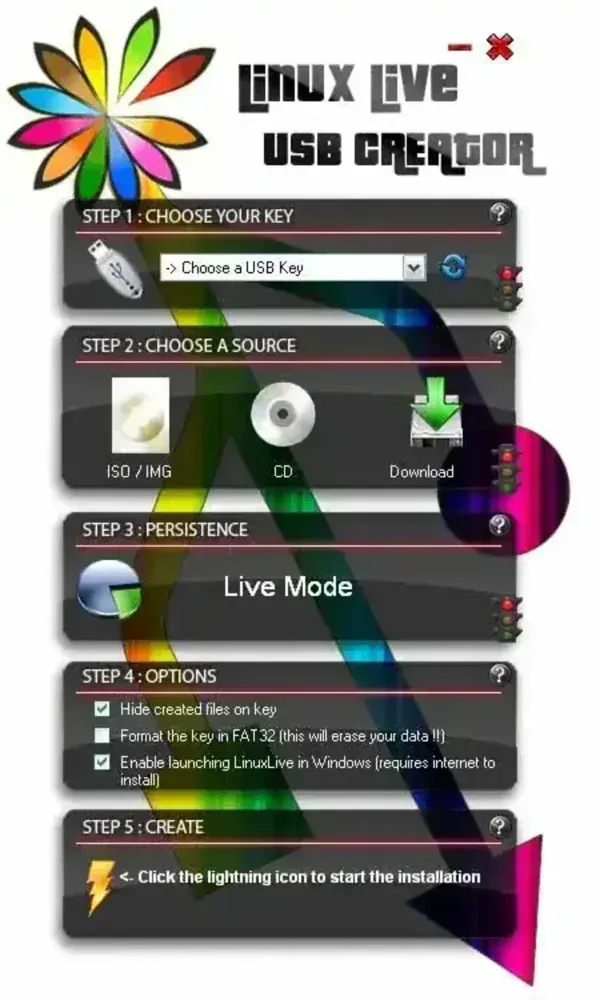
LiLi was built around a five-step workflow: select a USB drive, choose a Linux source, configure persistence and formatting options, review the settings, and create the bootable drive. It supported Linux ISO files and some compressed image formats, and its interface included options for downloading a supported distribution or checking a downloaded image.
Persistence and Live USB Features
- Guided USB creation: Walks through selecting the target USB drive and Linux image.
- Persistence: Can create a persistent area for supported distributions, allowing selected files and settings to remain after reboot.
- Image sources: Use a downloaded ISO or one of the supported download options where still available.
- Image verification: Includes options intended to check the selected Linux image before writing it.
- Windows interface: Creates Linux boot media from a Windows computer without requiring a Linux desktop.
- Legacy compatibility: Designed for older Windows versions and Linux distributions available around the time of its final release.
Persistence is not supported in the same way by every Linux distribution. The amount of persistent storage and which system changes are retained depend on the distribution and the way its Live USB environment is built. A persistent Live USB is also different from a full Linux installation on a flash drive.
How to Create a Live USB with LiLi
- Connect a USB flash drive with enough capacity for the Linux image and any persistence space.
- Start LiLi and select the correct USB drive. Double-check the drive letter because the creation process may format or overwrite the selected device.
- Choose a supported Linux ISO or another source recognized by the program.
- Configure persistence if the selected distribution supports it.
- Review the selected drive and formatting options before starting the write process.
- When the process completes, safely eject the drive and test it on a computer that supports the boot mode and hardware requirements of the chosen distribution.
Always back up the USB drive before using a boot-media creator. Writing an image can erase existing files on the selected device. LiLi's old distribution list and bootloader support may not work with current Linux releases, UEFI Secure Boot configurations, or modern hardware.
Development Status and Compatibility
The developer announced that LinuxLive USB Creator was abandoned in December 2015. Version 2.9.4, released September 10, 2015, is the final version listed for the project. The original compatibility information covers older Windows versions, but it does not establish reliable operation on current Windows builds. The old program may also lack the bootloader and filesystem support required by newer Linux distributions.
For a current single-image USB creation workflow, Rufus is an actively maintained option for Windows. For a multiboot USB drive, see YUMI. Check each tool's current documentation for distribution compatibility and persistence support.
LiLi Linux Live USB Creator Specifications
- Application: LinuxLive USB Creator (LiLi)
- Final version: 2.9.4
- Release date: September 10, 2015
- Developer: Thibaut Lauzière
- License: Open source
- Platform: Windows XP, Vista, 7, 8, and 10 were listed for the final release; current compatibility is unverified
- Main functions: Create Linux Live USB drives from supported images, optional persistence, image checking, guided setup
- Development status: Discontinued; project abandoned in December 2015
- Editor's Rating: ★★★★☆ (4/5) as a historical tool
- Project page: LinuxLive USB Creator
- Older versions: Archived LiLi downloads
Frequently Asked Questions
Does LiLi support persistent Linux USB drives?
It includes a persistence option for supported Linux distributions. The amount of space and which changes are saved depend on the distribution and its Live USB implementation.
Is LiLi still maintained?
No. The project was abandoned in December 2015, and version 2.9.4 from September 2015 is the final listed release.
Can LiLi create a USB drive for modern Linux distributions?
Compatibility with current distributions and modern UEFI or Secure Boot systems is not established. Use a maintained USB creation tool for current Linux releases.
Will creating a Live USB erase my flash drive?
The selected USB drive may be formatted or overwritten during creation. Back up its contents and verify the drive letter before starting.
Is LiLi Still Worth Using?
LiLi offered a straightforward way to create Linux Live USB media from Windows and made persistence easier to configure for supported distributions. Its guided interface remains interesting as a piece of portable-software history, but the project has been discontinued for more than a decade. For current Linux images, use a maintained tool such as Rufus or YUMI and verify the image and target USB drive before writing.