
HandBrake is a free tool that lets you convert just about any video file into a format that works almost anywhere. Maybe you want to turn a MOV into an MP4, shrink a huge video, get a file ready for your phone, or make your videos take up less space without losing quality-HandBrake handles all that. And since it's open source, you can download it and start using it right away.
HandBrake Portable Video Transcoder
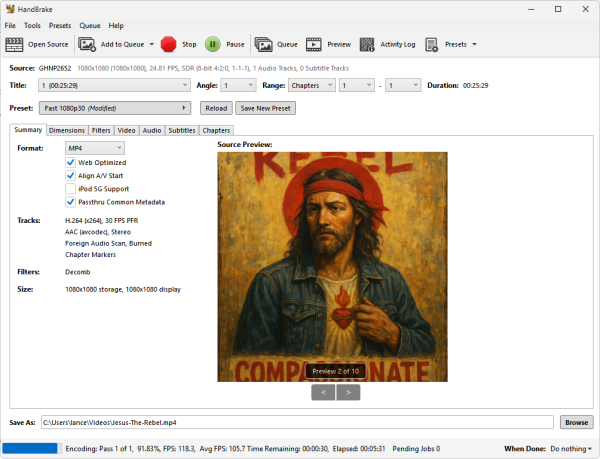
What is HandBrake?
HandBrake is a widely used open source video conversion and compression tool originally created by Eric Petit in 2003. Today it is maintained by the HandBrake Team and is available for Windows, Linux, and macOS.
The software is designed to convert video from supported source formats into modern codecs such as H.264, H.265 (HEVC), VP9, and AV1. It is commonly used to reduce file sizes, prepare videos for streaming, optimize media for smartphones and tablets, archive DVDs, and convert footage into more compatible formats.
Unlike many commercial video converters, HandBrake is completely free, contains no advertisements, and offers extensive control over video quality, audio tracks, subtitles, filters, and encoding settings.
Key Features
- Convert Videos Between Formats: Convert supported video files into MP4, MKV, or WebM containers.
- Modern Video Codecs: Supports H.264 (x264), H.265 (x265), VP9, and AV1 encoding.
- Device Presets: Includes ready-made profiles for Android devices, Apple products, Roku, Fire TV, and general playback.
- Batch Video Conversion: Queue multiple videos and process them automatically.
- Subtitle Support: Add, remove, burn-in, or preserve subtitle tracks.
- Audio Track Management: Configure multiple audio tracks, codecs, and bitrate settings.
- Video Filters: Includes deinterlacing, denoise, sharpen, crop, and scaling filters.
- Hardware Acceleration: Supports Intel Quick Sync Video, NVIDIA NVENC, and AMD VCN encoding on compatible hardware.
- Open Source: Completely free software released under the GNU GPL.
- Portable Friendly: Can be run from an extracted ZIP archive without a traditional installation.
Why Use HandBrake?
HandBrake is one of the most trusted video conversion tools available because it balances simplicity and advanced functionality. Beginners can quickly convert videos using presets, while experienced users can fine-tune every aspect of the encoding process.
Common uses include:
- Converting MOV videos to MP4
- Reducing video file sizes for storage
- Preparing videos for YouTube uploads
- Creating mobile-friendly video copies
- Backing up unprotected DVDs
- Archiving personal video collections
- Converting older video formats into modern codecs
Supported Formats
| Category | Supported Formats |
|---|---|
| Input Sources | Most common multimedia formats, DVDs, Blu-ray style structures (non-copy protected), and video files |
| Output Containers | MP4, MKV, WebM |
| Video Codecs | H.264, H.265 (HEVC), VP9, AV1, MPEG-4 |
| Audio Codecs | AAC, MP3, FLAC, AC3, Opus, Vorbis |
Codec Comparison
| Codec | Compression Efficiency | Encoding Speed | Compatibility |
|---|---|---|---|
| H.264 (x264) | Good | Fast | Excellent |
| H.265 (x265) | Very High | Moderate | Good |
| VP9 | Very High | Moderate | Good |
| AV1 | Excellent | Slower | Growing Support |
How to Convert Videos with HandBrake
- Download and extract the portable version.
- Launch HandBrake.exe.
- Click Open Source and select a video file or folder.
- Choose an output preset or customize encoding settings.
- Select the destination folder and output filename.
- Click Start Encode to begin the conversion.
- Wait for processing to complete and enjoy your converted video.
HandBrake vs Other Video Converters
| Software | Open Source | Batch Processing | Advanced Controls | Best For |
|---|---|---|---|---|
| HandBrake | Yes | Yes | Excellent | General video conversion and compression |
| FFmpeg | Yes | Yes | Expert Level | Automation and scripting |
| VLC Media Player | Yes | Limited | Basic | Occasional conversions |
| Shutter Encoder | No | Yes | Advanced | Content creators and editors |
Pros and Cons
Pros
- Free and open source
- Excellent video compression quality
- Supports modern codecs including AV1
- Cross-platform compatibility
- Batch conversion support
- Hardware accelerated encoding
- No ads or bundled software
Cons
- Advanced settings can be intimidating for beginners
- Cannot decrypt copy-protected DVDs or Blu-rays by itself
- AV1 encoding can be slow on older hardware
Specifications and Download
- Official Website: Project Page
- Developer: HandBrake Team
- Original Author: Eric Petit
- License: GNU GPL v2
- Supported Operating Systems: Windows 11, Windows 10, Windows 8, Linux, macOS
- Category: Video Converter, Video Transcoder
- Portable: Yes (ZIP builds available)
- Editor's Rating: ★★★★★
- Download: Download HandBrake
Frequently Asked Questions (FAQ)
Is HandBrake free?
Yes. It is completely free and open source software released under the GNU GPL v2 license.
Can HandBrake convert MOV files to MP4?
Yes. Converting MOV files to MP4 is one of the most common uses for it.
Can HandBrake rip DVDs?
Yes. It can convert unprotected DVDs and supported disc sources into digital video files.
Does HandBrake support AV1 encoding?
Yes. Modern versions include AV1 encoding support for improved compression efficiency.
Can I batch convert videos?
Yes. Multiple files can be added to a queue and processed automatically.
Is HandBrake portable?
Yes. ZIP builds can be extracted and run without a traditional installation, making them suitable for portable use.
Final Thoughts
HandBrake continues to be one of the best free video transcoding tools available. Its combination of powerful compression, modern codec support, hardware acceleration, and advanced customization makes it suitable for both beginners and experienced users.
Whether you need to convert MOV files to MP4, reduce video file sizes, prepare content for streaming, or archive a personal media collection, it delivers professional-quality results without cost or restrictions.
For users looking for a reliable portable video converter that balances ease of use with advanced capabilities, I think this tool remains one of the strongest choices available.
