
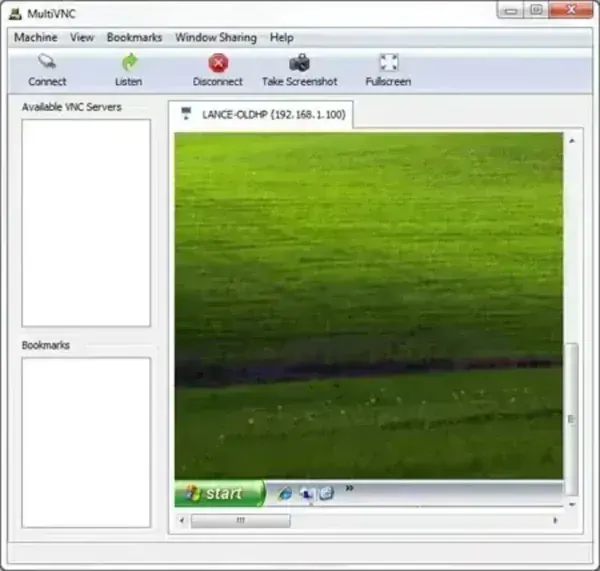
MultiVNC is a free, open source portable VNC viewer that allows users to remotely access and control computers over a network. Designed to work across multiple operating systems, it can connect to remote desktops running Windows, Linux, Unix, and macOS through the Virtual Network Computing (VNC) protocol. Lightweight and portable, it can be launched without installation, making it a useful addition to any USB technician toolkit.
MultiVNC | Portable Cross Platform VNC Viewer
What is MultiVNC?
MultiVNC is a remote desktop client designed for connecting to computers running compatible VNC server software. Once connected, you can view and control a remote system using your local keyboard and mouse, making it useful for remote administration, technical support, system monitoring, and accessing computers from another location.
Unlike many commercial remote desktop tools, MultiVNC is open source and supports direct VNC connections without requiring cloud services or subscription accounts.
Because it runs as a portable application, it can be stored on a USB flash drive and launched whenever remote access is needed.
Key Features
- Cross Platform Compatibility: Connect to systems running Windows, Linux, Unix, and macOS.
- Portable Operation: Runs without installation and can be carried on removable media.
- Tabbed Sessions: Manage multiple remote desktop connections within a single interface.
- TLS and SSH Tunneling: The project supports TLS and SSH tunneling, but protection depends on the selected connection method and server configuration. Verify the negotiated security settings rather than assuming every VNC session is encrypted.
- Zero Configuration Discovery: Can discover compatible servers advertising themselves on the local network.
- Connection Bookmarks: Save frequently used connections for quick access.
- Remote Display Resizing: Supports dynamic framebuffer resizing for improved viewing.
- Reverse Connection Support: Includes listen mode functionality for incoming connections.
Common Uses
- Remote technical support
- Managing home or office computers
- System administration tasks
- Accessing Linux or Unix servers remotely
- Maintaining portable IT support toolkits
- Monitoring multiple remote systems simultaneously
Why Choose MultiVNC?
MultiVNC offers a balance between portability and advanced functionality. While lightweight viewers focus primarily on simple remote access, this client includes features such as tabbed sessions, network discovery, and secure connections that can be valuable in professional environments.
Its open source licensing and cross platform support also make it appealing to users who prefer alternatives to commercial remote desktop solutions.
Specifications | Official Site | Download
- Project Website: Multi VNC Project Page
- Developer: Christian Beier
- License: GNU General Public License (GPL)
- Supported Operating Systems: Windows, Linux, Unix, macOS
- Category: Remote Desktop Software, VNC Viewer
- Extracted Size: Approximately 5.8 MB
- Editor's Rating: ★★★★☆ (4 Star)
- Download: Download MultiVNC
Final Thoughts
MultiVNC is a cross-platform VNC viewer with features such as tabbed sessions, network discovery, TLS support, and SSH tunneling. Encryption depends on the chosen connection method and server configuration; a direct VNC connection should not be assumed to protect traffic. For remote access across untrusted networks, configure a supported encrypted connection or SSH tunnel, verify server identity, and keep both client and server software updated.
If you need a free portable VNC viewer that works across multiple operating systems and supports managing several connections from a single interface, this tool is worth considering.
