
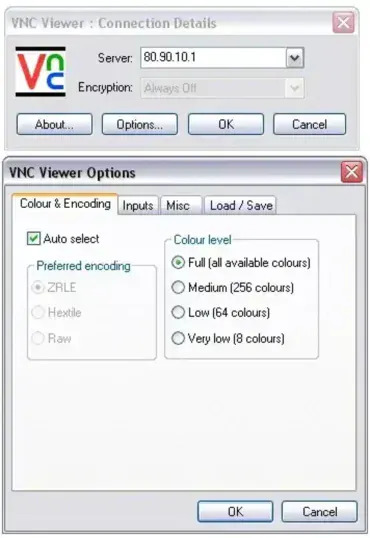
RealVNC Viewer is a portable remote desktop client (RDC) that enables you to securely access and control machines running a compatible VNC server. The viewer is developed by one of the original creators of Virtual Network Computing (VNC) and provides encrypted remote access to systems across local networks or the internet. It's easy to use, runs on multiple platforms, and provides optional cloud connectivity, making it a popular choice for home users, remote employees, and IT support professionals.
RealVNC Viewer | Portable Remote Desktop Client

What is RealVNC Viewer?
RealVNC Viewer is a remote desktop application that allows you to view and control another computer from virtually anywhere. By connecting to a compatible VNC server, you can interact with a remote desktop using your local keyboard and mouse as though you were sitting directly in front of the machine.
The software is commonly used for remote technical support, accessing home or office computers while traveling, managing servers, and assisting friends, family, or clients remotely.
Key Features
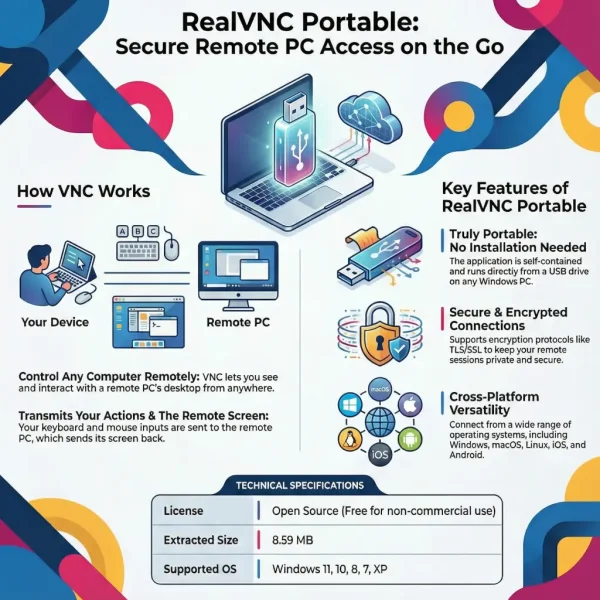
- Portable Remote Access: Launch the viewer without performing a traditional installation.
- Cross Platform Support: Connect between Windows, macOS, Linux, Android, and iOS devices.
- Encrypted Connections: Supports secure remote sessions using modern TLS encryption.
- Cloud Connectivity: Optional cloud based access simplifies connections across firewalls and dynamic IP addresses.
- Authentication Controls: Supports password protection and account-based authentication.
- Remote File Transfer: Available in supported editions.
Who Should Use RealVNC?
- Home users who need access to a PC while away from home
- Remote workers connecting to office systems
- IT professionals providing remote support
- Administrators managing computers across multiple locations
- Users seeking a simple remote desktop solution with cloud connectivity
Portability
While this Remote Desktop Viewer can be run without a traditional installation, some settings and connection information may be stored on the host computer. Because of this behavior, it is best described as a semi portable remote desktop client rather than a completely self contained RealVNC portable application.
For most users this is a minor consideration, but technicians who require a truly portable solution may prefer alternatives such as UltraVNC Viewer or TightVNC Viewer.
Portable VNC Viewer Comparison
| Feature | UltraVNC Viewer | TightVNC Viewer | RealVNC Viewer |
|---|---|---|---|
| Portable | Yes | Yes | Semi portable |
| Encryption | Yes | Optional | Yes |
| Cloud Access | No | No | Yes |
| Account Required | No | No | Yes |
| Best For | IT Administration | Lightweight Remote Access | Easy Personal Remote Access |
Specifications and Download
- Developer: RealVNC Ltd.
- Website: Project Page
- License: Free for personal use, commercial plans available
- Category: Remote Desktop Software / VNC Viewer
- Supported Operating Systems: Windows, macOS, Linux, Android, and iOS
- Extracted Size: Approximately 8.6 MB
- Editor's Rating: ★★★★☆ (4/5)
- Download: Download RealVNC Viewer
Final Thoughts
RealVNC Viewer provides a polished and user friendly way to access remote computers securely from almost anywhere. Its combination of encrypted connections, cross-platform support, and optional cloud connectivity makes it especially appealing to home users and remote workers who want a straightforward remote desktop solution.
While power users may prefer the additional configurability offered by UltraVNC Viewer, and minimalists may favor the lightweight nature of TightVNC Viewer, this VNC Viewer remains one of the easiest VNC clients to set up and use. For anyone looking for a reliable remote desktop client with modern security features and broad platform support, it continues to be a solid choice.
