SpaceSniffer - Find Lost Disk Space
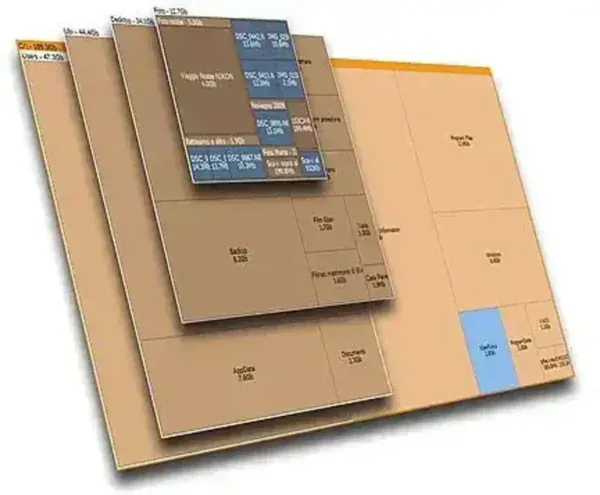
SpaceSniffer is a free, portable disk space analyzer for Windows. It scans a drive or selected folder and displays the results as a treemap, a visual map made up of rectangles representing files and folders. Larger rectangles indicate items using more storage, making it easier to spot oversized folders, old downloads, media files, backups, and other space-consuming data.
You can explore the map by selecting a large rectangle to view its contents, then continue drilling down until you identify the folders or files responsible for the space usage. SpaceSniffer also includes a filter field for narrowing results by file type, size, age, and other conditions. Color tags can be applied to items as you review them, and the built-in export module can generate a text report of the results.
SpaceSniffer is still available from its original developer, Uderzo Software. The developer lists version 2.2.0.27 as the latest release. It is distributed as a portable package, so you can extract it to a folder and run it without a conventional installation. The current release is a 64-bit Windows application and the developer's page lists testing for Windows 7, 8, 10, and 11.
SpaceSniffer Disk Space Analyzer
SpaceSniffer Features
- Treemap visualization: Displays storage usage as nested rectangles, with larger blocks representing larger files or folders.
- Folder exploration: Select a block to inspect its contents and drill down through the directory structure.
- File filters: Narrow the map by file extension, size, age, and combinations of filter conditions.
- Include and exclude filters: Show selected file types or exclude them from the current view.
- Color tags: Mark items with four available colors while reviewing a scan, then filter the view by those tags.
- Report export: Generate a text report and customize its layout using the built-in export module.
- Portable operation: Run the program from an extracted folder or USB drive without a traditional installation.
How to Find Large Files and Folders
- Download SpaceSniffer from the developer's download page and extract the archive to a folder.
- Launch the application and select the drive or folder you want to analyze.
- Start the scan and look for the largest rectangles in the treemap.
- Select a large block to inspect its contents, then continue into subfolders to identify the files using the most space.
- Use the filter field to narrow the results, for example by entering
*.jpgto focus on JPEG images or a size condition to find larger items. - Use color tags to mark items for later review, or export a report if you need to document the scan.
Using SpaceSniffer Safely
SpaceSniffer helps identify what is occupying storage, but a large file is not necessarily unnecessary. Before removing anything, confirm its full path and determine which application or Windows component uses it. Do not delete unfamiliar files from Windows system folders, application directories, or backup locations simply because they occupy a lot of space. Use Windows Explorer or the relevant application's own cleanup process after you have verified that an item is safe to remove.
Some protected folders may not be fully visible to a standard user account. If a scan appears incomplete, consider whether Windows permissions are preventing access to particular locations. Avoid changing permissions on system folders just to make them appear in the report.
Using SpaceSniffer Portably
Download the current ZIP package, extract it to your USB flash drive, and run the SpaceSniffer executable. The application does not require a conventional installer. Because the program analyzes the computer on which it is running, the results will reflect the drives and folders accessible on that host PC, not just the contents of the USB drive carrying the application.
Technical Details
- Editor's Rating: ★★★★☆ (4/5)
- Current version: 2.2.0.27.
- Developer: Uderzo Software.
- License: Freeware; donations are welcome.
- Platform: Windows, 64-bit release.
- Supported Windows versions listed by the developer: Windows 7, 8, 10, and 11.
- Official website: SpaceSniffer.
- Download: Download SpaceSniffer.