
XYplorer Free is a free portable file manager for Windows which provides a powerful alternative to the standard Windows File Explorer. The tool was originally developed by Cologne Code Company (now Donald Lessau) and is a portable, lightweight file manager that can be run directly from a USB flash drive without installation. No longer actively developed, the free edition is still one of the most capable portable file managers available.
XYplorer Free | Portable File Manager for Windows
If you frequently copy, move, organize, compare or search files, XYplorer Free has many advanced features that Windows File Explorer does not. Its feature-rich tabbed interface, fast search engine, flexible layout and comprehensive file management functions make it especially appealing to power users, developers and IT pros.
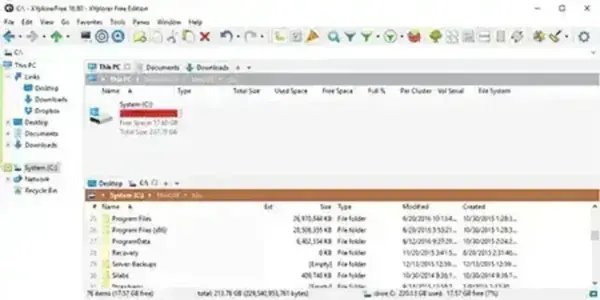
What is XYplorer?
XYplorer is an advanced file explorer replacement designed to simplify everyday file management tasks. Unlike Windows Explorer, it includes features such as tabbed browsing, batch file operations, duplicate file detection, advanced searching, customizable keyboard shortcuts, and extensive automation options. The portable edition stores its configuration locally, making it ideal for USB toolkits and technicians who work across multiple computers.
Complete Feature List
- Portable operation with no installation required.
- Tabbed file browsing for managing multiple folders simultaneously.
- Dual pane mode for faster file copying and organization.
- Advanced file search with powerful filtering options.
- Duplicate file finder.
- Batch file renaming with customizable rules.
- Integrated ZIP archive browsing.
- Multi-level undo and redo for file operations.
- File preview for images, documents, audio, and video files.
- Animated GIF preview.
- Custom file associations and user commands.
- Breadcrumb navigation and tree path tracing.
- Folder colorization and visual tagging.
- Favorites and quick access locations.
- Powerful file filtering and sorting.
- Secure file deletion (data wiping).
- Directory size calculations.
- Custom keyboard shortcuts and mouse gestures.
- Scripting and automation support.
- Fast startup with low memory usage.
Who Should Use XYplorer?
- IT professionals managing multiple computers.
- Power users needing more features than Windows File Explorer.
- Developers working with large project folders.
- Photographers and content creators organizing media collections.
- Anyone looking for a portable file manager that runs from a USB flash drive.
Why Choose XYplorer Free?
Even though development of the free edition ended in 2017, it still offers significantly more functionality than the default Windows File Explorer. Features like tabbed browsing, advanced search filters, duplicate file detection, and customizable workflows continue to make it a practical file management solution for many users.
Specifications
- Author's Website: Project Page
- Developer: Donald Lessau (formerly Cologne Code Company)
- License: Freeware (legacy version)
- Portable: Yes
- Extracted Size: Approximately 8 MB plus user configuration data.
- Supported Operating Systems: Windows 11, 10, 8, 7
- Editor's Rating: ★★★★★ (5 Stars)
- Download: Get the final free release here:
XYplorer Free Download
Frequently Asked Questions
What is XYplorer used for?
It is a feature rich file manager that replaces Windows File Explorer with advanced tools for browsing, organizing, searching, copying, renaming, and managing files.
Is XYplorer Free still available?
Yes. Although the free edition stopped receiving updates in 2017, the final release remains available from the official website.
Is XYplorer portable?
Yes. The portable version runs without installation and stores its settings locally, making it ideal for USB flash drives.
Does XYplorer support tabbed browsing?
Yes. One of its most popular features is tabbed browsing, allowing multiple folders to remain open simultaneously for easier file management.
What's the difference between XYplorer Free and XYplorer?
XYplorer Free is the final freeware release and is no longer updated. The commercial version continues to receive new features, bug fixes, and ongoing support from the developer.
Final Thoughts
XYplorer Free remains one of the best portable file managers ever released for Windows. Despite no longer being actively developed, it still offers a feature set that surpasses the standard Windows File Explorer in many areas, including tabbed browsing, advanced search, duplicate file detection, and batch file operations. If you need a lightweight yet powerful portable file explorer for your USB toolkit, this is still well worth downloading.
