
EasyPHP is a free Windows WAMP web server package that provides Apache, PHP, MySQL, and phpMyAdmin in a single development environment. It was designed to make it easier to create, test, and manage PHP websites locally without configuring each server component separately.
EasyPHP can also be used as a portable local web development environment. By placing the application on a USB flash drive or other portable storage device, developers can carry a self-contained PHP development environment between compatible Windows computers.
It is particularly useful for testing PHP applications, working with MySQL databases, experimenting with WordPress, and developing websites locally before publishing them to a live web server.
EasyPHP Portable | Free WAMP Web Server
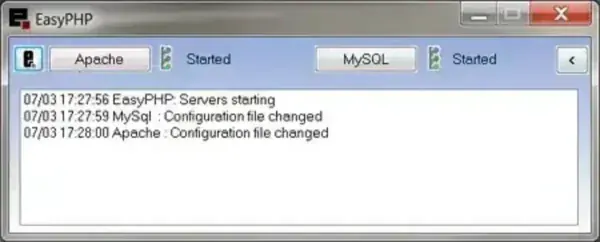
What Is EasyPHP?
EasyPHP is a Windows-based WAMP development environment that bundles the main components needed to run PHP websites locally. WAMP stands for Windows, Apache, MySQL, and PHP.
Instead of downloading and configuring Apache, PHP, and a database server individually, EasyPHP provides these components together in a single development package. It also includes phpMyAdmin for managing MySQL databases through a web browser.
This makes EasyPHP useful for developers who want to build and test dynamic websites on their own computer without uploading files to a live hosting account.
A local EasyPHP installation can be used to test PHP scripts, WordPress installations, database-driven applications, themes, plugins, and other web projects before deploying them to a production server.
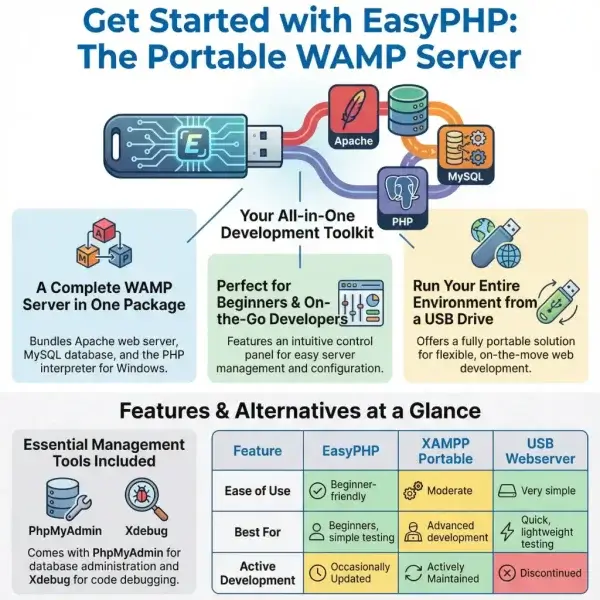
Complete EasyPHP Feature List
EasyPHP combines several separate server and development components into one manageable Windows environment. Depending on the version being used, the package can provide the following features:
- Apache Web Server: Includes Apache for serving websites and PHP applications locally.
- PHP Interpreter: Provides the PHP runtime required for running dynamic PHP websites and applications.
- MySQL Database Server: Provides a relational database system for PHP applications that require stored data.
- phpMyAdmin: Includes the popular browser-based database management interface for creating, editing, importing, exporting, and managing MySQL databases.
- Xdebug: Some EasyPHP packages include Xdebug for PHP debugging and development.
- Localhost Development: Run websites locally through a web browser using a localhost address.
- PHP Website Testing: Test PHP scripts and dynamic websites before uploading them to a live server.
- Database Development: Create and manage MySQL databases for local web applications.
- Graphical Control Panel: Manage the bundled server components through an EasyPHP control interface.
- Portable Use: EasyPHP can be configured for use from removable storage, depending on the package and version.
- USB Development: Carry a local PHP development environment on a USB flash drive.
- Multiple Projects: Use the local server environment to develop and test multiple websites and applications.
- WordPress Testing: A local PHP and MySQL environment can be used to create and test WordPress installations before deployment.
- Database Administration: Manage databases without requiring a separate desktop database application.
- Self-Contained Development Environment: Provides the major components required for basic PHP/MySQL development in one package.
Apache, PHP, MySQL and phpMyAdmin in One Package
The main advantage of EasyPHP is that it brings the major components of a PHP development environment together.
Apache acts as the local web server. When you access a website through localhost, Apache handles the request and serves the appropriate files.
PHP processes server-side PHP scripts, allowing you to test dynamic websites and applications locally.
MySQL provides database functionality for applications that need to store information.
phpMyAdmin provides a graphical interface for managing MySQL databases through a web browser.
Together, these components provide the basic infrastructure required to develop and test many PHP-based websites.
Why Use EasyPHP?
EasyPHP is useful when you want to create a local web server without manually configuring every component. This can save considerable setup time, especially for users who are new to PHP development.
A local server also provides an important advantage: changes can be tested privately before they are uploaded to a production website.
For example, a developer could install WordPress locally, test a new theme or plugin, modify PHP files, inspect database changes, and troubleshoot errors without affecting a live website.
EasyPHP can also be useful for students, web developers, designers, and technicians who need a convenient PHP testing environment.
EasyPHP Portable on a USB Flash Drive
One of EasyPHP's most interesting characteristics for PendriveApps users is the ability to use the development environment from removable storage.
A portable PHP server can be useful when you work on multiple Windows computers or want to carry your development environment with you.
However, portability should not be confused with simply copying an installed program folder to another computer. Server configuration files can contain paths that depend on the drive letter or installation location.
If you intend to run EasyPHP from USB, test the specific version you are using and verify that Apache, PHP, MySQL, and phpMyAdmin continue to function correctly after moving the USB drive between computers.
How to Run EasyPHP from a USB Drive
The exact procedure can vary depending on the EasyPHP release, but the general process is:
- Insert your USB flash drive.
- Download the appropriate EasyPHP package.
- Install or extract EasyPHP to a folder on the USB drive, depending on the version.
- Launch the EasyPHP control application from the USB drive.
- Start the Apache and MySQL services.
- Open a web browser and test the local server using http://localhost/.
- Open phpMyAdmin if it is included and verify that database management is working.
- Create a test PHP file and place it in the appropriate web directory.
- Open the PHP file through localhost to verify that PHP is being processed correctly.
If the USB drive receives a different drive letter on another computer, configuration paths may need to be adjusted. This is one reason portable web servers should be tested after moving them between systems.
Using EasyPHP to Test WordPress Locally
EasyPHP can provide the Apache, PHP, and MySQL components needed to create a local WordPress development environment.
A typical workflow is:
- Start Apache and MySQL through EasyPHP.
- Create a MySQL database using phpMyAdmin.
- Place the WordPress files in the local web directory.
- Open the WordPress installation through localhost.
- Enter the database information when prompted.
- Complete the WordPress installation.
- Use the local installation to test themes, plugins, PHP changes, and website functionality.
This approach allows developers to experiment with WordPress without making changes to a publicly accessible website.
If you are interested in carrying an entire WordPress development environment, you may also want to see our guide and related XAMPP Portable resources.
EasyPHP vs XAMPP Portable vs USB Webserver
EasyPHP is not the only way to create a portable PHP development environment. XAMPP and USB Webserver are two other options worth considering.
| Feature | EasyPHP | XAMPP Portable | USB Webserver |
|---|---|---|---|
| Windows Support | Yes | Yes | Yes |
| Apache | Included | Included | Included |
| PHP | Included | Included | Included |
| MySQL / MariaDB | Included depending on version | Included depending on version | Included |
| phpMyAdmin | Included | Included | Included |
| Portable Use | Possible with compatible versions | Yes | Yes |
| Control Panel | Yes | Yes | Simple control interface |
| Best For | Simple PHP development and testing | Full-featured local development | Lightweight portable web server use |
XAMPP Portable may be a better choice if you want a more widely used local development stack, while USB Webserver is worth considering if portability and simplicity are your primary requirements.
Who Is EasyPHP Best For?
EasyPHP is particularly useful for:
- PHP developers who need a local testing environment.
- WordPress developers who want to test websites locally.
- Web designers who need to preview PHP-based projects.
- Students learning PHP, MySQL, and web development.
- Technicians who need a portable local server toolkit.
- Developers working on multiple computers who want to carry their development environment with them.
- Users testing databases before deploying an application online.
EasyPHP Specifications and Download
- Application: EasyPHP
- Category: WAMP / Portable Web Server / PHP Development
- Developer: EasyPHP
- License: Open Source / Freeware depending on component and version
- Supported Operating System: Windows
- Extracted Size: Approximately 120 MB for the archived version listed here
- Web Server: Apache
- Programming Language: PHP
- Database: MySQL
- Database Manager: phpMyAdmin
- Rating: ★★★★☆
- Official Website: EasyPHP Project Page
- Download: EasyPHP Portable Download
Frequently Asked Questions
What is EasyPHP?
EasyPHP is a Windows WAMP development environment that bundles Apache, PHP, MySQL, and phpMyAdmin for local website and PHP application development.
Is EasyPHP free?
EasyPHP has historically been distributed as free software for PHP development. Individual bundled components may have their own licenses, so users should check the license information for the specific release they download.
Can EasyPHP run from a USB drive?
Yes, compatible EasyPHP packages can be configured for portable use from removable storage. Because server configuration can depend on file paths and drive letters, portability should be tested with the specific version being used.
What does WAMP mean?
WAMP stands for Windows, Apache, MySQL, and PHP. A WAMP package combines these technologies to create a local web development and testing environment on Windows.
Does EasyPHP include phpMyAdmin?
EasyPHP packages have included phpMyAdmin, providing a browser-based interface for managing MySQL databases.
Can I use EasyPHP for WordPress?
Yes. A compatible EasyPHP environment can be used to run WordPress locally because WordPress requires a web server, PHP, and a MySQL-compatible database.
Can I develop PHP websites without an internet connection?
Yes. Once the required EasyPHP components and website files are available locally, PHP applications can be developed and tested through localhost without an active internet connection.
Is EasyPHP better than XAMPP?
Neither is universally better. EasyPHP emphasizes simplicity and an integrated development environment, while XAMPP is a popular alternative with a broader ecosystem. The best choice depends on the PHP versions, server components, portability requirements, and project you are working on.
Final Thoughts
EasyPHP provides a convenient way to create a local PHP development environment on Windows by bringing Apache, PHP, MySQL, and phpMyAdmin together in one package. Instead of configuring each component individually, users can install or configure a ready-made WAMP environment and begin testing PHP applications locally.
Its ability to be used from removable storage is particularly interesting for developers and technicians who want a portable web server that can be carried on a USB flash drive. This makes it possible to take a local PHP development environment between compatible Windows computers, although configuration and drive-letter compatibility should be verified when moving the installation.
For testing PHP websites, databases, WordPress installations, and other server-side applications, EasyPHP remains a useful entry in the history of portable Windows development tools. If you want a more actively maintained alternative, XAMPP Portable is another option worth investigating.
If your goal is to build and test websites locally without uploading them to a live server, a portable WAMP environment such as EasyPHP can still be a practical addition to a USB web development toolkit.
