The Guide | Portable Information Organization Tool
The Guide is a Windows information organizer that combines a two-pane outline with a rich-text editor. It lets you build documents as a hierarchy of topics and subtopics, with a separate body of formatted text attached to each node. This structure works well for manuals, personal reference notes, research collections, and other material that is easier to browse as a tree than as one long document.
The Guide: A Tree-Based Note and Documentation Organizer
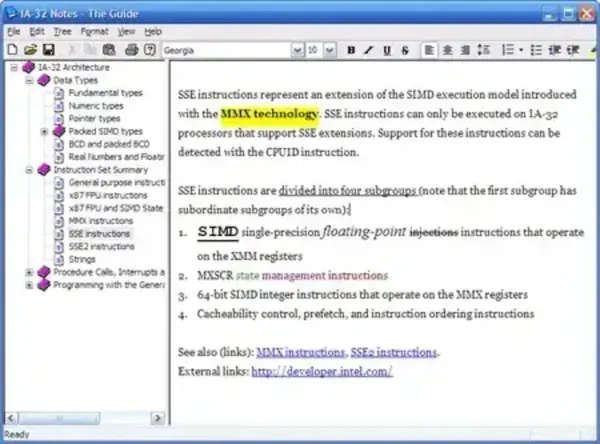
The Guide presents information in two connected panes. The navigation pane contains the outline, while the editing pane displays the text associated with the selected topic. You can create parent nodes, add nested sections, and rearrange entries as a document develops. This makes it possible to keep a large collection of related notes in one navigable file rather than scattering information across separate text documents.
Its rich-text editor supports formatting such as fonts, bold and italic text, and other styling options. Version 2.0 also introduced node icons, Unicode support, and a portable mode. Links can connect topics to other nodes, files, folders, email addresses, and web pages, making the outline useful as a small personal knowledge base.
What Can You Organize with The Guide?
- How-to guides: Break procedures into chapters, steps, and smaller reference topics.
- Research notes: Group findings under subjects and subtopics, then move entries as your outline changes.
- Personal reference: Keep frequently used instructions, checklists, and notes in one searchable structure.
- Project documentation: Organize requirements, decisions, and supporting links by project area.
- Long-form writing: Draft books or manuals as separate sections while retaining a single navigable outline.
Portable Mode and USB Use
The Guide includes a portable setting that tells the application to keep its configuration with the program instead of relying on the normal user profile location. To use the ZIP edition from removable storage, extract the archive to a folder on the USB drive, open guide.ini in a text editor, and change portable=0 to portable=1. Save the file and launch Guide.exe. Keep the application folder writable so it can save its settings and documents.
Portable mode is useful when you want to carry the application and its working files together. It does not make an old Windows application automatically compatible with every current computer, so test it on the version of Windows you intend to use before relying on it for important records.
The Guide Specifications
- Application: The Guide
- Version: 2.0
- Developer: The Guide project (SourceForge)
- Release date: December 13, 2008
- License: Apache License
- Platform: Windows; older compatibility listings include Windows 2000 through Windows 8
- Main features: Two-pane tree outline, rich-text editing, node icons, Unicode support, hyperlinks, and portable mode
- Development status: Legacy release; current support and compatibility are unverified
- Editor's Rating: ★★★★☆ (4/5)
- Download: Download The Guide 2.0 ZIP package from SourceForge
- Project page: The Guide on SourceForge
Limitations to Consider
The Guide is an older desktop application, not a cloud-synced notes service or a collaborative documentation platform. Its tree structure is helpful for carefully organized material, but it may feel restrictive if you need modern synchronization, real-time collaboration, mobile access, or integrated publishing. The last listed application release is version 2.0 from 2008, so treat it as a legacy utility and keep separate backups of important documents.
Is The Guide Still Worth Trying?
The Guide remains an interesting option for users who prefer a compact, hierarchical outliner and want their notes stored locally. Its portable mode and rich-text editing make it more capable than a basic text file for building small manuals and reference collections. However, the age of the software is a significant limitation. Try it with nonessential documents first, and choose a maintained note-taking or documentation tool if you need dependable support on current Windows systems.