Sudoku Portable Puzzle Game
Sudoku Portable is a lightweight Windows number puzzle game built around the familiar 9-by-9 Sudoku grid. The PortableApps.com edition includes four difficulty levels, pencil-mark entry, a game-checking option, a solver, and automatic saving when you exit. Its small portable package makes it easy to keep a puzzle game on a USB drive for use on compatible Windows computers.
Play Sudoku on a Windows PC or USB Drive
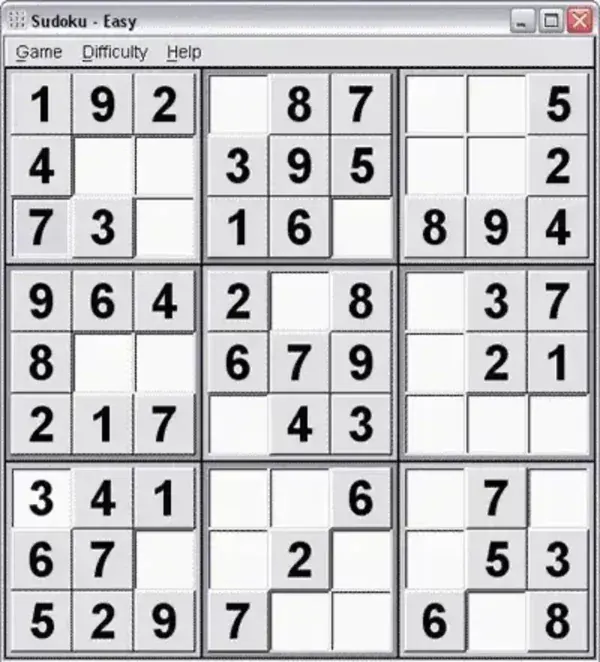
Sudoku is played on a 9-by-9 grid divided into nine smaller 3-by-3 boxes. Fill every empty cell with a number from 1 to 9 so that each number appears only once in every row, column, and 3-by-3 box. The starting numbers are clues; the challenge is to work out the remaining values through deduction.
Difficulty Levels and Helpful Tools
The PortableApps.com edition provides four difficulty settings: Easy, Medium, Hard, and Impossible. The harder settings can require more advanced elimination, and the Impossible setting may involve guessing. The program also includes tools that let you:
- Enter possible values: Add candidate numbers to an empty square by holding Shift while pressing a number on the standard number row.
- Check the game: Check your current entries for mistakes.
- Solve the puzzle: Display the solution when you want to see the completed board.
- Resize the window: Make the interface larger or smaller to suit your screen.
- Save automatically: The current game is saved when you exit, so you can continue later.
The check and solve options are useful when learning the rules or reviewing a difficult puzzle. If you want to practice solving without assistance, avoid using the solver until you have finished.
Basic Sudoku Strategy
Start with rows, columns, or 3-by-3 boxes that already contain many numbers. Identify which digits are missing, then check the intersecting rows and columns to narrow down where each one can go. Candidate notes help keep track of possibilities when a puzzle has several empty cells.
Look for a cell with only one possible value, or a digit that can fit in only one position within a row, column, or box. These straightforward deductions often reveal the next move without guessing. If you get stuck, use the game's checking feature to review your entries rather than immediately solving the whole board.
Save a Puzzle and Continue Later
Sudoku Portable saves the current game when you close the application. This is handy for longer puzzles or short sessions during a break. The PortableApps package is designed to keep its application data with the portable installation, so you can carry the game and its saved state together.
To install it, download the PortableApps package, run the installer, and choose a folder on your USB drive. Launch SudokuPortable.exe from the created SudokuPortable folder. Close the game normally and wait for the drive activity to finish before safely ejecting the USB drive; removing it while data is being written can damage saved data.
Sudoku Portable Specifications
- Game: Sudoku Portable
- Original developer: Michael Sweet
- Portable packaging: PortableApps.com
- Version listed by PortableApps.com: 1.1.7.4
- License: Open source (GPL)
- Platform: Windows XP through Windows 11 (PortableApps.com listing); WINE is also listed
- Game type: Number logic puzzle
- Features: Four difficulty levels, candidate entry, check and solve tools, resizable window, automatic save
- Deployment: PortableApps package
- Editor's Rating: ★★★★☆ (4/5)
- Project page: Sudoku Portable at PortableApps.com
- Support: Installation and usage instructions
Frequently Asked Questions
Does Sudoku Portable save unfinished games?
Yes. The game automatically saves when you exit, allowing you to resume your current puzzle later. Close the program normally and safely eject the USB drive after its activity has stopped.
Can I enter notes in empty squares?
Yes. The game supports entering possible values in empty cells. Hold Shift and press a number on the standard number row, not the numeric keypad.
Can Sudoku Portable show the solution?
Yes. The Solve Game feature displays the solution to the current puzzle. There is also a Check Game feature for checking your progress without necessarily revealing the full solution.
Is Sudoku Portable free?
Yes. The PortableApps.com package is listed as open source under the GPL and can be downloaded free from the project page.
Is Sudoku Portable Worth Playing?
Sudoku Portable keeps the classic number puzzle simple and accessible. Four difficulty levels, candidate notes, automatic saving, and optional checking make it suitable for both casual play and more deliberate solving practice. It is not a feature-heavy puzzle suite, but its small size and USB-friendly packaging make it a convenient game to carry with other portable applications.