
SpeedCrunch is a free and open source scientific calculator that combines high precision mathematics with a fast, keyboard-driven interface. Designed for students, engineers, programmers, and power users, it allows you to evaluate complex mathematical expressions instantly without the limitations of a traditional desktop calculator.
Because it is fully portable, the application can be run directly from a USB flash drive without installation, making it a convenient addition to any portable software collection.
SpeedCrunch | Free Portable Scientific Calculator
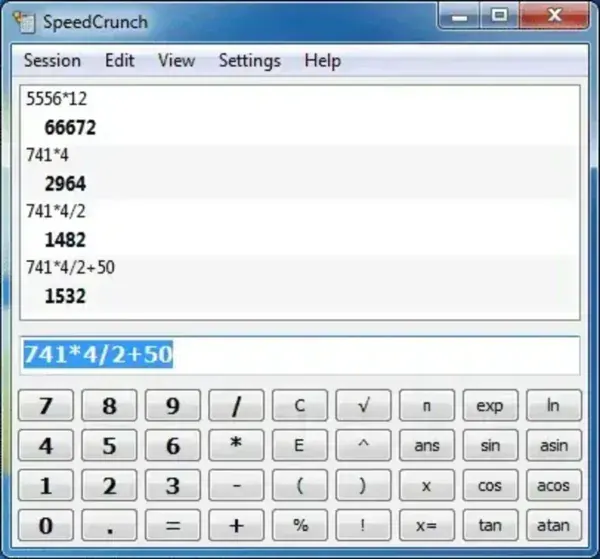
What is SpeedCrunch?
SpeedCrunch is an advanced calculator designed for users who frequently work with mathematical formulas, engineering calculations, programming tasks, statistics, or scientific functions. Instead of relying on buttons and menus, users can type complete mathematical expressions directly into the calculator and receive results instantly.
The application supports high precision arithmetic, variables, functions, constants, and expression history, providing far more flexibility than the standard Windows Calculator.
Key Features
- Advanced Expression Calculator: Enter complete mathematical formulas using natural syntax.
- High Precision Calculations: Supports calculations with up to 50 decimal places.
- Syntax Highlighting: Improves readability and helps reduce input errors.
- Variables and Functions: Store values and create more complex calculations.
- Auto Completion: Suggests functions, constants, and variables while typing.
- Calculation History: Recalls previous expressions and results.
- Customizable Shortcuts: Keyboard-focused workflow for faster operation.
- Portable Operation: Runs without installation and leaves no significant footprint on the host PC.
Why Use SpeedCrunch?
Unlike many basic calculator applications, SpeedCrunch is designed for users who need more than simple arithmetic. It excels at handling lengthy formulas, engineering calculations, algebraic expressions, scientific functions, and precision math.
Its lightweight design, responsive interface, and portable nature make it useful for:
- Students studying mathematics and science
- Engineers performing technical calculations
- Programmers working with numerical values
- Researchers requiring high precision results
- Anyone looking for a powerful alternative to Windows Calculator
Performance and Portability
One of the application's biggest advantages is its portability. Simply extract the files and launch the executable. No installation process is required, and the software can be stored on a USB flash drive for use on multiple computers.
Benefits include:
- No installation required
- Fast startup and low resource usage
- Runs directly from removable media
- Suitable for older and modern Windows systems
- Small footprint and lightweight design
Specifications and Download
- Developer: Helder Correia and contributors
- License: Open Source (GPL)
- Supported Operating Systems: Windows
- Extracted Size: Approximately 3.6 MB
- Category: Scientific Calculators, Math Utilities
- User Rating: ★★★★☆ (4/5)
- Project Website: SpeedCrunch Project Page
- Download: Download SpeedCrunch
Pros and Cons
Pros
- High precision mathematical calculations
- Fast keyboard-driven workflow
- Expression history and variable support
- Portable and lightweight
- Free and open source
Cons
- Less familiar than traditional button-based calculators
- Advanced features may require a short learning curve
- Focused on calculations rather than graphing functions
Final Thoughts
SpeedCrunch is one of the best portable scientific calculators available for Windows users who need more power than a basic calculator can provide. Its combination of precision, speed, portability, and advanced mathematical capabilities makes it particularly useful for students, engineers, programmers, and technical professionals.
If you're looking for a lightweight calculator that can handle everything from simple arithmetic to complex mathematical expressions, SpeedCrunch remains an excellent choice.
