
Simple Ping is a small Windows utility from PCWinTech that displays ping response times so you can monitor connection latency while browsing or gaming. It can be useful when an online game does not show ping clearly or when you want to compare response times while troubleshooting an intermittent connection. A high ping can indicate a delay between your computer and the test destination, but it does not by itself identify the cause of slow downloads or page loading.
Legacy software notice: The developer's page lists Simple Ping version 1.0.3 and older Windows versions, including Windows 2000, XP, Vista, 7, and 8. Current Windows compatibility has not been confirmed. Treat it as a legacy utility rather than a currently maintained network diagnostic tool.
Simple Ping - Check Internet Ping
What Simple Ping Does
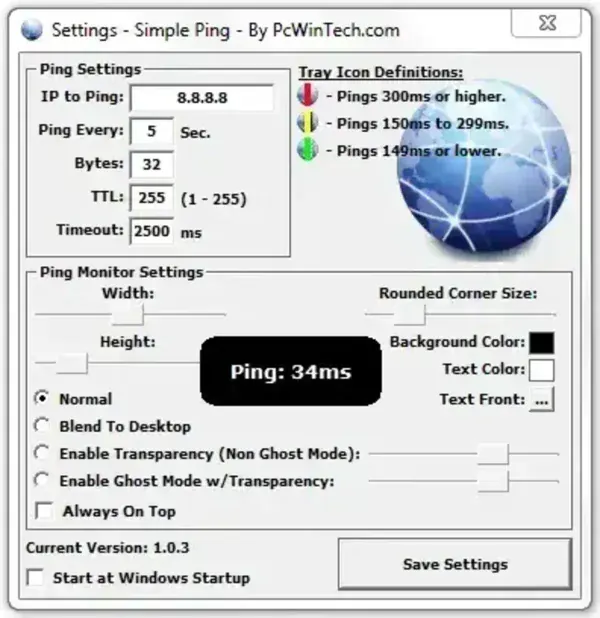
Simple Ping periodically checks a selected address and displays the response time. The developer originally described it as a way to watch latency during online games or other activities where the application itself does not provide a convenient ping display. Its settings let users adjust the monitor's appearance.
Ping measures the time taken for a test packet to travel to a destination and for a response to return, when the destination responds to ping. Results can vary with the destination, wireless signal, network congestion, routing, and whether the destination or network handles ping traffic. A single reading is not enough to diagnose an internet problem.
Version and Windows Compatibility
The developer's website identifies the program as Simple Ping v1.0.3 and lists support for older Windows releases. That list does not confirm compatibility with Windows 10 or Windows 11. The current status of development and testing on modern systems is unknown, so use caution if you try it on a newer PC.
The original listing at PendriveApps recorded an extracted size of approximately 456 KB and classified the utility as freeware. File sizes may differ between the installer and the portable ZIP package. Check the package details on the developer's page before downloading.
Download and Portability
PCWinTech's page has historically offered both an installer and a ZIP package described as a portable, non-setup version. To review the available files and the developer's notes, visit the official Simple Ping page at PCWinTech. Availability can change, and this listing does not independently verify the current download files.
License: The developer describes Simple Ping as free. Confirm the terms shown with the copy you obtain, especially before redistributing it.
Limitations and Safety
Simple Ping is a basic latency monitor, not a full network analyzer. It does not replace testing with Windows tools such as ping or tracert, and it cannot determine the exact reason for a slow connection on its own. Compare results to more than one destination and repeat tests before drawing conclusions.
Because this is an older utility, scan downloaded files with reputable security software and avoid running the program if the file source or integrity is uncertain. Do not assume that an old program is safe simply because it is small or was previously listed as freeware.
Simple Ping Details
- Developer: PCWinTech
- Last listed version: 1.0.3
- Platform: Windows; the developer lists older Windows versions, and current compatibility is unverified
- License: Described by the developer as freeware
- Portability: A ZIP package was historically offered as a non-setup portable version
- Best suited for: Basic ping and latency monitoring, if it runs correctly on your system
