
Angry IP Scanner is a free, open source, and fully portable network IP scanner designed to quickly detect active devices, resolve hostnames, and scan for open ports across local or remote networks. Widely used by network administrators, IT technicians, and security professionals, this lightweight utility combines speed, simplicity, and portability into a powerful diagnostic tool.
Available for Windows, Linux, and macOS, Angry IP Scanner can run directly from a USB flash drive without installation, making it ideal for portable network troubleshooting and device discovery.
Angry IP Scanner | Portable Open Source IP & Port Scanner
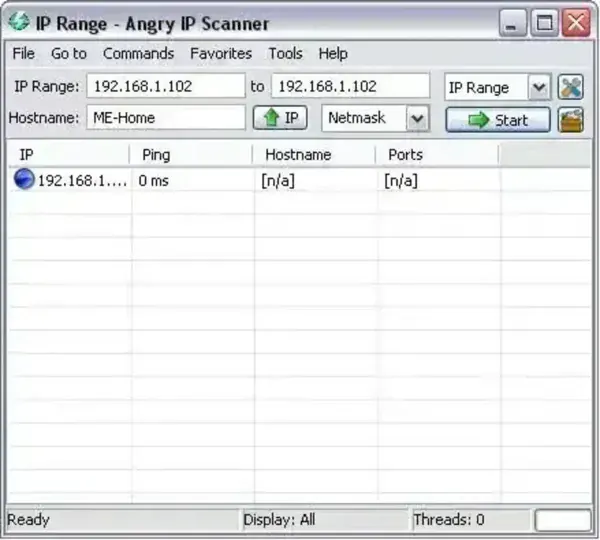
This fast multi threaded scanner can analyze large IP ranges in seconds while displaying detailed information about discovered devices and services.
What Is Angry IP Scanner?
Angry IP Scanner is a portable network scanning utility used to identify active hosts and detect open ports on local networks or internet accessible systems. Similar to tools like Free IP Scanner, it helps users quickly discover devices connected to a network and gather useful diagnostic information.
The application works by scanning IP address ranges and checking which systems respond. Once active devices are detected, the software can retrieve:
- Hostnames
- MAC addresses
- Open TCP or UDP ports
- Network service information
- Additional host details through plugins
Its lightweight footprint and portable design make it especially useful for technicians carrying network utilities on a USB flash drive.
How Angry IP Scanner Works
The software sends ICMP ping requests to IP addresses within a specified range to determine whether devices are online. When a responsive host is found, Angry IP Scanner can optionally perform additional scans to detect services and open ports.
Users can customize scan behavior by adjusting:
- Scanning thread count
- Connection timeout values
- Port ranges
- TCP or UDP scan methods
- Plugins and data retrieval options
Because it uses multi threaded scanning, Angry IP Scanner is capable of scanning large networks extremely quickly while using minimal system resources.
Open Port Scanning Features
One of the most useful capabilities of Angry IP Scanner is its ability to identify open network ports and exposed services.
This helps users:
- Detect running web servers
- Find remote desktop services
- Troubleshoot connectivity issues
- Identify misconfigured devices
- Locate shared services or unauthorized systems
Use Angry IP Scanner only on networks and address ranges you own or have explicit permission to test. A scan result is a snapshot: firewalls, timeouts, routing, and host settings can affect whether a device or port responds. An open port indicates that a connection attempt received a response; it does not by itself prove that the service is vulnerable or insecure.
Main Features
- Fast Multi Threaded Scanning: Quickly scan large IP ranges.
- Port Scanning: Check selected ports for responses and identify potentially available services. Results can be affected by firewalls, timeouts, and network configuration.
- Hostname Resolution: Resolve discovered device names automatically.
- MAC Address Detection: Retrieve MAC addresses on local networks.
- Plugin Support: Extend functionality with custom plugins.
- Portable Utility: Run directly without installation.
- Cross Platform Support: Available for Windows, Linux, and macOS.
- Runtime Requirements: Current 3.x releases have different requirements from the legacy 2.x Windows build. Check the official download page for the appropriate package and Java/runtime requirements for your operating system.
- Export Options: Save scan results in multiple formats.
- Open Source: Released under the GNU GPL license.
Common Use Cases
- Identifying devices connected to a network
- Detecting unauthorized or unknown hosts
- Troubleshooting network connectivity problems
- Locating open ports and exposed services
- Performing quick network audits
- Running portable diagnostics from a USB drive
How to Use Angry IP Scanner
- Download and launch Angry IP Scanner.
- Enter the IP range you want to scan.
- Select optional port scanning settings if needed.
- Click Start to begin scanning.
- Review detected hosts, open ports, and network details.
- Export results for reporting or troubleshooting purposes.
Specifications | Official Site | Download
- Official Website: Project Page
- License: Open Source (GNU GPL)
- Supported Operating Systems: Windows, Linux, macOS
- File Size: Approximately 888 KB
- Rating: 4 Star
- Category: Network Utilities, Security Tools
- Portable: Yes
- Download: Official Angry IP Scanner downloads (choose the current package for your operating system; version 2.21 is a legacy release for older Windows versions).
Final Thoughts
Angry IP Scanner is an open-source, cross-platform utility for discovering responsive hosts and checking selected ports. It can be useful for network inventory and troubleshooting, but scan results are not a security verdict and may be incomplete when devices or firewalls do not respond. Download the current build from the official project site and confirm its runtime requirements before using it on a new system.
Whether you need to identify live hosts, troubleshoot devices, or inspect exposed network services, Angry IP Scanner delivers fast and reliable results while remaining lightweight enough to carry anywhere on a USB flash drive.
