
Advanced IP Scanner is a free Windows network scanner that discovers active devices on a local network and displays available details such as IP and MAC addresses, hostnames, shared folders, and common services. It can also launch supported remote-management actions, including RDP or Radmin connections and Wake-on-LAN. The official product offers a portable edition, so it can be run without a traditional installation; scan results depend on the network, device responses, and permissions.
Because it has a portable edition, Advanced IP Scanner can be useful for technicians working across multiple systems. Scan only networks you own or have permission to assess. Results depend on device responses, firewalls, network segmentation, and permissions, so a scan may not reveal every device or service. If you mainly want a simple list of devices visible on your Wi-Fi network, see our Wireless Network Watcher review for another option.
Advanced IP Scanner | Portable LAN Scanner
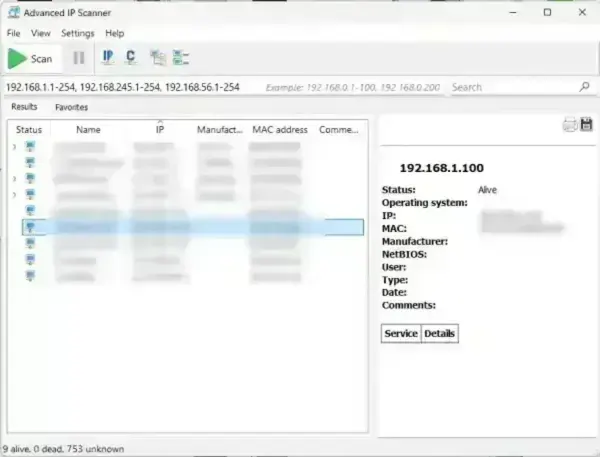
The utility scans IP ranges to detect active devices, retrieve network information, and identify available services. It can display:
- IP addresses
- Hostnames
- MAC addresses
- Device manufacturers
- Shared folders
- HTTP and HTTPS servers
- Common services and shared resources detected during a scan
Its simple interface and fast performance make it ideal for troubleshooting connectivity issues, auditing devices, and monitoring local network activity.
How Advanced IP Scanner Works
The application works by sending scan requests across a specified IP range to identify active hosts on a local network. Once devices respond, the program gathers available network information including hostname, MAC address, manufacturer details, and accessible services.
Unlike basic ping scanners, Advanced IP Scanner can also:
- Detect shared network folders
- Identify active web servers
- Identify some responding services on discovered hosts
- Launch remote management tools
- Perform Wake-On-LAN operations
- Remotely shut down compatible systems
The software integrates with Radmin for remote administration when the required Radmin components are available. It can also launch supported Windows remote-management tools; the available actions depend on the target computer, installed software, permissions, and network configuration.
Service Discovery and Shared Resources
Advanced IP Scanner helps identify active devices and discover services or shared resources that respond during a scan. It is primarily a LAN discovery tool, not a comprehensive port-auditing scanner, and results can be limited by firewalls, host settings, and network permissions. This can help users:
- Troubleshoot firewall or connectivity issues
- Identify exposed services
- Locate HTTP, HTTPS, FTP, and RDP servers
- Detect misconfigured systems
- Audit devices connected to a LAN
For small office or home networks, this can be especially useful when diagnosing network visibility problems or identifying unknown devices.
Main Features
- Fast LAN Scanning: Quickly detect devices connected to your local network.
- Service Discovery: Identify active hosts and display common services or shared resources detected during a scan.
- Device Information: View MAC addresses, hostnames, and manufacturer details.
- Wake-On-LAN: Remotely power on compatible computers.
- Remote Shutdown: Shut down networked systems remotely.
- Shared Folder Detection: Browse available network shares.
- Remote Access Integration: Launch Radmin remote management tools directly.
- Portable Utility: Runs directly from USB without installation.
- Lightweight Interface: Minimal resource usage with fast scan performance.
- License: Freeware; check the vendor's current terms for your intended use.
How to Use Advanced IP Scanner
- Download and launch Advanced IP Scanner.
- Enter the IP range you want to scan or use the automatically detected local subnet.
- Click Scan to begin analyzing the network.
- Review detected devices and network details.
- Right-click a device for additional actions such as Wake-On-LAN, remote shutdown, or opening shared folders.
- Export results for documentation or inventory purposes if needed.
Specifications | Official Site | Download
- File Size: 20 MB
- Developer: Famatech Corp.
- Official Website: Project Page
- License: Freeware
- Supported Operating Systems: Windows 11, Windows 10, Windows 8, Windows 7
- Portable: Yes
- Rating: 4 Star
- Category: Network Utilities
- Download: Advanced IP Scanner Download
Final Thoughts
Advanced IP Scanner is a practical Windows LAN discovery utility for finding responding devices, reviewing available network details, and troubleshooting local connectivity. Its portable edition and shortcuts to supported remote-management actions can be useful for home users and IT technicians. It is not a substitute for a dedicated, configurable port scanner when you need a thorough port audit.
Whether you need to inventory devices on a local network, locate shared resources, or launch supported remote-management actions, Advanced IP Scanner provides a straightforward Windows interface. Use remote shutdown and access features only on systems you are authorized to administer.
