
Marxio Timer was a Windows automation utility described as a way to schedule actions such as shutting down or restarting a computer, locking a workstation, launching or closing programs, playing sounds, displaying messages, and automating selected keyboard or mouse actions. The original listing described it as portable and donationware, but the project and its old download link are no longer verified as active.
Legacy software notice: Marxio Timer is an old automation tool, and compatibility with current Windows releases has not been confirmed. Its ability to trigger system actions and automate input means an incorrect task can interrupt work, close applications, or perform actions you did not intend. Do not rely on an archived build for unattended automation on a production computer.
Marxio Timer - Scheduled Tasks and Macro Tool
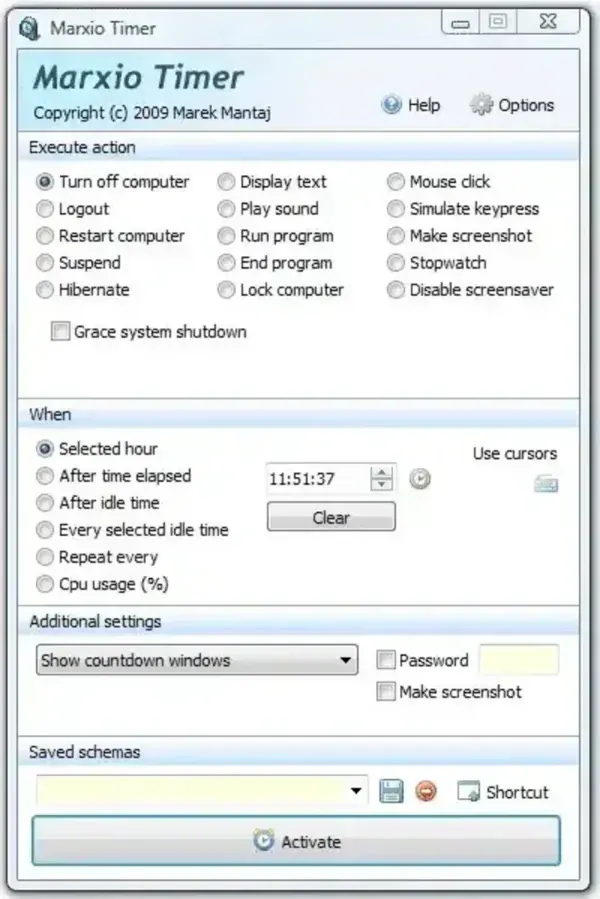
Original Automation Features
The historical description lists scheduled actions such as shutting down, restarting, logging out, locking, hibernating, or suspending the computer. It also describes launching or closing processes, displaying text, playing sounds, taking screenshots, and sending keyboard combinations or mouse clicks at selected coordinates.
These features go beyond a simple countdown timer. Keyboard and mouse automation can interact with whichever application is active, and scheduled shutdown or process-closing actions can interrupt unsaved work. The original feature list is historical and has not been independently tested against a current release.
Download and Windows Compatibility
The original listing marked Marxio Timer as donationware and portable, but its developer download is no longer verified as available. I could not confirm a maintained release, current documentation, or compatibility with Windows 10 and Windows 11. This page is therefore a historical reference, not a recommendation to install the old utility on a current system.
Automation Safety
Before using any automation utility, inspect each scheduled action, test it with harmless tasks, and make sure it cannot close applications or shut down the computer unexpectedly. Avoid running an old or unverified automation program with elevated privileges. For routine scheduling on a modern Windows computer, consider built-in Task Scheduler features where they meet your needs.
Marxio Timer Details
- Purpose: Historical timer, scheduled-action, and macro utility
- Platform: Windows; current compatibility unverified
- Historical license: Donationware
- Portability: Previously described as portable; not currently verified
- Current status: Legacy software; current download and maintenance status unverified
