OperaPassView: Recover Passwords from Legacy Opera Profiles
OperaPassView is a legacy Windows utility from NirSoft that can display saved website credentials from older versions of the Opera browser. It was designed for the classic Opera Wand password store, used before Opera moved to its Chromium-based architecture. The program can read a supported local profile or backup file and export the results, but it does not work with modern Opera password databases.
Recover Credentials from Classic Opera Profiles
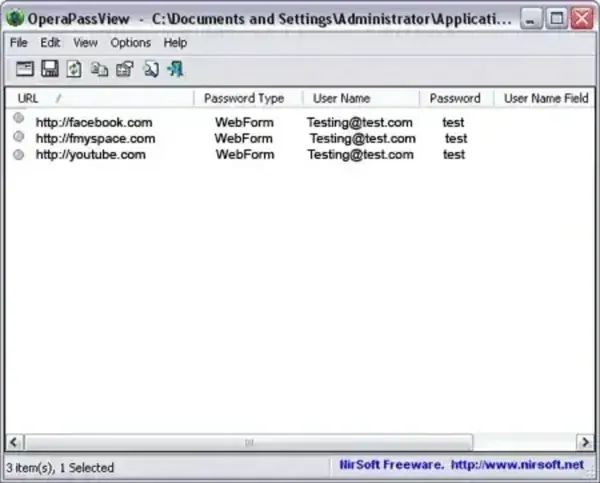
Older Opera releases stored saved website logins in a file named wand.dat. OperaPassView was created to display credentials from that legacy format, which can be useful when migrating an old browser profile or recovering access to an account you own. It can also export selected records to text, HTML, CSV, or XML for migration to another password manager.
The utility is limited to the older Opera versions that used the Wand system, generally releases before Opera 15. It cannot access the password store used by current Chromium-based Opera. NirSoft also documents that entries protected by an Opera master password cannot be decrypted by the program.
Security and Privacy Considerations
Saved browser passwords are credentials, not ordinary browsing data. Use OperaPassView only with browser profiles and backup files you own or are authorized to administer. Do not use it to access another person's saved logins or to bypass account protections.
Exports may contain passwords in readable form. Store them in a secure password manager, avoid sending them through email or chat, and delete temporary reports after migration. If an old profile contains passwords that are no longer needed, remove the exported copies and update any account credentials that may have been exposed.
Password-recovery tools may trigger antivirus warnings because they inspect credential stores. That does not prove every alert is a false positive. Download only from the publisher, verify the file, and review security detections before running archived software.
OperaPassView Specifications
- Developer: Nir Sofer (NirSoft)
- Version: 1.10
- License: Freeware
- Platform: Windows 2000 through Windows 7/Server 2008 (publisher listing)
- Supported browser: Legacy Opera versions using the Wand password file
- Main features: Read saved credentials from supported legacy profiles, load a local Wand file, copy or export selected records
- Limitations: No support for modern Chromium-based Opera; cannot decrypt entries protected by the Opera master password
- Deployment: Standalone executable
- Editor's Rating: ★★★☆☆ (3/5)
- Download: Get OperaPassView from the official NirSoft page
Modern Opera Password Management
Current Opera releases use a different password-storage system and provide their own password manager and account synchronization features. Use the browser's supported password export or account recovery process when migrating a current profile. Do not assume that OperaPassView can recover passwords from a modern browser installation.
Is OperaPassView Still Useful?
OperaPassView can help with a narrow legacy migration task when an old Opera profile contains saved Wand credentials. Its compatibility is limited to an obsolete browser generation, and it is not a general password-recovery utility. Use it only for authorized local recovery, protect exported credentials, and use a current password manager for active accounts.