
KeePass Password Safe is yet another great Portable Password Manager that can be run directly from a portable USB device. This application allows you to put all of your passwords in one database, which is then locked with a single password or master key disk. So you only have to remember one password or insert the key disk to unlock or gain access to the whole database.
KeePass Password Manager
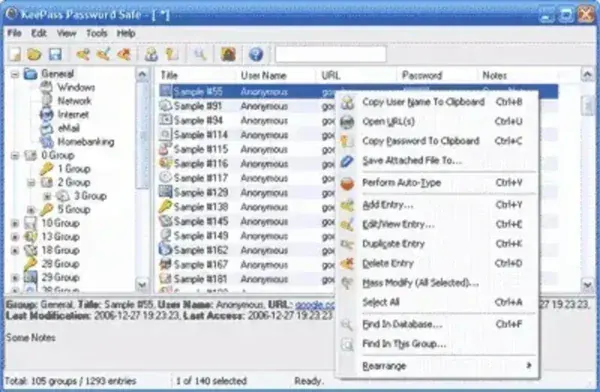
The database is encrypted as well using some of the most secure encryption algorithms AES and Twofish. It is completely free to use. Not only that, it's also open source so your able to view and even modify the inner workings if you would like.
KeePass Password Safe Specs | Official Site | Download
- Authors Website: Project Page
- License: Open Source
- Supported OS: Windows
- Downloading: Get the latest release here:
Keepass Password Safe Download
Using KeePass from a USB Drive
KeePass is a local password database manager, so the database file and its protection are your responsibility. Before relying on a USB copy, test that you can open the database on the computers you use and keep a separate backup in a safe location. Losing the only database copy or forgetting the master password can mean losing access to the stored entries.
Download the package from the official KeePass project and check its documentation for the difference between available editions and portable packages. Portable operation does not guarantee that a host computer leaves no traces, and it does not make an unlocked database safe on a shared PC. Lock the database when stepping away and avoid saving passwords on computers you do not trust.
For more options, browse our portable password manager reviews. Compare supported operating systems, database formats, backup options, and the way each tool handles local data before choosing one.
