Movienizer: Movie Collection Organizer with Portable Edition
Movienizer is a Windows movie collection organizer that builds a searchable catalog of films and television series. It can add titles from names, barcodes, discs, folders, or video files, then retrieve details such as plots, cast, crew, posters, ratings, and other movie information from online sources. The publisher offers both an installer and a portable edition, so you can keep a collection manager on a USB drive or use it on a computer where you cannot install software.
Build and Organize a Movie Collection
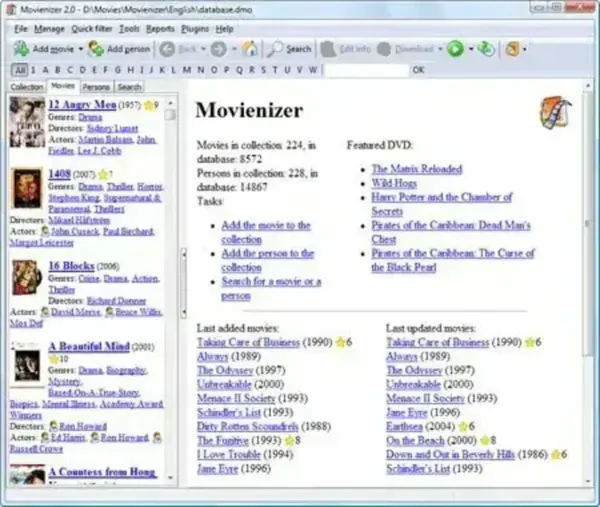
Movienizer can add movies by title or barcode and scan folders or discs to associate catalog entries with video files. It can retrieve information and artwork from supported online sources, after which you can edit details, add personal notes, record whether a movie has been watched, and assign your own rating.
The catalog can be searched, sorted, and filtered. You can maintain multiple databases, track movies that you lend to other people, create custom fields, and export or print collection reports. The publisher also documents options for managing different editions of a title, importing data from other catalog programs or CSV files, and backing up and restoring the database.
Portable Edition and Database Storage
The publisher provides a portable edition that can be extracted and launched without a conventional installation. Its FAQ explains that you can start the portable version by running portable.bat. Unlike the installed edition, the portable package stores its settings in an INI file rather than the Windows Registry.
Keep in mind that the program settings and your movie catalog are separate. The movie database file and its Covers folder contain collection information and artwork, so copy both when backing up or moving your catalog. Close Movienizer before manually copying these files, or use the program's backup feature. If you move the catalog to another drive, check the stored video paths and update them if necessary.
Adding Movies and Maintaining Your Catalog
- Download the installer or portable package from the publisher's website.
- For the portable edition, extract the archive to a folder and run portable.bat.
- Create a database for your collection, then add titles by name, barcode, disc, folder, or video file.
- Review the information retrieved online and correct any mismatched titles, editions, cast details, or artwork.
- Use watched status, personal ratings, custom fields, and loan tracking to keep the catalog useful.
- Back up the database file and Covers folder regularly, especially before moving the collection to another computer.
Online lookups depend on the availability and structure of external information sources. Check imported details rather than assuming every result is complete or accurate. A catalog entry also does not guarantee that the associated video file is still present or playable.
Trial Version and Licensing
Movienizer is try-before-you-buy software, not unrestricted freeware. The publisher offers a trial with limitations and paid license options. The publisher's registration information describes different license durations and computer limits, which may change, so review the current terms before purchasing. If you only need to evaluate the cataloging workflow, start with the trial and confirm that its limitations suit your needs.
Movienizer Specifications and Download
- Developer: ManiacTools
- Current publisher-listed version: 10.3
- License: Commercial software with a limited trial
- Platform: Windows
- Deployment: Installer and portable editions
- Main features: Movie catalog, online metadata, artwork, ratings, reports, loan tracking, database backup, and player integration
- Official product page: Movienizer
- Help and feature guide: Movienizer Help
- Editor's Rating: ★★★★☆ (4/5)
Frequently Asked Questions
Does Movienizer have a portable version?
Yes. The publisher offers a portable edition that can be extracted and started by running portable.bat. It stores settings in an INI file rather than the Windows Registry.
Where does Movienizer store its movie collection?
The catalog is stored separately from the program settings. The publisher's FAQ identifies the movie database file with the .dmo extension and a Covers folder for artwork. Back up both to preserve the collection.
Can Movienizer find movie information automatically?
It can retrieve information and artwork from supported online sources. Results may need review or correction, particularly when different films share a title or when an edition has alternate metadata.
Can I track movies that I lend to someone?
Yes. The publisher documents a built-in Loan Manager for tracking movies lent to friends, along with watched status, personal ratings, and custom collection fields.
Is Movienizer free?
It is distributed as try-before-you-buy software. The trial has limitations, and a paid license is required to unlock the full product. Check the publisher's current registration page for license terms.
Can I play videos from the catalog?
Movienizer can launch videos through its built-in or an external player. Playback still depends on the video file, installed codecs, and the selected player.
Is Movienizer Worth Using?
Movienizer is a feature-rich option for people who want a detailed, searchable movie database rather than a simple list of filenames. Its online metadata lookup, portable edition, reports, loan tracking, and backup tools make it useful for maintaining a large personal collection. The main considerations are its Windows focus, dependence on online sources for some information, and commercial licensing. If you want to keep the catalog portable, remember to back up the database and Covers folder along with the program.