Folder Size - List and Sort Directories by Size
Folder Size by MindGems is a Windows disk space analyzer that scans drives and directories, lists folder and file sizes, and helps identify what is using storage. It can be used with local disks, external drives, USB flash drives, SD cards, and supported network locations. The current product is actively maintained, but its available editions and download options have changed over time.
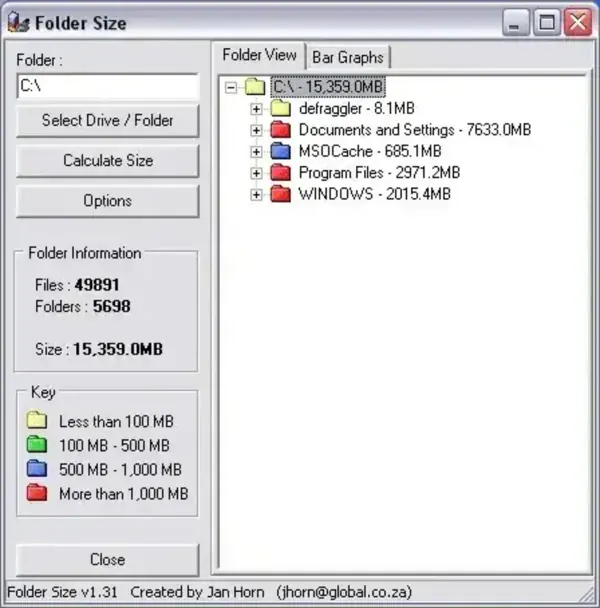
After scanning a selected location, Folder Size displays directory sizes in a sortable view. Bar and pie charts provide a visual overview of how storage is distributed, while reports can help locate the largest files and folders. This is useful when a drive is running low on space or when you want to understand how a removable drive's capacity is being used.
Folder Size - Analyze and Sort Directories by Size
Folder Size provides a straightforward way to investigate disk space usage and find directories that are consuming significant amounts of storage. It is particularly useful when a drive is running low on available space and you need to determine which folders are responsible.
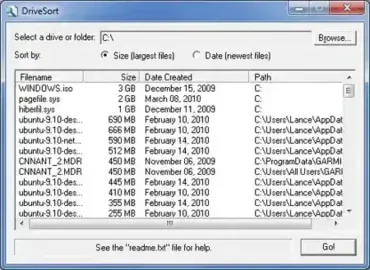
After scanning a selected location, the program displays the folders it finds along with their respective sizes. You can sort the results to bring the largest directories to the top, helping narrow down where to look when cleaning up a drive.
Its graphical display provides another way to interpret the scan results. Folder sizes can be represented using either bar charts or pie charts, with percentages helping illustrate how much space individual directories occupy relative to the scanned contents.
Find Large Folders and Recover Storage Space
One of the most practical uses for Folder Size is identifying directories that contain large amounts of data. Over time, drives can accumulate downloads, archived files, old backups, temporary data, and other content that is no longer needed.
Instead of searching through directories individually, you can use Folder Size to locate the largest storage consumers.
This can be helpful when:
- Checking how much space individual folders are using on a USB flash drive.
- Finding large directories on an external hard drive.
- Investigating why a computer or removable drive is running low on storage space.
- Identifying directories containing old downloads, backups, or archived data.
- Comparing the relative storage usage of different folders.
Once you identify a directory that is consuming substantial space, you can open it using your regular file manager to inspect its contents. Review files carefully before deleting anything, particularly when working with application data, backups, or system directories.
Visual Disk Usage Reports
Folder Size offers two graphical display options to help make scan results easier to understand:
- Bar Chart: Displays folder sizes as proportional bars, making it convenient to compare directories and spot larger storage consumers.
- Pie Chart: Provides a percentage-based visual breakdown of directory usage, helping illustrate how storage space is distributed.
These visualizations complement the directory size information and make it easier to recognize storage usage patterns without relying exclusively on numerical values.
Using Folder Size with USB Flash Drives and External Storage
Folder Size can analyze attached USB flash drives and external storage, making it useful when investigating a drive that is nearly full. The developer currently lists a standard freeware edition and a separate portable package. The portable download is marked as available to supporters, so do not assume that the portable edition is included with the unrestricted free download. Check the current download page for the latest edition details before choosing a package.
A scan reports the folders and files visible to the Windows account running the program. Protected locations, inaccessible network shares, and files that change during a scan can affect the results. If a directory is missing, check the account's permissions rather than assuming the drive contains no data there.
Folder Size Review and Limitations
Folder Size is more than a simple folder-size viewer. The current release includes sortable folder and file details, bar and pie charts, largest-file and largest-folder reports, and export options. Its Explorer context-menu integration can also make it easier to inspect a specific directory without manually browsing through the application first. Some advanced capabilities, including command-line automation and selected reporting functions, are edition-dependent.
The program helps identify storage consumers, but it does not determine whether a file is safe to delete. Review the contents and purpose of large folders before removing anything, especially system directories, application data, and backups. Folder Size is best treated as an analysis tool rather than an automatic cleanup utility.
Specifications
- Developer: MindGems
- Product type: Disk space analyzer and folder size viewer
- Current version listed: 5.9.0.6
- License: Freeware edition available; additional editions and features may differ
- Supported Windows: Windows 7, 8, 8.1, 10, and 11 (32-bit and 64-bit)
- Portable edition: Listed separately by the developer and currently available to supporters
- Editor's Rating: ★★★★☆ (4/5)
Download Folder Size
Visit the official Folder Size product page for feature details, or use the developer's Folder Size download page to compare the current freeware and portable packages. The developer lists version 5.9.0.6; its portable package is marked as available to supporters, so check the current terms before downloading.
Frequently Asked Questions
What is Folder Size?
Folder Size is a Windows disk space analyzer from MindGems. It scans selected drives and directories, calculates folder and file sizes, and displays storage usage using sortable results and graphical charts.
Is Folder Size free?
MindGems lists a freeware edition. The portable package is listed separately as available to supporters, so check the developer's download page for current edition details.
Can Folder Size analyze a USB flash drive?
Yes. You can use Folder Size to examine an attached USB flash drive and identify which directories are consuming the most storage space.
How does Folder Size display disk usage?
It lists folder and file sizes in sortable views and provides bar and pie charts to help visualize how storage is distributed.
Can Folder Size help find large folders?
Yes. By scanning a selected drive or directory and sorting the results by size, Folder Size helps identify directories that occupy significant amounts of storage space.
Does Folder Size automatically delete unnecessary files?
No. Folder Size is intended to analyze and display directory storage usage. You should inspect files and folders yourself before deciding what to remove.
For more utilities that help organize, browse, and manage files on your computer and removable storage devices, visit our File Managers category.