Free Graphical Art Software - Zip Art
Zip Art is a small Windows drawing program by Paul Friedlander that encourages free-form experimentation with colors, shapes, and visual effects. Rather than offering the detailed tools found in a full image editor, it is designed as a simple creative art toy. Users can draw with a mouse and explore built-in effects and presets to create abstract images. The program is distributed as a ZIP package and can be launched without a conventional installation.
Zip Art: Free Graphical Art and Drawing Software
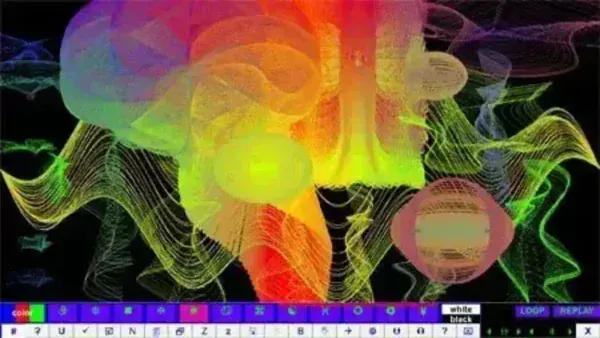
Zip Art focuses on spontaneous drawing and visual experimentation instead of precise photo editing or professional illustration. Its simple interface makes it possible to start creating without first learning a large set of tools. The results are better suited to playful abstract artwork than polished layouts, technical diagrams, or detailed image retouching.
Drawing and Creative Features
- Free-form drawing: Use the mouse to create lines, shapes, and expressive marks.
- Visual effects: Experiment with built-in drawing styles and effects to produce colorful patterns.
- Keyboard and mouse input: Create artwork using standard desktop controls without a drawing tablet.
- Simple interface: Use the program without the extensive menus and panels found in professional graphics editors.
- Creative experimentation: Explore abstract compositions and visual variations rather than following a fixed design workflow.
- Portable package: Extract the ZIP archive and launch the application from a folder or USB drive.
Zip Art is not intended to replace a photo editor or a full drawing application. The original listing does not document advanced layers, selection tools, vector editing, color management, or a professional export workflow. Check the available save options in the program before investing time in a detailed project.
Try Zip Art
- Download the ZIP package from the PendriveApps download link below.
- Extract the archive to a folder on your computer or USB drive.
- Launch the Zip Art executable.
- Experiment with the drawing controls, mouse movements, and built-in effects.
- Try different colors and visual styles to create an abstract composition.
- Use the program's available save or export command if you want to keep the result.
The original developer page is an older project reference, and current compatibility with Windows 10 and 11 has not been independently verified. Test the program on the computer where you plan to use it. As with any old executable, scan the archive before running it.
Who Might Enjoy Zip Art?
Zip Art may appeal to casual users who enjoy experimenting with visual patterns, families looking for a simple offline drawing activity, or anyone who wants a small creative program without a complex interface. The developer does not provide an age rating or formal educational assessment, so it should be treated as a casual drawing toy rather than a certified learning application.
Zip Art Specifications
- Application: Zip Art
- Developer: Paul Friedlander
- License: Freeware
- Platform: Windows; current Windows 10/11 compatibility is not verified
- Category: Drawing and creative art software
- Input: Keyboard and mouse
- Deployment: ZIP package; no conventional installation required
- Development status: Legacy application; current maintenance is not verified
- Editor's Rating: ★★★★☆ (4/5) as a simple creative drawing toy
- Original project page: Paul Friedlander Zip Art page (legacy site)
- Download: Zip Art portable ZIP (legacy package; scan before use)
Frequently Asked Questions
Is Zip Art a full photo editor?
No. It is a simple drawing and visual-effects program for creating abstract artwork. It does not provide the advanced photo-editing and layout features of a full graphics suite.
Can I use Zip Art with a mouse?
Yes. The program is designed around standard keyboard and mouse input and does not require a drawing tablet.
Can Zip Art run from a USB drive?
Yes. It is distributed as a ZIP package that can be extracted to a USB drive and launched from the folder.
Is Zip Art suitable for children?
Its simple drawing interface may appeal to younger users, but the developer does not provide a formal age rating or educational certification. Adult supervision is appropriate when using old software downloaded from an archive.
Does Zip Art work on Windows 11?
Current Windows 11 compatibility is not verified. The original program is a legacy release, so test it before relying on it.
Is Zip Art Worth Trying?
Zip Art is a lightweight creative program for users who enjoy experimenting with color and abstract drawing. Its simple controls and portable package make it easy to try, but it should not be confused with a modern image editor or professional illustration tool. If you want a small drawing toy rather than a full graphics suite, Zip Art offers a different kind of creative experience. Keep expectations modest because the project is old and current Windows compatibility is not confirmed.