
Pivot Animator is a free portable stick figure animation program for Windows that lets you create smooth frame by frame animations without requiring advanced drawing skills. Designed for beginners, students, educators, and hobbyists, it makes creating animated stick figures, simple cartoons, motion demonstrations, and animated GIFs fast and approachable.
Because it runs without installation, you can launch it directly from a USB flash drive and take your animation projects anywhere. Completed animations can be exported as animated GIFs or AVI videos for sharing online, embedding in presentations, or posting to social media.
Pivot Animator | Free Stick Figure Animation Software
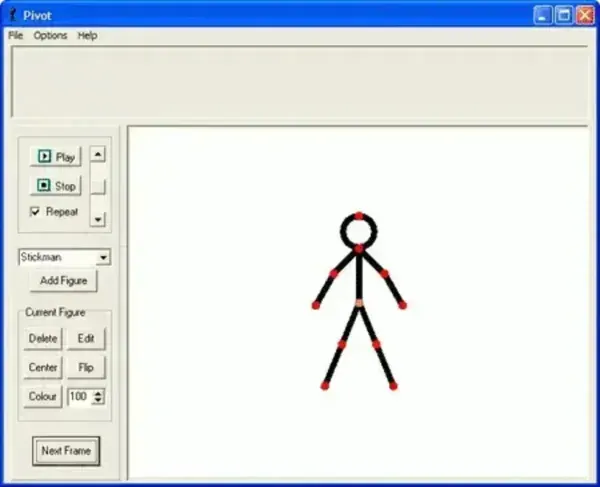
What is Pivot Animator?
Pivot Animator is a lightweight 2D animation program created by Peter Bone that specializes in stick figure animation. Instead of drawing every frame manually, users manipulate connected joints to create natural movement one frame at a time. This approach makes learning the principles of animation much easier than traditional drawing applications while still producing smooth, engaging results.
Whether you're creating simple animated GIFs, educational demonstrations, classroom projects, or short action scenes, Pivot Animator provides an intuitive workspace that requires very little learning before you can begin producing animations.
If you need to edit images before importing them into an animation, you might also like Fotografix Portable Photo Editor.
Complete Feature List
- Create custom stick figures with movable joints.
- Frame by frame animation timeline.
- Onion skin mode for smoother animation.
- Add multiple stick figures to a single scene.
- Create and save custom figure libraries.
- Import custom backgrounds and images.
- Resize, rotate, and reposition figures.
- Copy, paste, duplicate, and edit animation frames.
- Automatic frame interpolation for smoother movement.
- Undo and redo editing.
- Adjust animation playback speed.
- Preview animations before exporting.
- Export animations as animated GIF files.
- Export projects as AVI video files.
- Resizable animation canvas.
- Keyboard shortcuts for faster editing.
- Save and reload animation projects.
- Portable application requiring no installation.
- Runs directly from a USB flash drive.
- Lightweight and beginner friendly interface.
Best Uses for Pivot Animator
- Learning the fundamentals of animation.
- Creating stick figure cartoons.
- Producing animated GIFs.
- Making educational demonstrations.
- Teaching animation concepts in classrooms.
- Creating simple social media animations.
- Building storyboard animations.
- Experimenting with frame by frame animation techniques.
Why Choose Pivot Animator?
Professional animation software often comes with a steep learning curve and countless advanced features that beginners rarely need. Pivot Animator focuses on simplicity, allowing users to concentrate on movement, timing, and storytelling instead of learning complicated drawing tools.
Its joint based editing system makes it possible to produce surprisingly fluid animations while remaining approachable for first time animators. Because the application is portable, it's also an excellent choice for schools, computer labs, and anyone who prefers carrying their software on a USB flash drive.
How to Create Your First Animation
- Download Pivot Animator using the link below.
- Extract the archive to any folder or USB flash drive.
- Launch Pivot Animator.
- Create or load a stick figure.
- Move the figure's joints into position.
- Add a new animation frame.
- Repeat the process until your animation is complete.
- Preview the finished animation.
- Export it as an animated GIF or AVI video.
Pros and Cons
Pros
- Completely free to use.
- No installation required.
- Easy for beginners to learn.
- Very lightweight.
- Excellent for educational use.
- Supports animated GIF and AVI export.
- Portable and USB friendly.
- Large community with many shared stick figures and tutorials.
Cons
- Limited to 2D stick figure animation.
- Not intended for professional animation production.
- Fewer drawing tools than full featured animation suites.
- Limited advanced visual effects.
Specifications | Official Site | Download
- Author's Website: Project Page
- Developer: Peter Bone
- License: Freeware
- Supported Operating Systems: Windows 11, Windows 10, Windows 8, Windows 7
- Application Category: Animation Software
- Editor's Rating: ★★★★☆
- Download: Pivot Animator Download
Frequently Asked Questions
Is Pivot Animator free?
Yes. Pivot Animator is freeware and can be downloaded and used without purchasing a license.
Does Pivot Animator require installation?
No. The program is portable and can be run directly after extracting the downloaded files, making it ideal for use from a USB flash drive.
Can Pivot Animator create animated GIFs?
Yes. Finished animations can be exported as animated GIF files, making them easy to share online, embed in websites, or include in presentations.
Can Pivot Animator export AVI videos?
Yes. In addition to GIF animation, it can export projects as AVI video files for playback in most media players.
Is Pivot Animator suitable for beginners?
Absolutely. Its joint based editing system and straightforward interface make it one of the easiest animation programs for new users to learn.
Can I create my own stick figures?
Yes. You can build custom stick figures, save them to your own library, and reuse them in future animation projects.
Can Pivot Animator be run from a USB flash drive?
Yes. Since it doesn't require installation, it can be copied to a USB flash drive and run on compatible Windows computers without modifying the host system.
Final Thoughts
Pivot Animator remains one of the best free stick figure animation programs available for Windows. Its lightweight design, portable operation, and intuitive joint based editing system make it an excellent choice for students, educators, hobbyists, and anyone interested in learning the fundamentals of animation.
Although it isn't intended to replace professional animation suites, its simplicity is exactly what makes it so appealing. Whether you're creating classroom demonstrations, animated GIFs, short cartoons, or simply experimenting with frame by frame animation, Pivot Animator delivers an enjoyable and accessible experience without the complexity or cost of larger animation packages.
If you're looking for a free portable animation tool that's easy to learn yet surprisingly capable, I'd say this one is well worth adding to your USB software collection.
