DB Browser for SQLite
DB Browser for SQLite (DB4S) is a free, open-source graphical application for creating, browsing, editing, and managing SQLite database files. SQLite is a self-contained database engine commonly used by desktop software, mobile apps, websites, and embedded devices. Unlike a traditional database server, an SQLite database is usually stored in a single file that an application opens directly.
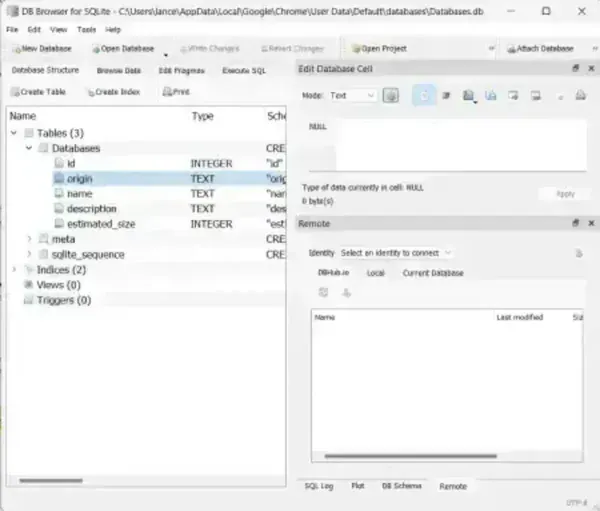
DB Browser for SQLite provides a visual interface for working with database tables and records, so you can inspect and edit data without writing every operation as SQL. It also includes an SQL editor for users who want to run queries, create tables, modify a database schema, or automate more advanced tasks. The application can import and export data, compare database structure, and show a log of SQL commands issued by the interface.
The current stable release listed by the project is version 3.13.1, released October 16, 2024. Although the stable version has not changed recently, the project continues to publish development builds and added official support for Windows on ARM in 2026. Windows downloads include installer and non-installer ZIP packages for Intel 32-bit, Intel 64-bit, and ARM64 systems. A separate PortableApps package is also available for supported Windows editions.
DB Browser for SQLite
DB Browser for SQLite Features
- Create and compact databases: Create new SQLite database files and compact existing databases.
- Manage tables and indexes: Create, define, modify, and delete tables, indexes, and other database objects.
- Browse and edit records: View table contents, search and sort records, and add, edit, or delete data.
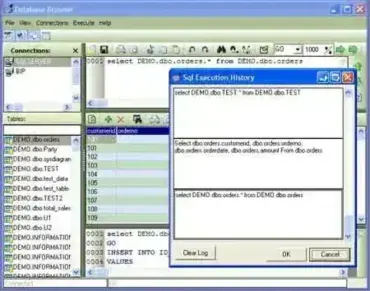
- SQL query editor: Write and execute SQL statements, inspect query results, and review the SQL command log.
- Import and export data: Import and export records as text and work with CSV files.
- SQL dump support: Import and export database structures and contents using SQL dump files.
- Schema inspection: Examine tables, indexes, triggers, views, and other database structures.
- Simple graphs: Create basic charts from selected table or query data.
- SQLCipher support: Add, change, or remove SQLCipher encryption for supported database files.
- Cross-platform: Available for Windows, macOS, and Linux.
How to Open and Edit an SQLite Database
- Start DB Browser for SQLite and choose Open Database.
- Select the SQLite database file you want to inspect.
- Use the Browse Data tab to select a table and view its records.
- Use the Database Structure tab to inspect tables, indexes, views, and triggers.
- Use the Execute SQL tab to run queries or database commands when you need more control.
- Save changes when you are satisfied with the edits.
DB Browser for SQLite is a database editor, not a read-only viewer. Editing or deleting records changes the database file. Make a separate copy of an important database before experimenting, and be careful when modifying a database that belongs to another application. Changing its tables or schema can prevent that application from working correctly.
Using DB Browser for SQLite Portably
The official Windows download page provides ZIP packages without an installer for Intel 32-bit, Intel 64-bit, and ARM64 Windows. Download the package that matches the computer, extract it to a folder on your USB flash drive, and run the application executable from that folder. The project also offers a separate PortableApps package for supported Windows systems.
When working with a database on a USB drive, avoid disconnecting the drive while the database is open or being modified. Close DB Browser cleanly before removing the device, and keep a backup of important database files. The database itself may contain sensitive application data, so protect the USB drive accordingly.
Stable Releases and Development Builds
The project's current stable release is version 3.13.1. Nightly and continuous builds are also published, but they are development versions and may contain unfinished changes or bugs. For routine work with important databases, choose the stable release unless you specifically need to test a newer development build.
Specifications and Download
- Current stable version: 3.13.1, released October 16, 2024.
- Developer: DB Browser for SQLite project.
- License: Open source.
- Platforms: Windows, macOS, and Linux.
- Windows packages: Intel 32-bit, Intel 64-bit, and ARM64, with non-installer ZIP options.
- Official website: DB Browser for SQLite.
- Download: Official downloads. Choose a Windows ZIP package for non-installer use.
- Editor's Rating: ★★★★☆ (4/5)
Why Choose DB Browser for SQLite?
DB Browser for SQLite is a practical choice when you need to inspect or edit SQLite database files through a visual interface. Its table editor, schema tools, SQL query window, and import/export functions make it useful for developers, administrators, and curious users. The portable Windows ZIP packages are convenient for USB-based troubleshooting, but always work on a backup when editing a database that another application depends on.