
SpidEye is a free portable HTML browser and website analysis tool designed for webmasters, developers, and SEO professionals. Rather than displaying pages like a traditional web browser, it renders the underlying HTML and structural elements that search engine crawlers evaluate. This makes it easy to inspect titles, headings, links, metadata, and other important on-page SEO elements without visual distractions.
Because it runs without installation, SpidEye can be launched directly from a USB flash drive, making it a convenient addition to any portable webmaster toolkit.
SpidEye | Portable HTML Browser for SEO Analysis
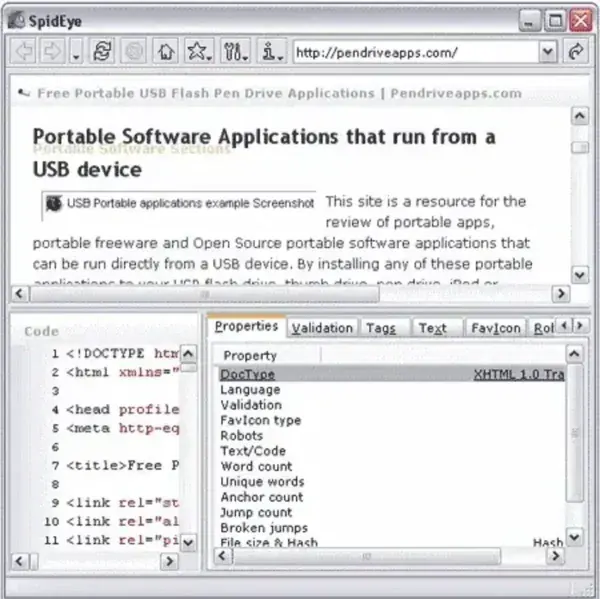
What is SpidEye?
Unlike a standard web browser that focuses on page layout and styling, SpidEye presents the underlying page structure that search engines primarily analyze. It helps reveal information that may otherwise be hidden beneath CSS, JavaScript, and other visual elements.
This makes it useful for checking how important page content is organized and identifying common optimization issues before publishing a website.
Complete Feature List
- Portable standalone application requiring no installation
- Displays websites from an HTML-focused perspective
- Shows page titles and meta descriptions
- Displays H1, H2, H3 and other heading tags
- Lists internal and external hyperlinks
- Shows image ALT attributes
- Displays page metadata for inspection
- Helps locate missing or duplicate SEO elements
- Useful for identifying broken links
- Provides a simplified view without CSS styling
- Allows quick page structure validation
- Lightweight with minimal resource usage
- Runs directly from a USB flash drive
- Suitable for webmasters, developers, and SEO professionals
How SpidEye Helps with SEO
While this tool predates today's search engines and AI powered search experiences, its core functionality remains useful. Search engines continue to rely on clean HTML structure, descriptive headings, metadata, internal linking, and properly labeled images when understanding webpages.
Using SpidEye, you can quickly verify that important content is accessible within the page source rather than relying entirely on visual presentation. It can also help identify issues such as:
- Missing or duplicate page titles
- Weak heading hierarchy
- Broken internal links
- Missing image ALT text
- Poorly organized HTML structure
- Pages containing very little crawlable content
Although modern search engines execute JavaScript more effectively than older crawlers, clean semantic HTML remains an important ranking and accessibility factor.
Who Should Use SpidEye?
SpidEye is particularly useful for:
- Website owners performing basic SEO audits
- Developers debugging page structure
- Content creators optimizing articles before publishing
- Digital marketers reviewing on-page optimization
- Students learning how search engines interpret webpages
How to Use SpidEye
- Download the ZIP archive from the link below.
- Extract the contents to any folder or USB flash drive.
- Launch the executable.
- Enter the website URL you want to inspect.
- Review titles, headings, links, metadata, and HTML structure.
- Correct any issues discovered within your website.
Comparison with Similar SEO Tools
| Tool | Best For | Portable | Primary Focus |
|---|---|---|---|
| SpidEye | Quick HTML inspection | Yes | HTML structure and metadata |
| Xenu's Link Sleuth | Broken link analysis | Yes | Link validation |
| Screaming Frog SEO Spider | Complete website audits | No | Technical SEO |
If you frequently analyze websites, SpidEye pairs well with Xenu's Link Sleuth, which specializes in finding broken links and crawl errors throughout an entire website.
Specifications | Official Site | Download
- Author's Website: Project Page
- Developer: Satelier
- License: Freeware
- Supported Operating Systems: Windows
- Category: SEO Utility / HTML Browser
- Editor's Rating: ★★★★★
- Download: SpidEye Download
Frequently Asked Questions
What is SpidEye used for?
The tool lets you inspect websites from an HTML perspective, making it easier to evaluate page structure, metadata, headings, links, and other SEO related elements.
Can SpidEye improve SEO?
It doesn't optimize websites automatically, but it helps identify structural issues that can negatively impact crawling, indexing, accessibility, and search visibility.
Does SpidEye work offline?
The application itself runs locally, but websites still need to be accessible for analysis unless you're working with local HTML files.
Is SpidEye portable?
Yes. It requires no installation and can be launched directly from a USB flash drive.
Is SpidEye still useful today?
Yes. Although modern search engines process JavaScript more effectively than when it was created, inspecting clean HTML structure, metadata, headings, and internal links remains valuable for technical SEO and accessibility.
Final Thoughts
SpidEye remains a useful lightweight utility for anyone interested in technical SEO, HTML validation, or understanding how website content is structured beneath the visual design. Its portability, simplicity, and focus on crawlable content make it an excellent addition to a USB toolkit for webmasters and developers.
While larger SEO platforms provide deeper analytics, it excels at one task: presenting the raw page structure that search engines and other automated systems rely on. Used alongside tools such as Xenu's Link Sleuth, it provides a fast and effective way to diagnose common on page optimization issues.
