
Instagiffer is a Free Animated GIF Maker that allows users to create personalized GIFs with captions from a variety of video formats, game streams, and images. The software supports importing videos from YouTube, Vimeo, or local files, and can be stored and run directly from a USB flash drive. This makes it ideal for creating GIFs on the go, whether at home, work, or while traveling.
Free Animated GIF Maker | Instagiffer
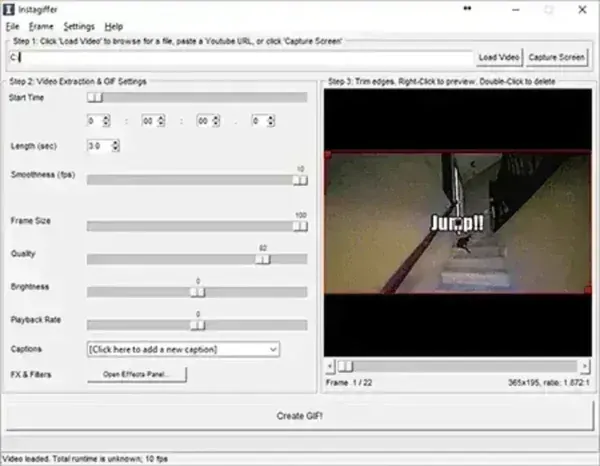
About Instagiffer
Instagiffer provides an easy-to-use platform to create GIFs (Graphics Interchange Format) from video clips, images, or other sources. It is fully portable, lightweight, and perfect for anyone who wants to generate high-quality GIFs without installing bulky software. Key features include:
- Animated GIF Creator: Convert video clips or sequences of images into GIFs. Supports video imports from YouTube, Vimeo, or local files.
- Animated GIF Editing Tools: Trim videos, adjust frame rates, apply filters and effects, and add captions or text to your GIFs.
- Frame-by-Frame GIF Editing: Fine-tune each frame’s appearance and timing for precise control over the final GIF.
- GIF Preview and Playback: Preview your GIF within the software to ensure it looks perfect before saving.
- Animated GIF Customization: Adjust size, quality, loop behavior, and color palette to optimize file size and visual quality.
Why Use Instagiffer?
Instagiffer is a great tool for social media enthusiasts, content creators, gamers, and educators who want to create eye catching GIFs quickly and efficiently. Its portability allows you to carry your GIF-making setup on a USB drive and use it on any Windows PC without installation. It is also ideal for creating GIFs from streaming video or local media for presentations, tutorials, or personal use.
Specs and Download
- Extracted Size: 65.5 MB
- Author's Website: Project Home Page
- License: Freeware
- Downloading: You can get this free GIF creator here:
Instagiffer Download
Final Thoughts
Instagiffer is a simple, portable, and powerful tool for creating animated GIFs from video files, game streams, or images. Its portability makes it ideal for users who need a quick GIF creation tool on the go without installing software. With its frame by frame editing, customizable options, and support for multiple video sources, it is perfect for content creators, social media enthusiasts, and anyone who wants to make high quality GIFs easily.
Whether you want to create GIFs for social media, presentations, or personal projects, this tool offers an intuitive, free, and portable solution for Windows users.
