
fre:ac (formerly called BonkEnc) is a free and open source audio converter and CD ripper that can convert music files between popular audio formats including MP3, AAC, FLAC, Ogg Vorbis, WAV, and M4A. It also includes secure CD ripping capabilities, allowing users to extract audio tracks from CDs and save them in their preferred digital format.
Because fre:ac is available as a portable application, it can be run directly from a USB flash drive without installation, making it a convenient tool for audio conversion and media management on the go.
fre:ac | Free Audio Converter and CD Ripper
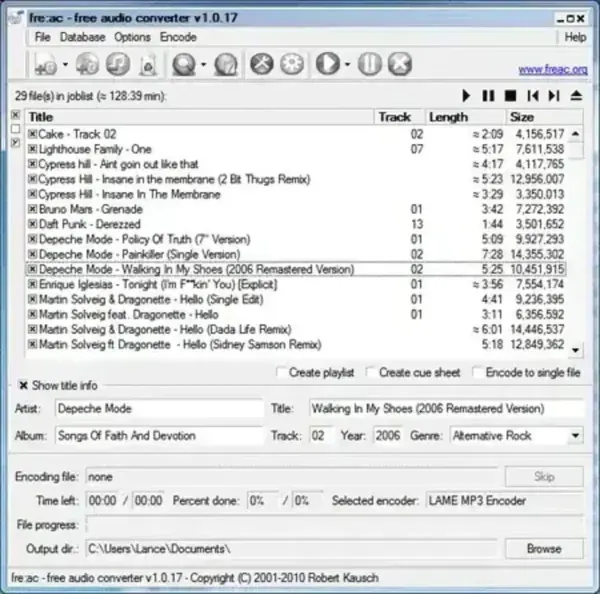
What is fre:ac?
fre:ac is a powerful audio conversion utility designed to help users convert music files between multiple audio formats while maintaining high audio quality. In addition to file conversion, it can rip audio CDs, retrieve track information from online databases, and preserve metadata such as artist, album, genre, and track details.
Whether you're converting music for a portable media player, archiving a CD collection, or preparing audio files for different devices, it provides an easy and reliable solution.
Key Features
- Audio Format Conversion: Convert between MP3, AAC, FLAC, Ogg Vorbis, WAV, M4A, and other supported formats.
- CD Ripping: Extract audio tracks from CDs and save them as digital music files.
- Metadata Support: Preserve and edit artist, album, title, genre, and track information.
- Batch Processing: Convert multiple audio files simultaneously.
- Custom Encoding Options: Adjust bitrate, quality, and compression settings.
- Unicode Support: Properly handles filenames and metadata from multiple languages.
- Cross-Platform Compatibility: Available for Windows, Linux, and macOS.
- Portable Operation: Run directly from removable media without installation.
Why Use fre:ac?
Unlike many commercial audio converters, fre:ac combines audio conversion, CD ripping, metadata management, and batch processing in a single lightweight package.
Popular uses include:
- Converting music between audio formats
- Creating MP3 files from audio CDs
- Archiving CD collections as FLAC files
- Preparing audio for portable media players
- Managing large music libraries
- Preserving metadata during conversion
Performance and Portability
The application is lightweight and efficient, making it suitable for both modern and older computers. Since no installation is required, users can carry the software on a USB flash drive and use it on multiple systems.
Benefits include:
- No installation required
- Portable USB friendly stand alone operation
- Low resource usage
- Fast batch conversion support
- Compatible with multiple operating systems
Specifications | Project Page | Download
- Developer: Robert Kausch
- Author's Website: Project Page
- License: Open Source (GPL)
- Supported Operating Systems: Windows, Linux, macOS
- Category: Audio Converters, CD Rippers, Media Utilities
- Editor's Rating: ★★★★☆ (4 Star)
- Download: Download fre:ac
Pros and Cons
Pros
- Supports many popular audio formats
- Integrated CD ripping functionality
- Batch conversion support
- Portable and lightweight
- Free and open source
Cons
- Interface feels dated compared to modern media tools
- Advanced encoding options may be overwhelming for beginners
- Focused on audio conversion rather than audio editing
Final Thoughts
fre:ac remains one of the best free audio converters available for users who need reliable audio format conversion and CD ripping in a portable package. Its support for multiple formats, batch processing, metadata management, and open source licensing make it a valuable tool for music enthusiasts and collectors alike.
If you're looking for a lightweight audio converter that can also rip CDs and preserve audio quality, fre:ac continues to be an excellent choice.
