
FlashCookiesView is a small, portable freeware utility from NirSoft that was designed to view and manage Flash cookies, also known as Local Shared Objects (LSOs). The program displays Flash-created cookie files stored on a Windows computer and allows users to inspect their contents, export information, or delete selected files.
The privacy tool was particularly useful when Adobe Flash Player and Flash based websites were commonly used. Today, Flash Player has been discontinued and modern web browsers no longer use Flash in the way they once did, so this utility is best regarded as an archived privacy and system utility for examining legacy Flash data.
FlashCookiesView | View and Delete Flash Cookies
What Is FlashCookiesView?
FlashCookiesView is a small Windows utility created by NirSoft for viewing Flash cookie files stored on a computer.
Flash cookies, technically known as Local Shared Objects or LSOs, were data files created by Adobe Flash applications. They could store information locally and were sometimes used by websites and Flash based applications to retain settings, preferences, or other information.
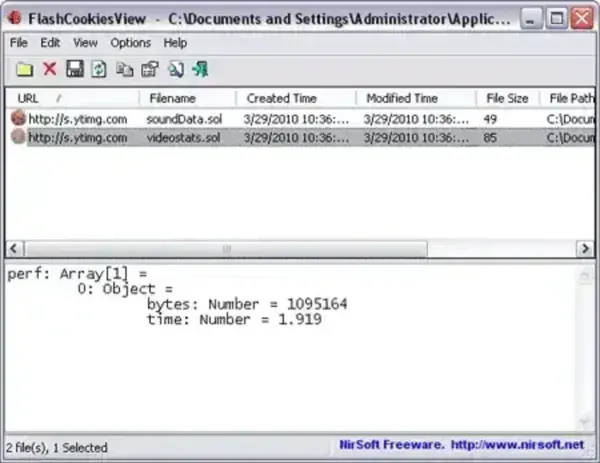
FlashCookiesView provides a simple graphical interface for examining these files rather than requiring users to manually locate and inspect them.
NirSoft's current description confirms that the utility displays Flash-created Local Shared Objects and can show their contents in readable form or as a hexadecimal dump. Selected files can also be copied, exported, or deleted.
FlashCookiesView Features
- View Flash Cookies: Displays Flash cookie files stored on the computer.
- Local Shared Object Support: Designed specifically to work with Flash Local Shared Objects (LSOs).
- Readable Data View: Displays the contents of selected Flash cookie files in a readable format.
- Hexadecimal View: Allows the contents of an LSO to be examined as a hexadecimal dump.
- Delete Flash Cookies: Select unwanted Flash cookie files and remove them.
- Export Information: Save selected information to text, HTML, or XML files.
- Copy to Clipboard: Copy selected cookie information for use in another application.
- Portable: NirSoft utilities distributed as ZIP archives can generally be run directly without a conventional installation.
- Very Small: FlashCookiesView was designed as a tiny utility with minimal system requirements.
What Were Flash Cookies?
Flash cookies were a form of locally stored data associated with Adobe Flash content. They were different from the traditional HTTP cookies managed directly by web browsers. Because Flash content could maintain its own locally stored information, Flash cookies became a subject of privacy discussions, particularly when users were unaware that this data existed separately from their normal browser cookies. This tool provided a convenient way to find this legacy data and remove selected Local Shared Objects.
How FlashCookiesView Works
Using the application is straightforward:
- Launch FlashCookiesView.exe.
- Allow the utility to scan for available Flash cookie files.
- Review the detected Local Shared Objects in the main window.
- Select an item to inspect its stored information.
- Use the available options to copy, export, or delete selected entries.
The lower portion of the interface can display the contents of a selected Flash cookie in readable form or as a hexadecimal dump.
Is FlashCookiesView Still Useful?
For most modern Windows users, FlashCookiesView has limited practical use because Adobe Flash Player is no longer part of the modern web.
The application nevertheless remains useful as an archival utility when examining older Windows installations, legacy browser profiles, backups, or systems that may contain historical Flash-related data. It is also an interesting example of the specialized privacy utilities that were available when Flash based websites were commonplace.
NirSoft still lists FlashCookiesView v1.15 among its utilities, but the tool should be considered legacy software rather than a modern browser privacy solution.
Portable Flash Cookie Utility
Like many NirSoft utilities, FlashCookiesView is small and designed to be straightforward to use. Distributed as ZIP archive, allowing users to extract an individual program and run it without a traditional installation. NirSoft also maintains NirLauncher, a collection of more than 200 of its portable freeware utilities that can be run from a USB flash drive. This cookies tool is a natural fit for any portable Windows troubleshooting or privacy toolkit, particularly when working with older systems.
FlashCookiesView Specifications
- Developer: NirSoft / Nir Sofer
- Application: FlashCookiesView
- Version: 1.15
- Category: Privacy / Browser Data / System Utility
- Function: View and delete Flash Local Shared Objects
- License: Freeware
- Portability: Portable
- Official Website: Proect Page
- Download: FlashCookiesView ZIP Download
NirSoft currently lists version 1.15 and describes its ability to view, copy, export, and delete Flash cookie files.
Frequently Asked Questions
What is FlashCookiesView?
FlashCookiesView is a small NirSoft utility that displays Flash cookie files, also known as Local Shared Objects (LSOs), stored on a Windows computer.
What are Flash cookies?
Flash cookies were locally stored data files created by Adobe Flash applications. They were used by Flash-based websites and applications to retain information on a user's computer.
Can FlashCookiesView delete Flash cookies?
Yes. The utility allows users to select Flash cookie files and delete them.
Can FlashCookiesView display the contents of Flash cookies?
Yes. Selected Local Shared Objects can be displayed in a readable format or as a hexadecimal dump.
Is FlashCookiesView portable?
Yes. It is distributed as a small standalone utility and can be extracted and run without a traditional installation.
Does FlashCookiesView work with modern browser cookies?
No. It was specifically created for Adobe Flash Local Shared Objects. It is not a general-purpose viewer for modern HTTP browser cookies.
Is FlashCookiesView still useful today?
It has limited use on modern systems because Adobe Flash is obsolete. It can still be useful when examining legacy Flash data or older Windows systems.
Is FlashCookiesView still available?
NirSoft still lists it in its current utilities catalog and provides the utility as part of its collection of Windows freeware tools.
Final Thoughts
FlashCookiesView is a tiny example of the specialized Windows utilities that were useful during the era of Adobe Flash. It provided an easy way to locate, inspect, export, and delete Flash Local Shared Objects without requiring users to manually search through hidden application data.
While the decline and eventual removal of Adobe Flash from modern browsers means that most users will never need this tool today, it remains useful as an archival utility for examining older systems and legacy browser data.
For users maintaining a collection of portable Windows utilities, it is also a good example of NirSoft's minimalist approach to software: a focused tool that performs one specific task without requiring a traditional installation.
If you are looking for a modern browser privacy utility, however, this should not be presented as a current solution for managing today's web cookies. Its real value now is as a legacy Flash cookie viewer and deletion tool.
