Google Hacks - Advanced Google Search
Google Hacks is a small search-query launcher that groups prewritten searches for Google Search and related services into a simple interface. Instead of remembering every search operator, you choose a category, enter a search term, and open the resulting query in your web browser. The archived 1.6 release dates to August 2007, so it should be treated as a legacy search helper rather than a current Google product.
Google Hacks: A Collection of Advanced Search Queries
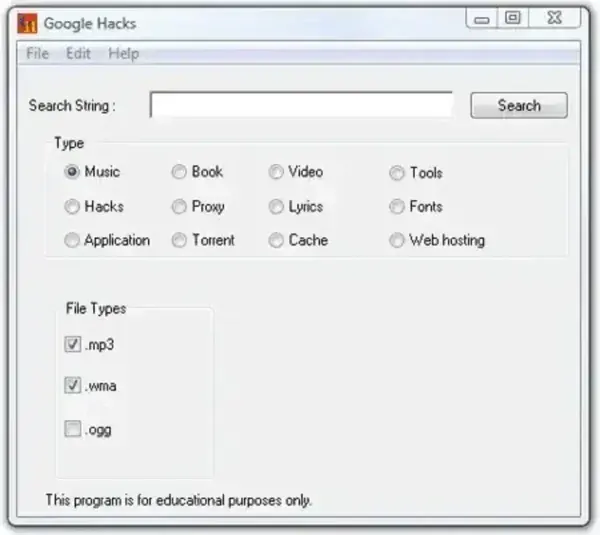
Google Hacks does not search the web independently or provide access to private Google data. It builds search URLs from a collection of predefined query patterns and opens them in the default browser. The underlying results still come from Google's search services, and the availability of each search operator depends on Google's current behavior.
How Search Operators Help Narrow Results
Google's search operators can narrow a search by site, file type, page title, or URL. For example, adding site:example.com limits results to a particular domain, while filetype:pdf asks for PDF results. Google Hacks packages selected combinations into buttons and categories so users do not need to type each query manually.
Useful, legitimate examples include:
- Find public documentation: Search a software publisher's site for manuals or support PDFs.
- Locate public research: Narrow results to a university or research organization.
- Search a specific website: Restrict results to a site you own or are authorized to research.
- Learn search syntax: Compare the results of different query operators and see how they affect a search.
Google changes its search system over time. Some older operators and specialized query combinations may no longer work as they did when Google Hacks was released. Treat the program as a shortcut collection, and inspect the generated query in your browser if the results are unexpected.
Categories and Search Workflow
The original utility groups queries into categories for different types of public information, such as documents, media, software, books, and other web content. The exact categories reflect the Google services and search features available when the application was developed. Current Google interfaces and result types may differ.
- Open Google Hacks and choose a search category.
- Enter a descriptive search phrase or the name of a site you are authorized to research.
- Select the query type you want to run.
- Review the generated search in your web browser and adjust the search terms if needed.
- Check the source and permissions of any files or material you find before downloading or reusing them.
Google Hacks is not a vulnerability scanner, security-testing framework, or password-recovery tool. Search operators can reveal public pages and indexed files, so use them responsibly. Do not use search queries to access private information, bypass access controls, or collect data from systems you do not own or have permission to assess.
Portable Use and Archived Release
The SourceForge archive lists Google Hacks 1.6, last modified on August 12, 2007. The PortableApps-style package can be extracted or installed to a folder on a USB drive, depending on the package. Keep the complete folder structure together. The program opens searches in the host computer's default browser, so browser history and other browsing data are handled by that browser, not by Google Hacks itself.
The SourceForge project also provides a source archive. The file page displays a SHA-256 checksum for the original 1.6 installer, which can be used to verify that a downloaded copy matches the file listed by SourceForge. A checksum confirms file identity, not that an old program is free of vulnerabilities or suitable for modern Windows.
Antivirus Alerts and Download Safety
Do not automatically dismiss an antivirus warning as a false positive. The old project has limited current maintenance, and its original source and package should be evaluated separately from any third-party repackaging. Download only from the project archive, compare the file's checksum when available, and scan it with current security software. If the file is blocked or its origin cannot be verified, do not run it on a primary computer.
Google Hacks Specifications
- Application: Google Hacks
- Archived version: 1.6
- Original release archive date: August 12, 2007
- Developer: octalmage
- License: Open-source source archive available; review the included license for the exact package
- Platform: Windows, macOS, and Linux listed in the SourceForge project archive; the portable package is intended for Windows
- Primary function: Launch predefined Google search queries from a graphical interface
- Development status: Legacy project; current maintenance and compatibility are not established
- Editor's Rating: ★★★★☆ (4/5) for its original search-shortcut concept
- Project source: Google Hacks source repository
- Archived files: Google Hacks 1.6 at SourceForge
- Portable download: Google Hacks Portable 1.6 (legacy package; verify before use)
Frequently Asked Questions
Does Google Hacks search Google by itself?
No. It builds predefined search queries and opens them in your default browser. Google Search processes the query and displays the results.
Do all Google Hacks search buttons still work?
Not necessarily. The 1.6 release dates to 2007, and Google's search features and operators have changed. Some queries may return different results or no longer behave as intended.
Can Google Hacks find private files or bypass website security?
No. It launches search queries against publicly indexed information. It does not bypass passwords or access controls. Only search for information you are authorized to access and use.
Is Google Hacks portable?
A portable package was distributed for Windows and can be carried in a folder on a USB drive. Searches open in the host computer's browser, so browser history and downloaded files are handled outside the Google Hacks folder.
Is the antivirus warning a false positive?
That cannot be assumed. Verify the exact file, compare its published checksum when available, and scan it with current security software. Do not run a blocked or unverified archive on a primary system.
Is Google Hacks Still Worth Using?
Google Hacks is an interesting example of a search helper from the era when users often had to memorize operators and build their own query combinations. Its interface can still demonstrate how targeted searches are constructed, but the archived release is old and some queries may no longer work. For current research, use Google's own search interface and documentation, and treat Google Hacks as a historical shortcut collection rather than a maintained search tool.