ReNamer: Powerful Portable Batch File Renaming Utility
ReNamer is a Windows batch file renaming utility that applies a sequence of rules to selected files and folders. It supports common operations such as inserting or removing text, replacing strings, changing case, adding sequential numbers, and renaming files from metadata. The portable edition can be extracted to a folder and run without a conventional installation.
Build Repeatable Rules for Batch Renaming
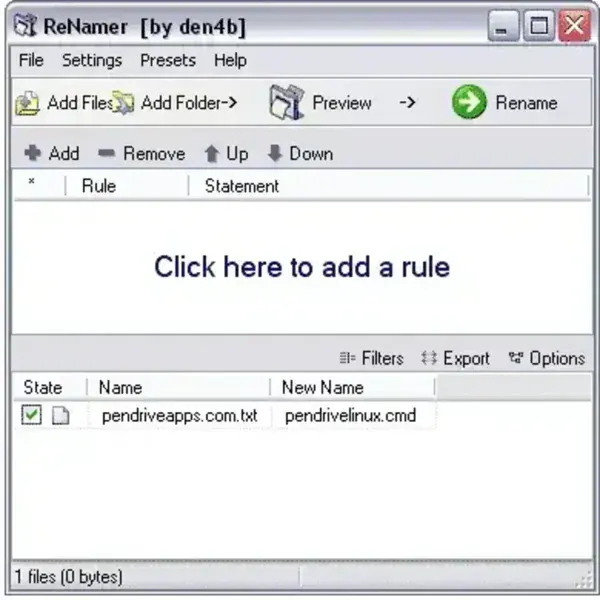
ReNamer's main advantage is its rule-based workflow. You can combine several operations in a defined order, preview the proposed filenames, and save frequently used rule sets as presets. This is useful when organizing large photo collections, music libraries, documents, or downloaded files.
The program supports regular expressions and a Pascal Script rule for more advanced transformations. Its metadata tags can use information such as music artist and track details, photo capture dates, image dimensions, document properties, and file hashes. These tags are used to build filenames; ReNamer does not edit the embedded metadata itself.
Use Metadata and Regular Expressions
Metadata-based rules can help organize music by artist, album, and track number or sort photographs by capture date. Regular expressions allow more precise matching and replacement, while Pascal Script can handle custom naming logic. These advanced features are powerful, but a small mistake in a rule can affect hundreds of files.
When working with camera images, remember that EXIF dates can be missing or incorrect. A copied or edited photo may have a file creation date that differs from its capture date. Check the source metadata and preview the results before applying a date-based rename.
Preview Before Applying Changes
Always review the preview before committing a large rename operation. A rule that works for one naming pattern may produce unexpected results with another. Test the rules on copies of a small sample folder first, especially when using regular expressions or scripts. Keep a backup if the original filenames are important.
ReNamer processes a sequence of rules in order, so the result of one rule can affect the input to the next. If a rename produces unexpected results, disable rules one at a time and inspect the intermediate preview. Avoid applying a complex preset to your only copy of a photo or document collection.
Portable Operation and Current Version
The developer provides both installer and portable downloads. The product page lists ReNamer 7.10 as the latest stable version and supports Windows 2000 and later. Check the official download page for the current build and release notes. The portable package is convenient for removable storage, but settings and presets should be backed up separately if you have created custom rules.
ReNamer Specifications
- Developer: den4b
- Version: 7.10 (latest stable version listed by developer)
- License: Freeware edition; Pro features are also offered
- Platform: Windows
- Main features: Rule-based batch renaming, presets, regular expressions, Pascal Script, metadata tags, Unicode support
- Deployment: Installer and portable packages
- Editor's Rating: ★★★★☆ (4/5)
- Download: Get the portable build from the official ReNamer page
Is ReNamer Worth Using?
ReNamer remains a flexible choice for users who need repeatable file-naming rules and metadata-based filenames. Its preview, presets, and script support make it more capable than a basic search-and-replace renamer. Use the preview carefully and test complicated rules before applying them to an entire collection. For more file utilities, browse our portable file managers.