Rename Multiple Files with Rename Master
Rename Master is a free Windows batch-renaming utility from JoeJoeSoft. It can rename files and folders using ordered rules, wildcards, regular expressions, and metadata from music, images, videos, and other file properties. The program includes an automatic preview, subfolder scanning, saved scripts, command-line options, and full Unicode filename support. It is available as a standalone executable with an optional installer.
Rename Multiple Files with Rename Master
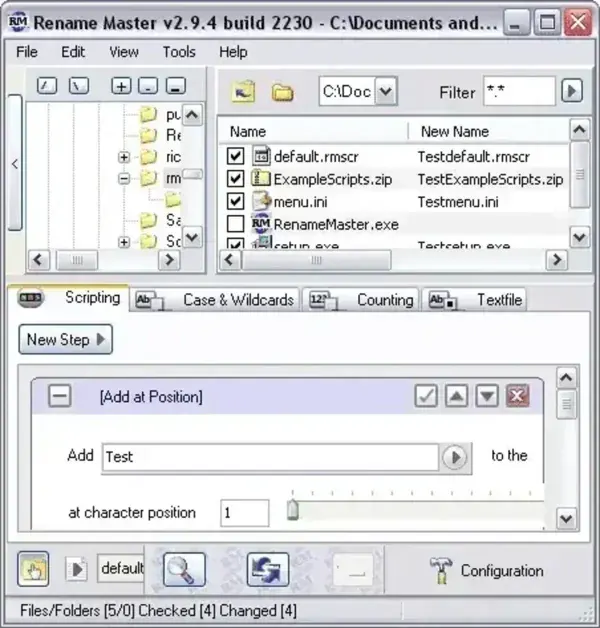
Rename Master can add, remove, replace, or rearrange parts of filenames across a selection of files and folders. Rules can be combined into a sequence and saved as scripts for reuse. This is useful for organizing downloaded files, preparing image collections, standardizing music filenames, or applying a consistent naming scheme to project folders.
The program supports metadata-based renaming from MP3 tags, JPEG JFIF and EXIF information, video tags, file properties, and text files. You can also use wildcards or regular expressions to match specific filename patterns. Full Unicode support helps preserve international characters in filenames.
Preview and Validate a Batch Rename
The automatic preview shows the proposed names before any changes are applied. Use this to catch duplicate names, incorrect date fields, or unexpected results from a regular expression. Subfolder scanning can process files in nested directories, while custom file-list columns make it easier to inspect relevant metadata before renaming.
Rename Master includes intelligent number sorting, case conversion, text-file import, and optional Windows Explorer integration. Command-line options can be used to launch the application with a selected file list or execute a saved renaming workflow. The newer renaming-script interface also supports JavaScript steps for custom operations.
Current Release and Portable Use
The developer lists Rename Master 4.05 as the current official release, published August 6, 2026. The release fixes issues in the rename process and improves multi-monitor positioning. The program requires no installation, although an optional setup package is available. The developer also publishes a public beta 4.06, but recommends caution because beta builds may contain untested changes.
For most users, choose the stable 4.05 release rather than the beta. Keep the portable executable and its configuration files together if you want to carry saved scripts between computers. The developer lists Windows XP through Windows 10 as supported; test Windows 11 compatibility before applying a large batch operation.
Rename Master Specifications
- Developer: JoeJoeSoft
- Version: 4.05 stable (August 6, 2026); 4.06 public beta also listed
- License: Freeware
- Platform: Windows XP through Windows 10 (developer listing); Windows 11 compatibility should be tested
- Main features: Batch file and folder renaming, metadata variables, regular expressions, wildcards, Unicode, subfolder scans, preview, saved scripts, command-line options
- Deployment: Standalone executable; optional installer
- Editor's Rating: ★★★★☆ (4/5)
- Download: Get the stable release from the official Rename Master page
Is Rename Master Worth Using?
Rename Master is a flexible choice for users who need repeatable rules and metadata-based filenames. Its preview, Unicode support, subfolder scanning, and script system make it more capable than a basic search-and-replace tool. Test a sample folder first, keep a backup of important files, and choose the stable release rather than a public beta when renaming large collections.