
Mini Relay Server is a free, lightweight, portable SMTP relay that runs locally on your Windows computer. Instead of configuring your email client to use an ISP or hosted SMTP server, it listens on 127.0.0.1 (localhost) and attempts to deliver outgoing messages directly to recipient mail servers.
Mini Relay Server | Portable Local SMTP Relay
Mini Relay Server is designed for users who need a small standalone SMTP relay that can run without installation. Once started, your email client sends mail to the local relay, which performs DNS lookups for recipient mail servers and forwards messages using standard SMTP.
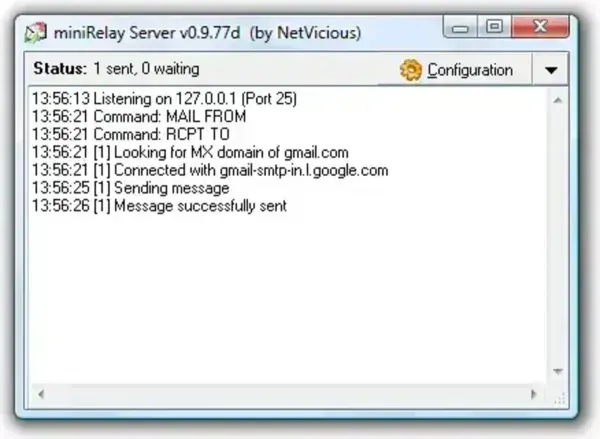
This approach removes the need to configure different outgoing SMTP servers when switching between networks. However, successful delivery still depends on modern email security policies and whether the destination mail server accepts direct SMTP connections.
What Does Mini Relay Server Do?
Rather than sending mail through your Internet provider or a third-party SMTP service, Mini Relay Server accepts messages from your email client via localhost and then attempts to deliver them directly to the recipient's mail server using DNS MX records.
This makes it useful for testing, development, or environments where configuring multiple SMTP providers would otherwise be inconvenient.
Key Features
- Portable: Runs without installation from a USB flash drive or local folder.
- Local SMTP Relay: Accepts outgoing mail through 127.0.0.1.
- No ISP SMTP Configuration: Eliminates the need to configure different outgoing mail servers.
- Automatic MX Lookup: Resolves recipient mail servers using standard DNS records.
- Small Footprint: Requires very little disk space and memory.
- Simple Configuration: Designed to work with standard SMTP email clients.
Typical Uses
- Testing SMTP applications during software development.
- Portable email setups on USB toolkits.
- Users who frequently change Internet connections.
- Learning how SMTP mail delivery works.
How to Use Mini Relay Server
- Download and extract Mini Relay Server.
- Launch the application.
- Configure your email client to use 127.0.0.1 as its outgoing SMTP server.
- Send email normally through your preferred mail client.
Mini Relay Server then attempts to forward outgoing messages directly to the appropriate destination mail servers.
Specifications
- Official Website: Project Page
- Developer: NetVicious
- License: Freeware
- Supported Operating System: Windows
- Extracted Size: Approximately 296 KB
- Category: Networking, Email, SMTP Utility
- Price: Free
- Editor's Rating: ★★★★☆
- Download: Mini Relay Server Download
Frequently Asked Questions
Does Mini Relay Server replace my email provider?
No. It functions as a local SMTP relay for sending outgoing mail. Your existing email account and mail client remain unchanged.
Does it require installation?
No. The application is fully portable and can be run directly from a folder or USB flash drive.
Will every mail server accept direct SMTP delivery?
Not necessarily. Many modern mail providers apply spam protection measures that may reject mail sent directly from residential or dynamically assigned IP addresses.
Who is this tool intended for?
Mini Relay Server is most useful for developers, administrators, network technicians, and users who need a lightweight local SMTP relay for testing or portable email configurations.
Final Thoughts
Mini Relay Server is a compact SMTP relay that provides a simple way to submit email through a locally running mail server. Although today's email ecosystem relies heavily on authentication, reputation, and anti-spam technologies, the software remains a useful utility for testing, development, portable toolkits, and specialized networking environments where a lightweight SMTP relay is needed.
