FLV Converter: Legacy Portable Flash Video Converter
FLV Converter is an older Windows utility designed to convert Flash Video files (FLV) into other media formats. The original listing describes conversion to AVI, MPEG, MP4, MOV, 3GP, MP3, and device-oriented presets for products such as the iPod, PSP, and iPhone. Its purpose was to make older Flash video files playable in media players that did not handle FLV directly.
Convert FLV Video to Other Formats
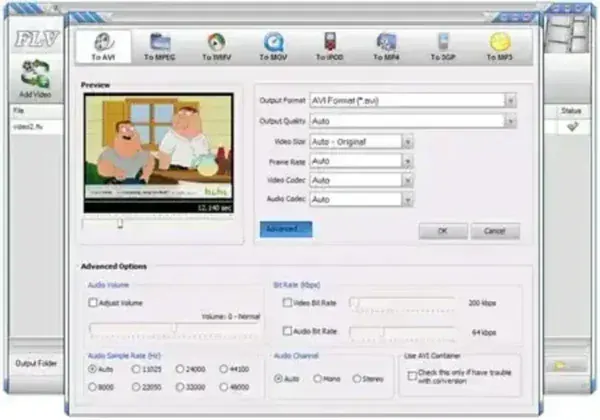
The program was promoted as a portable converter. The format list includes:
- Video formats: AVI, MPEG, MP4, MOV, and 3GP.
- Audio output: MP3 extraction from supported FLV files.
- Device presets: Older iPod, PSP, and iPhone profiles.
Conversion generally decodes the source stream and re-encodes it for the selected output. This can change file size or reduce quality depending on the settings. Keep the original file until you have checked the converted copy and confirmed that both audio and video play correctly.
Flash Video Is a Legacy Format
FLV was widely used for web video in the Flash era, but browser-based Flash Player support has ended and modern services use other delivery formats. This converter is mainly relevant when working with old FLV files in an archive. It should not be considered a current online video downloader or a general-purpose modern media converter.
Availability and Compatibility
The original project website and download are no longer verified as maintained sources. The listing once described a portable freeware executable, but we cannot confirm the integrity or compatibility of an archived copy. Avoid unrelated mirrors, and scan any old executable before running it.
FLV Converter Specifications
- License: Originally listed as freeware
- Platform: Windows; current compatibility unverified
- Original purpose: Convert FLV video to common video formats or MP3
- Deployment: Portable executable (original listing)
- Availability: Original download no longer verified
- Editor's Rating: ★★★☆☆ (3/5)
Modern FLV Conversion Alternative
HandBrake is a maintained open-source video transcoder that can open many common video sources, including FLV, and convert them to MP4, MKV, or WebM. It offers presets for common devices, a conversion queue, and control over video and audio settings. The official documentation lists supported source formats. HandBrake is intended for media files you already have and does not bypass DRM or copy protection.
Is FLV Converter Still Useful?
This utility may be of interest if you need to convert a small collection of old FLV files, but the unavailable publisher source and uncertain compatibility are significant drawbacks. For regular media conversion, use a maintained tool that documents its supported codecs and output settings. Browse our audio and video tools for related utilities.