ADRC Data Recovery Tools: Legacy File Recovery and Disk Utilities
ADRC Data Recovery Tools is an older Windows recovery package that combines several small utilities for retrieving deleted files and working with damaged storage. The original package includes file undelete, disk imaging, disk cloning, copying files from drives with bad sectors, and tools for backing up or restoring boot parameters. It was distributed as a compact portable toolkit, but its age and limited modern support make careful handling essential.
Recover Deleted Files and Copy Data from Drives
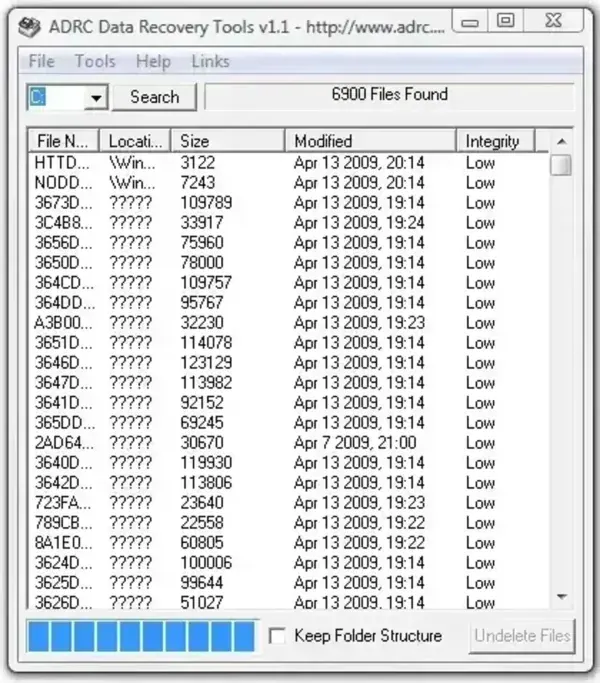
The undelete component was intended to search for files that had been removed from a disk, including files emptied from the Recycle Bin. Other tools in the package address different recovery tasks: creating a disk image for backup, restoring an image, cloning a drive, copying files from a disk with bad sectors, and backing up or restoring boot parameters. These functions should not be confused with a complete forensic recovery suite or a guarantee that damaged data can be restored.
Disk imaging and cloning can be useful when you need a working copy of a storage device before attempting recovery. A sector-by-sector image may preserve information that a normal file copy cannot read, but the result depends on the condition of the source drive and the software's ability to handle read errors. Always confirm the destination device before starting an imaging or cloning operation.
Important Data Recovery Precautions
When a file is deleted, further writes to the same storage device can overwrite the data that might otherwise be recoverable. Stop using the affected drive as soon as possible. Run recovery software from another device where practical, and save recovered files to a different physical drive. Do not create an image or clone onto the source disk.
A drive with physical failure symptoms, repeated disconnects, clicking sounds, or rapidly worsening read errors may need professional recovery. Repeated scans and unnecessary power cycles can make a failing drive worse. If the data is irreplaceable, stop experimenting and consult a recovery specialist.
The package also includes boot-parameter tools. Changing boot information can prevent a computer from starting, so do not use those functions unless you understand the target disk and have a verified backup. A recovery toolkit should not be used as a general-purpose disk maintenance utility.
ADRC Data Recovery Tools Specifications
- Project: ADRC Data Recovery Tools
- Version: 1.1
- Release date: June 19, 2008 (archived listing)
- License: Freeware
- Platform: Windows 95 through XP listed; modern compatibility unverified
- Original features: File undelete, disk imaging, image restore, disk cloning, copying from bad sectors, boot-parameter backup and restore
- Deployment: Portable package (original listing)
- Development status: Legacy project
- Editor's Rating: ★★★☆☆ (3/5)
Current Windows File Recovery Option
For deleted files on supported local drives, Microsoft provides Windows File Recovery, a command-line app available through the Microsoft Store. It can attempt to recover deleted files from local storage, including external and USB drives. It does not replace ADRC's disk-imaging or cloning functions, and Microsoft also advises minimizing use of the affected computer to reduce the chance of overwriting deleted data.
Is ADRC Still Worth Using?
ADRC bundled several basic recovery and disk-copying tasks in a small package, which made it convenient for older Windows rescue work. Its age and uncertain compatibility make it unsuitable as the only recovery option for valuable data. Use a maintained recovery tool for current systems, work from a backup or disk image whenever possible, and never write recovered files back to the source device.