
Oiko Visual CSS Editor is a free portable CSS editor designed to help users create and modify cascading style sheets through a simple visual interface. Instead of writing code manually, it offers an intuitive, icon based navigation system along with a live preview feature that lets you instantly see how your styles will appear in browsers such as Internet Explorer and Firefox.
Oiko Visual CSS Editor
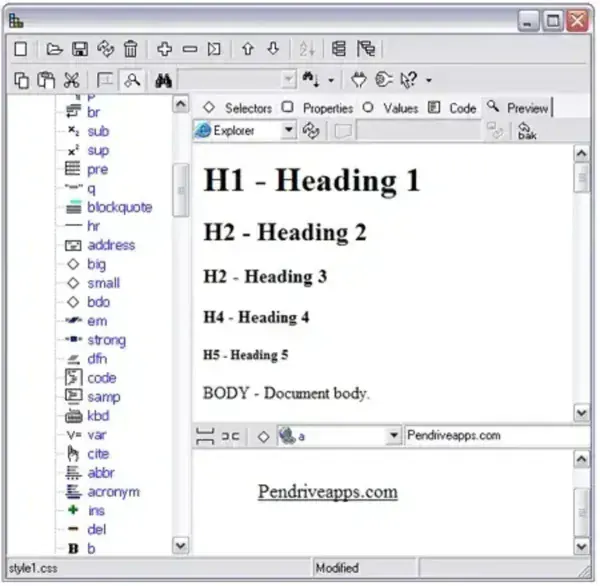
Key Features
- Visual CSS Editing: Design and modify CSS styles without writing code manually.
- Simple Interface: Icon based navigation makes it easy to adjust colors, fonts, spacing, and layout properties.
- Live Browser Preview: Instantly preview your CSS changes in supported browsers like Internet Explorer and Firefox.
- Fully Portable: No installation required, run directly from a USB flash drive or external storage device.
About CSS and Why It Matters
CSS (Cascading Style Sheets) is responsible for the visual presentation of websites, controlling elements such as layout, colors, typography, and spacing. A tool like Oiko Visual CSS Editor simplifies the process, making it accessible for beginners and designers who want to create clean, consistent, and visually appealing web pages without deep coding knowledge.
Specifications
- Author's Website: Project Page
- License: Freeware
- Rating: 4 Star
- Category: Portable CSS Editor, Web Development Tool
- Download: You can get the last version here;
Download Oiko Visual CSS Editor
Final Thoughts
While Oiko Visual CSS Editor remains a lightweight and convenient option for basic CSS editing on the go. For more modern workflows, users may prefer advanced alternatives like Notepad++ Portable, which offers extensive features and plugin support for live previews and enhanced code editing.
