
Pale Moon Portable is a free and open source portable web browser for Windows that can be run directly from a USB flash drive or other writable removable storage without a traditional installation. Developed independently from Mozilla Firefox, Pale Moon uses its own Goanna browser engine and focuses on efficiency, customization, privacy, and support for a classic desktop browsing experience.
The official Pale Moon project provides a dedicated Portable Windows version designed specifically for use on removable media. The portable package keeps your bookmarks, passwords, browsing history, downloads, and other personal browser data with the portable installation instead of storing them on the host computer. This makes it particularly useful when you need a consistent browser environment on multiple Windows PCs.
Pale Moon Portable | Free Portable Web Browser
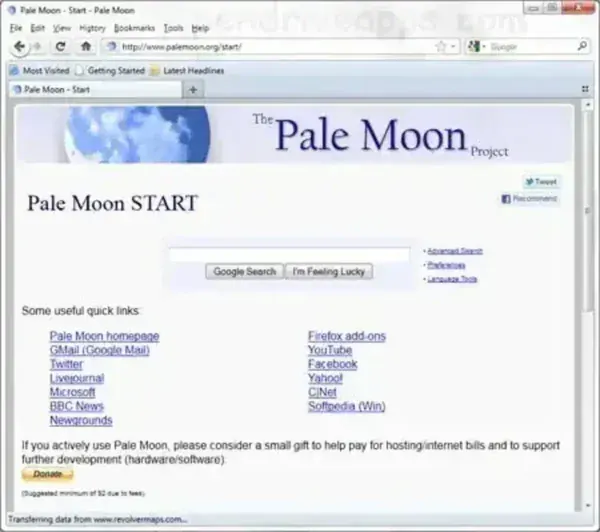
What Is Pale Moon?
Pale Moon is an independently developed, free and open source web browser that originated from the Mozilla Firefox codebase but has evolved into its own browser platform. It uses the Goanna rendering engine and follows its own development path rather than tracking Mozilla Firefox releases.
The browser emphasizes customization, efficiency, privacy, and a traditional desktop browsing experience. It retains extensive interface customization options and supports a range of extensions and themes developed specifically for Pale Moon.
Pale Moon is not simply a portable copy of Firefox. It is a separate browser with its own engine, release schedule, add-on ecosystem, and configuration options.
What Makes Pale Moon Portable?
The official Windows Portable edition is specifically designed for removable media. Unlike the regular desktop installation, the portable package is intended to keep the browser environment self-contained.
According to the Pale Moon project, the portable edition keeps your:
- Bookmarks
- Passwords
- Browsing history
- Downloads
- Browser profile and settings
with the portable installation rather than storing them on the host computer.
This makes Pale Moon Portable useful for users who regularly move between computers and want to carry their browser configuration with them.
The portable version can be used from a USB flash drive, external hard drive, or another writable storage location. It requires write access because the browser needs to store its profile and other data alongside the portable installation.
Complete Pale Moon Portable Feature List
- Portable Windows Browser: Run Pale Moon directly from removable storage without installing it on the host computer.
- Self-Contained Browser Profile: Keep bookmarks, passwords, history, downloads, and settings with the portable installation.
- Open Source: Pale Moon is released as open source software.
- Goanna Rendering Engine: Uses Pale Moon's independently maintained browser engine.
- Firefox Heritage: Originally derived from Mozilla Firefox code but independently developed with its own platform and release cycle.
- Classic Browser Interface: Provides a traditional desktop browser experience with extensive interface customization.
- Highly Customizable: Customize browser appearance, navigation controls, tabs, and other interface elements.
- Custom Themes: Supports complete themes and lightweight Personas-style themes.
- Extension Support: Supports a range of legacy Firefox extensions and Pale Moon-specific add-ons.
- Dedicated Add-on Ecosystem: Pale Moon maintains its own collection of compatible extensions and themes.
- Hardware Acceleration: Can use supported GPU acceleration for rendering, compositing, scrolling, and animation.
- Modern Web Standards: Supports HTML5, CSS3, SVG, Canvas, and other modern web technologies.
- Image Format Support: Supports common formats including JPEG, PNG, WebP, GIF, and JPEG XL.
- Advanced Tab Customization: Provides additional options for controlling tabs and navigation compared with many modern browsers.
- Privacy Features: Includes configuration options intended to give users greater control over browser behavior and networking.
- Security Indicators: Provides enhanced indicators for connection and domain information.
- Portable Across Multiple PCs: Designed specifically for use on multiple host computers.
- 32-bit Windows Version: A 32-bit Windows build remains available for compatible systems.
- 64-bit Windows Version: A 64-bit Windows build is available for modern systems.
Pale Moon Portable vs Regular Pale Moon
The regular Pale Moon desktop version is intended for installation and integration with a Windows computer. The Portable edition is configured specifically for removable media.
The portable version is therefore better suited to users who want to carry their browser between computers, while the regular desktop version is preferable when you want normal Windows integration such as desktop shortcuts, pinned taskbar entries, file associations, and default-browser behavior.
Pale Moon's developers specifically caution that the Portable edition is designed for removable media and should not be considered a replacement for the normal desktop installation on a stationary PC.
How to Run Pale Moon Portable from a USB Drive
Running Pale Moon Portable from a USB flash drive is straightforward.
- Download the Pale Moon Portable Windows package from the official project website.
- Place the downloaded portable executable on your computer or USB flash drive.
- Run the portable executable and choose an empty folder where the browser should be extracted.
- Open the extracted Pale Moon Portable folder.
- Launch palemoon-portable.exe, rather than the regular palemoon.exe executable.
- Allow the browser to create its portable profile the first time it starts.
- Use Pale Moon normally. Your portable browser data will remain with the portable installation.
The first launch can take longer because Pale Moon Portable creates its personal profile on the USB drive. Subsequent launches should be faster, although performance depends partly on the speed of the removable storage.
Pale Moon Portable System Requirements
Pale Moon's current Windows requirements are considerably newer than the requirements listed in many older descriptions of the browser.
The current official builds require:
- Windows: Windows 7 Service Pack 1 or later.
- 32-bit Windows: Processor with at least SSE2 support.
- 64-bit: Processor with AVX support.
- Memory: At least 2 GB of free RAM, with 4 GB or more recommended.
- Storage: At least 250 MB of free space for installation, caching, and profile data.
The project recommends a 64-bit operating system and processor with 4 GB or more of RAM for a better experience. Windows Vista and Windows XP are no longer supported by current official builds.
Pale Moon and Firefox Compatibility
Pale Moon originated from Firefox code, but it should not be considered a current Firefox fork that tracks Mozilla's browser releases.
Pale Moon is independently developed and uses its own source code, release schedule, browser engine, and add-on ecosystem. As a result, Firefox compatibility is limited.
Some older Firefox extensions may work with Pale Moon, but compatibility is not guaranteed. The project specifically recommends using extensions maintained for Pale Moon through its own add-on ecosystem. Pale Moon supports legacy-style extensions and does not support Mozilla's newer WebExtensions model.
Why Use Pale Moon Portable?
Pale Moon Portable is particularly useful when you want to carry a complete browsing environment with you.
It can be useful for:
- USB software toolkits: Carry a complete browser on a flash drive.
- Multiple computers: Use the same browser profile on different compatible Windows PCs.
- Technicians: Keep a browser available when working on different computers.
- Privacy-conscious users: Keep the portable browser profile with the removable installation rather than leaving the normal browser profile on each host.
- Legacy browser enthusiasts: Use a browser with a traditional interface and extensive customization options.
- Users who prefer customization: Personalize the interface through themes, extensions, and browser settings.
Pale Moon Portable Pros and Cons
Pros
- Free and open source.
- Official Windows Portable edition available.
- Runs from USB storage without a traditional installation.
- Keeps its portable browser profile with the application.
- Highly customizable interface.
- Supports themes and a dedicated add-on ecosystem.
- Uses the independently developed Goanna engine.
- 32-bit and 64-bit Windows builds are available.
- Designed for users who prefer a traditional desktop browser experience.
Cons
- Not compatible with every modern Firefox extension.
- Does not support Mozilla's WebExtensions model.
- Not intended for desktop integration when using the Portable edition.
- Requires a writable location to store its portable profile.
- Current 64-bit builds require relatively modern processor capabilities.
- Some websites may work differently than they do in Chrome, Firefox, or Chromium-based browsers.
Specifications | Official Site | Download
- Developer: Moonchild Productions
- License: Open Source
- Operating Systems: Windows 7 SP1 and later for current Windows builds
- Architecture: 32-bit and 64-bit Windows builds
- Browser Engine: Goanna
- Application Category: Portable Web Browser
- Price: Free
- Editors Rating: 4 Star
- Official Website: Pale Moon Project Page
- Download: Pale Moon Portable Download
Frequently Asked Questions
Is Pale Moon Portable free?
Yes. Pale Moon is free and open source, and the official project provides Windows Portable packages at no charge.
Can I run Pale Moon Portable from a USB drive?
Yes. The official Portable edition is specifically designed to run from removable media such as a USB flash drive. It keeps the browser profile and personal data with the portable installation.
Does Pale Moon Portable require installation?
No. The Portable edition is extracted to a folder and launched using the portable executable. It is designed to run without a conventional Windows installation.
Is Pale Moon based on Firefox?
Pale Moon originated from the Mozilla Firefox codebase, but it is now independently developed with its own source code, release schedule, and Goanna rendering engine. It should not be treated as a current version of Firefox.
Can Pale Moon use Firefox extensions?
Some legacy Firefox extensions may work, but compatibility is not guaranteed. Pale Moon maintains its own add-on ecosystem and recommends extensions specifically compatible with the browser.
Does Pale Moon Portable save data to the computer?
The official Portable edition is designed to keep its bookmarks, passwords, history, downloads, and other personal data with the portable installation. It requires a writable location to operate correctly.
Does Pale Moon support Windows 10 and Windows 11?
Yes. Current versions support Windows builds support Windows 7 SP1 and later, which includes Windows 10 and Windows 11.
Does Pale Moon Portable work on Windows XP?
No. Current official builds no longer support Windows XP or Windows Vista. Windows 7 SP1 or later is required for current Windows builds.
Is Pale Moon faster than Firefox?
Pale Moon is designed with efficiency and performance in mind, but there is no reliable universal percentage by which it can be said to be faster than Firefox. Performance depends on the hardware, websites, extensions, and workloads being tested. Pale Moon itself notes that synthetic benchmark scores are not necessarily representative of real-world browser performance.
Final Thoughts
Pale Moon Portable is an interesting alternative for Windows users who want a free portable web browser that can be carried on a USB flash drive. Rather than simply packaging Firefox for portable use, Pale Moon is an independently developed browser with its own Goanna engine, customization philosophy, extension ecosystem, and release cycle.
Its official Portable edition is particularly useful because the browser profile travels with the application. That means your bookmarks, passwords, history, downloads, and settings can remain available when moving between compatible Windows computers.
It is not the right choice for everyone. Users who depend on modern Firefox WebExtensions or require maximum compatibility with every current website may prefer mainstream browsers such as Firefox or Chromium-based alternatives. However, for users who value portability, customization, a traditional browser interface, and an independently developed open source browser, it remains a distinctive option.
If you are looking for a portable Firefox alternative that you can carry on a USB drive, the Pale Moon Browser is certainly worth considering.
