
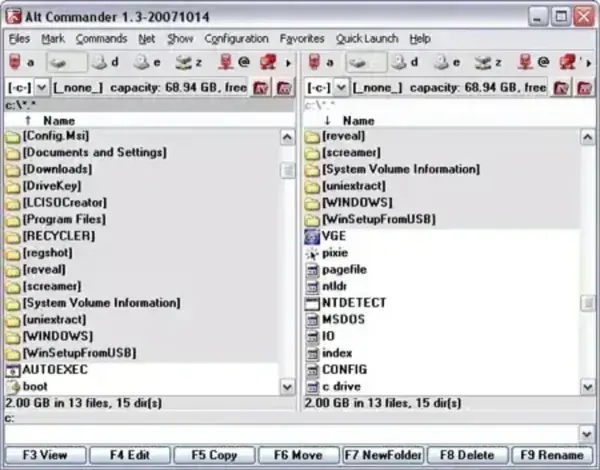
Alt Commander is a free portable file manager for Windows that can be used as a lightweight alternative to the default Windows File Explorer. This freeware file management tool features a dual pane interface and includes a wide range of useful built in utilities for handling files, folders, archives, and remote transfers.
Alt Commander Portable File Manager
What is Alt Commander?
Alt Commander is a standalone file explorer replacement designed for efficient file navigation and advanced file operations. Its dual-pane layout allows users to manage files side by side, making tasks like copying, moving, and comparing files faster and more intuitive.
Unlike the default Windows file manager, it includes additional tools such as archive handling, FTP access, and batch renaming, all within a compact and stand alone portable application.
Alt Commander Features
- Dual Pane File Manager: Manage files in two panels for faster navigation and transfers
- Portable Application: Run directly from USB without installation
- ZIP Compression and Extraction: Create and extract archive files
- Archive Browsing: Open and explore ZIP files like folders
- Built in Image Viewer: Preview images without external software
- Integrated FTP Client: Upload and download files from remote servers
- File Comparison Tool: Compare files to identify differences
- Batch File Renaming: Rename multiple files at once using patterns
- Drag and Drop Support: Simplifies file operations
- Keyboard Shortcuts: Speeds up workflow for power users
- Lightweight Design: Minimal system resource usage
- Standalone Execution: No background services or installation required
Why Use This Free File Manager?
- More powerful than Windows Explorer with advanced file handling tools
- Portable and lightweight for use on any Windows PC
- Improves productivity with dual-pane navigation
- All-in-one solution for file management, archives, and FTP
- Ideal for technicians and users managing multiple systems
Alt Commander vs Windows Explorer vs Total Commander
Choosing the right file manager depends on your workflow and feature needs. Here is how Alt Commander compares to the default Windows File Explorer and a popular advanced alternative.
| Feature | Alt Commander | Windows Explorer | Total Commander |
|---|---|---|---|
| Price | Free | Included with Windows | Paid (Shareware) |
| Portable Version | Yes | No | Yes |
| Dual Pane Interface | Yes | No | Yes |
| Built in FTP Client | Yes | No | Yes |
| Archive Support | Yes (ZIP) | Limited | Yes (Advanced) |
| Batch Rename Tool | Yes | Basic | Advanced |
| File Comparison | Yes | No | Yes |
| Ease of Use | Moderate | Easy | Advanced |
| System Resource Usage | Very Low | Moderate | Low |
Which File Manager Should You Choose?
- Alt Commander: Best for users who want free, portable file management with essential advanced tools.
- Windows Explorer: Ideal for basic everyday file browsing with no learning curve.
- Total Commander: Best suited for power users who need advanced features and customization.
Specifications
- Extracted Size: 816 KB
- Author's Website: Project Page
- License: Freeware
- Rating: 4 Star
- Operating System: Windows
- Download: Get the latest version here:
Alt Commander Download
Pros
- Portable file manager under 1 MB
- Dual pane interface improves workflow
- Built in FTP client and archive tools
- Batch rename and file comparison features
- Free to use with no installation required
Cons
- Outdated interface design
- May require a learning curve for new users
- Limited updates from the developer
Final Thoughts
Alt Commander is a free capable and lightweight stand alone file manager that offers more functionality than the standard Windows file explorer. With features like dual pane navigation, FTP support, archive handling, and batch renaming, it provides a practical solution for users who need advanced file management tools in a compact package.
If you're looking for a freeware file manager for Windows that can run from a USB drive and handle complex file operations efficiently, it is a solid windows file management alternative worth adding to your portable applications software toolkit.
