
Free IP Scanner is a small and portable network scanner that can find IP addresses and show various information about networked devices. It helps you find active systems by showing IP addresses, MAC addresses, hostnames and open ports over a specified IP range.
Most commonly the tool is used for network troubleshooting, device discovery, and basic network monitoring in home or office networks.
Free IP Scanner | Portable Network Scanner
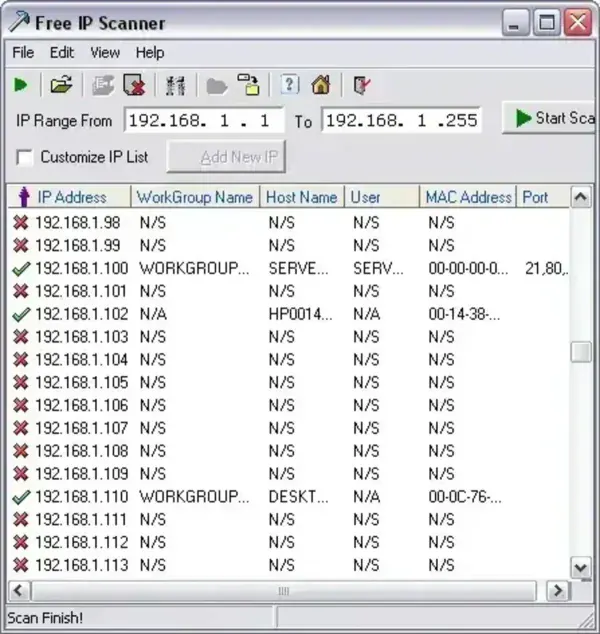
Because the application is fully portable, it can be launched directly from a USB flash drive without installation. This makes it especially useful for technicians, administrators, and users who regularly troubleshoot multiple Windows systems.
Main Features
- IP Range Scanning: Scan custom IP ranges or entire local subnets.
- Active Device Detection: Quickly locate responding devices on a network.
- Hostname and MAC Address Detection: View additional device information when available.
- Open Port Scanning: Detect open TCP ports on responding systems.
- NetBIOS Information: Retrieve available NetBIOS device details.
- Export Results: Save scan results as text or CSV files.
- Portable Utility: Runs without installation.
- Lightweight Interface: Simple and easy to use.
How It Works
The program scans a specified IP address range and checks which devices respond on the network. When active devices are found, the scanner attempts to retrieve additional information such as hostnames, MAC addresses, and open ports.
This can help users quickly identify connected devices, troubleshoot connectivity problems, or locate unexpected systems on a local network.
Common Uses
- Finding devices connected to a home or office network
- Identifying unknown systems on a LAN
- Troubleshooting network connectivity issues
- Checking for open network ports
- Creating simple network inventory reports
- Running portable diagnostics from a USB drive
Important Notes
- The utility is designed primarily for local area network scanning.
- Some device information may depend on firewall settings, permissions, or network configuration.
- Larger enterprise environments may require more advanced network monitoring tools.
Specifications | Official Site | Download
- Developer: Eusing Software
- Extracted Size: Approximately 432 KB
- License: Freeware
- Supported Operating Systems: Windows 11, 10, and 8
- Portable: Yes
- Rating: 4 Star
- Category: Network Utilities
- Official Website: Project Page
- Download: Free IP Scanner Download
Final Thoughts
Free IP Scanner remains a practical portable utility for quickly discovering devices and gathering basic network information on local area networks. Its lightweight design, portability, and straightforward interface make it useful for troubleshooting, network discovery, and simple device monitoring tasks.
For users looking for a fast and uncomplicated portable IP scanner, Free IP Scanner still provides a reliable solution without unnecessary complexity.
