
WinDataReflector is a free file synchronization and backup utility for Windows that helps users keep files and folders synchronized across multiple locations. It supports one-way and two-way synchronization, scheduled backups, file versioning, and cloud storage integration, making it a useful solution for protecting important data and maintaining identical copies of files between computers, external drives, network locations, and supported cloud services.
WinDataReflector | Free File Synchronization and Backup Software
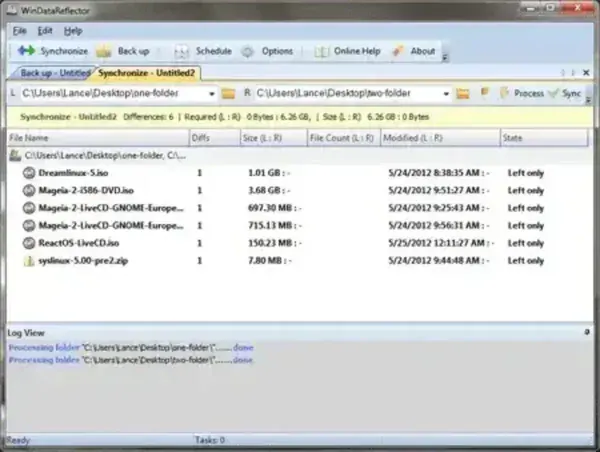
What is WinDataReflector?
WinDataReflector is a Windows backup and synchronization application developed by Veridium Software. The software is designed to help users create backup copies of important files and automatically synchronize data between multiple storage locations.
Whether you need to keep documents synchronized between computers, create backups to an external hard drive, mirror folders to a network share, or maintain copies of files in cloud storage, WinDataReflector provides a flexible and easy-to-use solution.
The software includes visual file comparison tools, scheduling options, filtering rules, and support for multiple synchronization jobs running simultaneously.
Key Features
- File Backup and Folder Synchronization: Create backup copies of important files and keep folders synchronized automatically.
- One-Way and Two-Way Synchronization: Choose between mirroring changes in a single direction or keeping both locations updated.
- Cloud Storage Synchronization: Works with folders synchronized by cloud services such as OneDrive, Google Drive, and Dropbox.
- FTP Synchronization Support: Synchronize files with supported FTP server locations.
- Visual File Comparison: Compare source and destination folders before performing synchronization tasks.
- Scheduled Backups: Automate synchronization and backup jobs using custom schedules.
- Incremental Backup Support: Only modified files are copied after the initial backup, saving time and storage space.
- File Versioning: Retain previous versions of files, making it easier to recover from accidental changes or deletions.
- ZIP Compression: Compress backup archives to reduce storage requirements.
- Custom Filters: Include or exclude specific files, folders, or file types from backup operations.
- Multiple Tasks: Create and manage several synchronization and backup jobs simultaneously.
- Portable Operation: Runs without installation, making it suitable for portable USB toolkits.
Common Uses
- Backing up important documents and personal files
- Synchronizing folders between desktop and laptop computers
- Maintaining copies of data on external drives
- Creating automated file backup routines
- Mirroring files to network storage devices
- Protecting business documents from accidental loss
- Keeping cloud storage folders synchronized
Synchronization Modes Explained
| Mode | Description | Best Use Case |
|---|---|---|
| One-Way Sync | Copies changes from source to destination only | Backups and file mirroring |
| Two-Way Sync | Updates both locations when changes occur | Working across multiple devices |
| Mirror Backup | Destination becomes an exact copy of source | Disaster recovery backups |
| Incremental Backup | Copies only new or modified files | Regular scheduled backups |
Advantages and Limitations
Pros
- Easy to configure synchronization jobs
- Supports scheduled backups
- File versioning helps prevent accidental data loss
- Visual file comparison tools
- Incremental backup support
- Portable and lightweight
- Free for personal use
Cons
- Windows only
- User interface appears somewhat dated
- Cloud synchronization relies on installed cloud storage clients
- Some advanced features are reserved for paid editions
Specifications and Download
- Official Website: Veridium Software
- Developer: Veridium Software
- License: Freeware
- Category: Backup and Synchronization Utilities
- Portable: Yes
- Extracted Size: Approximately 12.5 MB
- Supported Operating Systems: Windows 11, Windows 10, Windows 8, Windows 7
- Editor's Rating: ★★★★☆
- Download: Download WinDataReflector
Frequently Asked Questions (FAQ)
Is WinDataReflector free?
Yes. A free edition is available for personal use and includes core backup and synchronization functionality.
Can it synchronize files between two computers?
Yes. Files can be synchronized between computers through shared folders, network drives, cloud-synchronized folders, or removable storage devices.
Does it support scheduled backups?
Yes. Backup and synchronization jobs can be configured to run automatically according to a schedule.
Can I synchronize files with OneDrive or Google Drive?
Yes. WinDataReflector can work with folders synchronized by cloud storage clients such as OneDrive, Google Drive, and Dropbox.
What is the difference between synchronization and backup?
Synchronization keeps files consistent between locations, while backups create additional copies for recovery purposes.
Is WinDataReflector portable?
Yes. The ZIP version can be extracted and run without a traditional installation.
Final Thoughts
WinDataReflector provides a practical balance between file synchronization and backup functionality. Its support for scheduled tasks, visual file comparison, incremental backups, and file versioning makes it useful for both home users and professionals who need reliable data protection.
Whether you're keeping folders synchronized across multiple devices, backing up important documents, or maintaining copies of files on external drives and cloud storage, WinDataReflector offers a straightforward and lightweight solution that can be carried and run directly from a portable USB drive.
