
WinKeyFinder is a free, portable Windows product key finder that can quickly find and display the product keys for Microsoft Windows and Microsoft Office saved on your computer. This lightweight utility also allows you to save, export, encrypt and manage recovered license keys, making it a useful addition to any technician's or power user's USB toolkit. WinKeyFinder is a quick and easy way to find product keys for Windows and other software, whether you are reinstalling Windows, documenting software licenses or just backing up important activation information.
WinKeyFinder | Recover Windows & Office Product Keys
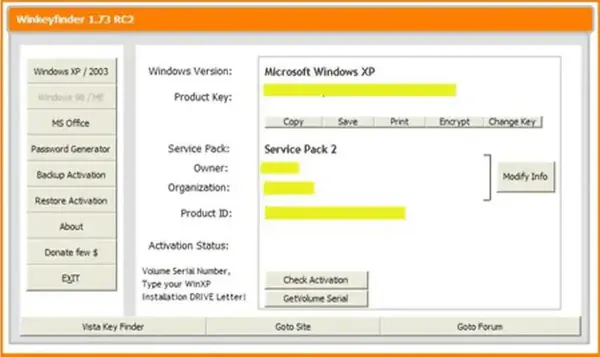
Losing access to a Windows or Microsoft Office product key can make reinstalling software more difficult than it needs to be. WinKeyFinder scans your system and retrieves supported product keys directly from Windows, displaying them in an easy to read interface. Since the program is completely portable, it can be run directly from a USB flash drive without installation.
Besides recovering license keys, the utility also displays useful system information including the Windows edition, Product ID, registered owner, computer name, and other details that can be helpful when documenting or troubleshooting a system.
Important: Modern versions of Windows often activate using a digital license linked to your Microsoft account or your PC's hardware. In these cases, a traditional product key may not always be available to recover.
Key Features
- Retrieve Windows product keys from supported installations.
- Display Microsoft Office product keys when available.
- View Product ID, registered owner, computer name, and system information.
- Save recovered keys for future reference.
- Export license information to a text file.
- Encrypt saved product keys for additional security.
- Generate strong random passwords with the built in password generator.
- Portable application requiring no installation.
- Compatible with both 32-bit and 64-bit Windows systems.
- Lightweight interface that's easy to use.
When Would You Use WinKeyFinder?
WinKeyFinder is especially useful when:
- Preparing to reinstall Windows.
- Replacing a failing hard drive.
- Documenting software licenses for multiple PCs.
- Backing up important activation information before upgrading hardware.
- Helping friends, family, or customers recover their Windows license information.
Although Windows 10 and Windows 11 commonly use digital activation, many systems still store recoverable OEM or retail product keys that can be displayed with this utility.
Related Product Key Recovery Tools
If this tool doesn't retrieve the information you're looking for, you may also want to try these alternatives:
- Magical Jelly Bean KeyFinder - Excellent for recovering product keys from many Windows installations and offline registry hives.
- Product Key Finder - Another lightweight utility for viewing Windows and Microsoft Office license information.
Each utility supports slightly different versions of Windows and Office, so having more than one available can improve your chances of recovering an older license key.
Specifications | Official Site | Download
- Author's Website: Project Page
- License: Freeware
- Supported Operating Systems: Windows XP, Vista, 7, 8, 8.1, 10, and 11
- Supports: Microsoft Windows and selected Microsoft Office versions
- Editor's Rating: ★★★★☆ (4 Stars)
- Download: Download WinKeyFinder
Frequently Asked Questions
What is WinKeyFinder?
WinKeyFinder is a free portable utility that retrieves Windows and supported Microsoft Office product keys stored on your computer.
Can WinKeyFinder recover Windows 11 product keys?
Yes. It can retrieve supported product keys from Windows 11 systems when a recoverable key is available. However, many Windows 11 installations use digital licensing tied to Microsoft accounts or hardware instead of traditional product keys.
Does it require installation?
No. WinKeyFinder is completely portable and can be run directly from a USB flash drive without installing anything on the host computer.
Can it recover Microsoft Office product keys?
Yes. It supports recovering product keys for several Microsoft Office versions, although support varies depending on the Office release and licensing method used.
Is WinKeyFinder safe?
Yes. The utility only reads licensing information already stored on your computer and does not modify Windows activation or system files.
Which product key finder is best?
WinKeyFinder is an excellent lightweight portable option. If you need additional recovery capabilities, you may also want to try Magical Jelly Bean KeyFinder or Product Key Finder, since each utility supports slightly different scenarios.
Final Thoughts
WinKeyFinder remains a handy utility for recovering Windows and Microsoft Office product keys from supported systems. Its portable design, simple interface, and ability to save or encrypt recovered license information make it especially useful for IT technicians, system builders, and home users alike.
While modern versions of Windows increasingly rely on digital activation, this key finding application still provides an easy way to recover traditional product keys whenever they're available. Combined with other recovery utilities, it deserves a place in any portable troubleshooting toolkit.
