
Qwix is a remote ISO file manager for Xbox and a tool for creating ISOs, made for PC users with a modded Xbox. You don't have to install it, either; just run it from a USB flash drive if you want, and you're good to go.
Qwix | Xbox ISO File Manager and Creator
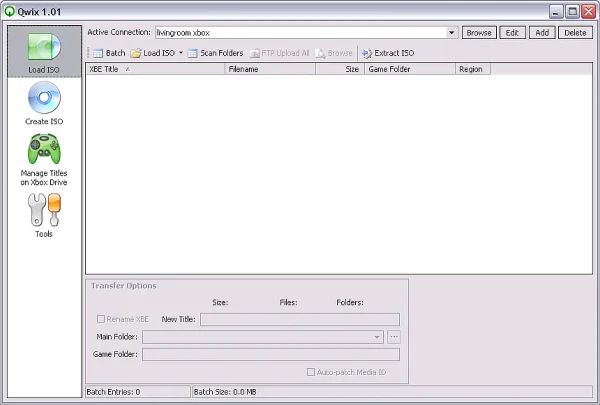
People usually turn to this Xbox file manager when they need to manage or back up their original Xbox game files. It can be a real lifesaver if you are trying to keep a big Xbox game collection in order.
Key Features
- ISO creation: Create Xbox compatible ISO images from extracted game folders
- ISO extraction: Extract ISO contents to a local folder on your PC
- FTP integration: Connect directly to a modded Xbox and transfer files
- Crosslink support: Detect and remove duplicate files across multiple games to save space
- Batch processing: Queue multiple ISO creation or extraction tasks
How to Use Qwix with an Xbox
- Download Qwix
- Extract the application and run it on your Windows PC
- Prepare your Xbox for FTP
- Your Xbox must be modded and running an FTP enabled dashboard such as EvolutionX or UnleashX
- Ensure your PC and Xbox are connected to the same network
- Configure FTP settings
- Open Qwix and navigate to the FTP Client section
- Enter the Xbox IP address, username, and password (xbox is the default for both)
- Connect to establish communication with the console
- Create an ISO
- Select the Create ISO option
- Browse to the game folder you want to convert
- Choose an output location and start the ISO creation process
- Extract an ISO
- Select the Extract ISO option
- Choose the ISO file and destination folder
- Extract the contents to your PC
- Upload files to Xbox
- Use the FTP interface to transfer ISO files or extracted game folders to the Xbox hard drive
- Batch processing
- Add multiple ISO jobs to the queue and let Qwix process them sequentially
Helpful Tips
- Compatibility: Some games may require additional patches or dashboard settings to run properly
- Storage space: Verify available hard drive space on your Xbox before transferring large files
Specifications and Download
- Extracted Size: 1.17 MB
- Author's Website: Project Page
- License: Freeware
- Supported Operating Systems: Windows 11, 10, 8
- Price: Free
- Category: Utilities, Xbox file manager
- Editor's Rating: ★★★★☆
- Download: Qwix Download
Final Thoughts
Qwix remains a powerful and reliable tool for managing original Xbox game backups. Its small size, portable nature, and built in FTP support make it an excellent choice for users who want full control over their Xbox ISO files without installing bulky software.
