
PStart is a free, lightweight portable start menu application designed to help users organize and launch software from a USB flash drive, SD card, external hard drive, or local folder. Created by Pegtop Software, this compact launcher makes it easy to access portable applications, documents, folders, and websites from a single customizable menu.
Popular among IT professionals, technicians, and portable software enthusiasts, PStart provides a simple way to carry an organized software toolkit between computers without requiring installation or administrative privileges. Its tiny footprint and straightforward interface have helped it remain a favorite portable launcher for years.
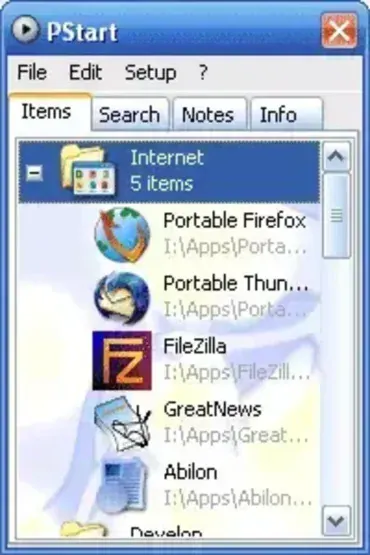
PStart Portable Start Menu Launcher
Our Take
Although newer portable launchers have appeared over the years, PStart remains one of the simplest and most reliable options available. During testing, the application launched quickly, consumed very little memory, and made organizing portable applications far easier than manually browsing folders on a USB drive.
One of its biggest strengths is its simplicity. Unlike larger launcher suites that include software catalogs, update systems, and additional services, PStart focuses on doing one job well: providing fast access to your portable software collection. Users who prefer a lightweight launcher without unnecessary extras will likely appreciate its clean approach.
What is PStart?
PStart is a portable application launcher that places a customizable menu in the Windows system tray. Instead of searching through folders for executable files, users can create organized menus containing applications, folders, documents, scripts, and websites.
Because all settings are stored alongside the program, it works exceptionally well from removable storage devices. Simply plug in your USB flash drive, launch PStart, and access your favorite tools from a familiar menu regardless of which computer you're using.
PStart was one of the early portable application launchers to gain popularity among USB toolkit enthusiasts, long before comprehensive launcher suites became common. Its focus on speed and portability continues to make it relevant today.
Key Features
- Portable Operation: Run directly from a USB flash drive, external drive, SD card, or local folder without installation.
- System Tray Integration: Places a launcher icon in the Windows notification area for quick access.
- Custom Menus: Organize applications, folders, documents, websites, and scripts into categories.
- Ultra Lightweight: Requires less than 1 MB of storage space and uses minimal system resources.
- Quick Launch Access: Start frequently used portable applications with just a few clicks.
- Drag and Drop Support: Easily add new shortcuts and organize existing entries.
- No Administrative Rights Required: Works on most Windows systems without needing elevated privileges.
- Portable Configuration: Settings travel with the application, maintaining the same experience across multiple computers.
Why Use PStart?
For users who maintain a collection of portable software, manually navigating folders can become cumbersome. PStart solves this problem by providing a centralized launcher that keeps everything organized and easily accessible.
It is particularly useful for:
- IT technicians carrying troubleshooting utilities on USB drives
- System administrators managing portable maintenance tools
- Students using portable software between school and home computers
- Users who frequently work on multiple PCs
- Anyone creating a personal portable software toolkit
Its minimal resource usage and fast startup times make it an excellent choice for older systems as well as modern hardware.
Pros and Cons
Pros
- Extremely lightweight and fast
- Easy to configure and use
- Fully portable with no installation required
- Excellent for organizing portable applications
- Minimal memory and CPU usage
- Leaves little or no trace on the host computer
Cons
- Interface appears dated by modern standards
- No built-in software update management
- Fewer advanced features than larger launcher platforms
- Development activity has been limited in recent years
How to Run PStart from a USB Drive
- Download PStartSetup211.exe from the official website.
- Launch the installer and select the Portable Setup option.
- Choose your USB flash drive when prompted.
- Complete the installation process.
- Open your USB drive and launch PStart.exe.
- Right-click inside the launcher to begin adding applications, folders, documents, and shortcuts.
Once configured, your launcher settings and shortcuts remain stored on the USB drive, allowing you to use the same setup on different computers.
What is a Portable Start Menu?
A portable start menu is a standalone launcher that runs independently of the Windows Start Menu. These launchers are commonly used to organize portable applications and provide quick access to software stored on removable media.
Unlike traditional software launchers that require installation, portable start menus keep both the launcher and its settings on the removable device itself. This allows users to maintain a consistent working environment across multiple computers.
Popular Alternatives
If you're looking for similar tools, consider the following alternatives:
- PortableApps Platform: A comprehensive launcher with built-in application management and update support.
- CodySafe: A customizable portable launcher featuring themes and application catalogs.
- ASuite: An open source launcher designed specifically for portable applications.
- Portable Start Menu: A lightweight tray-based launcher focused on simplicity.
- Lupo PenSuite: A complete portable software suite that includes hundreds of applications and an integrated launcher.
Specifications and Download
- Author's Website: Project Page
- Developer: Pegtop Software
- License: Freeware
- Extracted Size: Approximately 768 KB
- Supported Operating Systems: Windows XP, Vista, 7, 8, 10, and 11
- Category: Portable Application Launcher
- Price: Free
- Editor's Rating: ★★★★★
- Download: Download PStart Portable Start Menu
Frequently Asked Questions
Is PStart free?
Yes. PStart is freeware and can be used without cost.
Does PStart require installation?
No. It can be installed in portable mode and run directly from a USB flash drive or local folder.
Can I add websites and documents to PStart?
Yes. PStart supports shortcuts to applications, folders, documents, scripts, and websites.
Does PStart work on Windows 11?
Yes. It continues to function on modern Windows versions, including Windows 10 and Windows 11.
What makes PStart different from PortableApps Platform?
PStart focuses on lightweight application launching and organization, while PortableApps Platform provides additional features such as software management, updates, and integrated application catalogs.
Final Thoughts
PStart remains one of the most practical portable launchers available for users who value simplicity, speed, and reliability. Its tiny footprint, straightforward interface, and ability to organize portable applications from a single menu make it an excellent addition to any USB toolkit.
While larger launcher platforms offer more features, many users will appreciate PStart's lightweight design and focused functionality. If you're looking for an easy way to organize and launch portable software from a USB drive, PStart continues to be one of the best solutions available.
