
Drive Tidy is a freeware portable disk cleaner for Windows that helps remove junk files, temporary data, and unnecessary clutter to free up disk space. This lightweight cleanup utility runs directly from a USB flash drive without installation, making it a convenient tool for maintaining multiple PCs.
Drive Tidy Portable Disk Cleaner
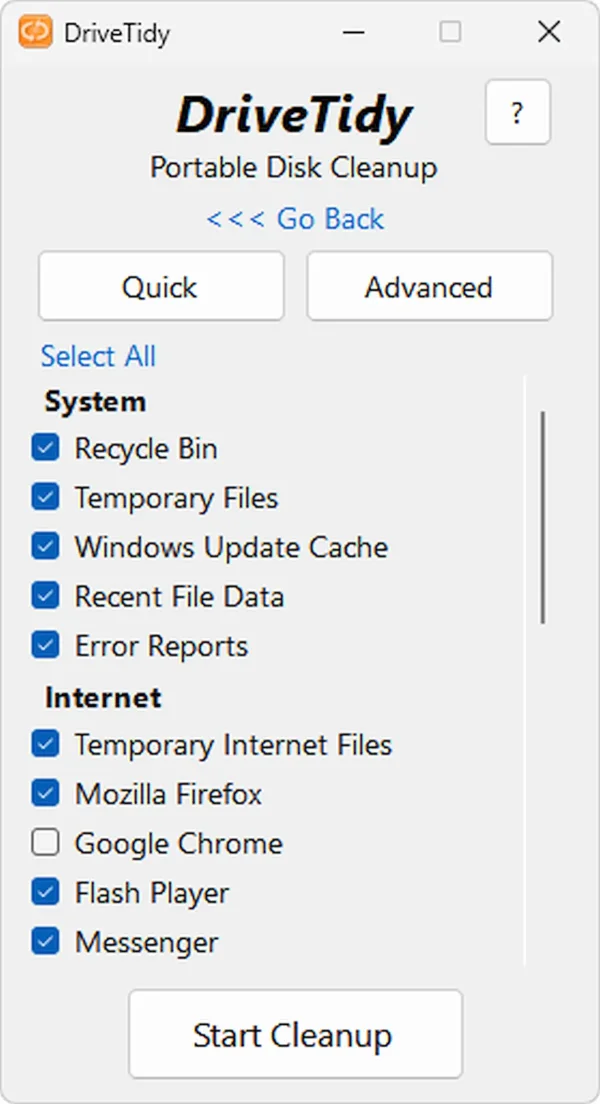
How Drive Tidy Works
Drive Tidy scans your system for temporary files, outdated logs, cache data, and other unwanted files that accumulate over time. Compared to the built in Windows Disk Cleanup tool, it can often detect additional items that can be safely removed to reclaim storage space.
This portable cleanup tool can be launched in two modes:
- Quick Mode: Automatically selects common junk files for fast cleanup with minimal input.
- Advanced Mode: Offers detailed control over file removal, allowing experienced users to fine-tune the cleanup process.
After running a scan, simply click Start Cleanup to remove detected files. A summary log is displayed upon completion so you can review what was deleted.
Drive Tidy Features
- Junk File Removal: Deletes temporary files, cache, logs, and leftover data
- Deep System Scan: Finds hidden or unused files missed by standard cleanup tools
- Quick and Advanced Modes: Choose between automatic cleanup or manual control
- Portable Execution: Runs without installation from USB or external drives
- Minimal Resource Usage: Designed to run efficiently on older or lower spec systems
- Fast Cleanup Engine: Performs scans and deletions quickly
- Detailed Cleanup Logs: Displays results after each cleanup session
- Simple Interface: Easy to navigate for both beginners and advanced users
- Safe File Removal: Targets only unnecessary and redundant files
- No Background Processes: Runs only when launched, no persistent services
- No Installation Required: Standalone executable for instant use
- Small File Size: Extremely compact at just 240 KB
Why Use This Free Disk Cleaner?
- Portable – runs from USB with no installation required
- Lightweight – extremely small footprint
- Effective cleanup – removes more junk files than basic tools
- Fast performance – quick scans and cleanup operations
- Ideal for technicians – useful for maintaining multiple systems
- Free to use – no ads or bundled software
If you need more advanced features, you might also consider CCleaner Portable, which includes additional system optimization tools.
Specifications and Download
- Developer: Microlink
- License: Freeware
- File Size: 240 KB
- Operating System: Windows
- Rating: 5 Star
- Official Site: Project Page
- Download: Download Drive Tidy
Final Thoughts
Drive Tidy is a simple and effective portable disk cleanup tool that focuses on speed and ease of use. Its small size and no-install design make it a great addition to any USB toolkit for system maintenance.
Whether you're freeing up space on an older PC or performing routine cleanup on multiple machines, this lightweight utility provides a quick and reliable solution without unnecessary complexity.
