gPodder - Podcast Downloader
gPodder is a free, open-source podcast client for subscribing to, downloading, organizing, and listening to podcast episodes. Add a podcast's RSS feed or search for a show through the available discovery services, then let gPodder check for new episodes and download the ones you want to keep. Downloaded episodes are stored locally, so you can listen to them later without streaming each time.
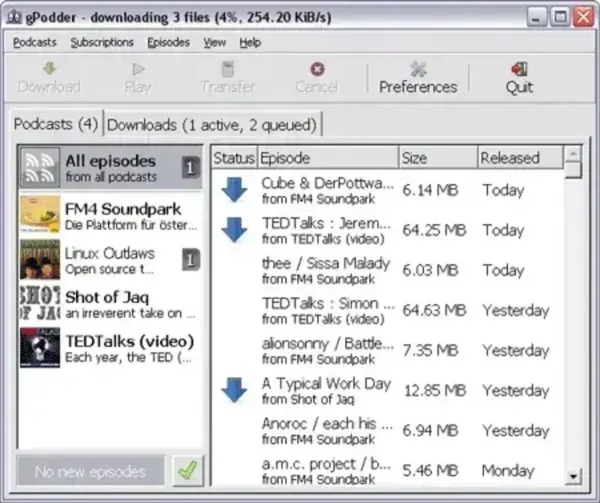
The application provides a library of podcast subscriptions, an episode list, download queue, playback controls, and options for importing or exporting subscriptions. It can also send downloaded episodes to an external media player. The Windows release includes a portable package, allowing you to run gPodder from a folder or USB drive without a conventional installation.
The latest stable release listed by the project is gPodder 3.11.5, released December 17, 2024. The project provides Windows, macOS, and Linux versions. The Windows portable executable is available alongside the installer. Because the stable release is not recent, check the project's release page for newer development activity and test the application on your Windows version before relying on it.
gPodder Podcast Downloader and Player
gPodder Features
- Podcast subscriptions: Add podcast feeds using their RSS or Atom URLs and organize your subscribed shows.
- Episode discovery: Search for podcasts through supported discovery extensions and add feeds to your library.
- Automatic feed updates: Check subscribed feeds for newly published episodes and notify you when new content is available.
- Episode downloads: Download individual episodes or configure automatic downloads for new releases.
- Download management: View queued, active, completed, and failed downloads and manage the download queue.
- Local playback: Play downloaded audio and video episodes using the built-in controls or send them to a compatible external player.
- Subscription backup: Import and export podcast subscriptions using OPML files.
- Podcast extensions: Add supported features and integrations through the extension system.
- Portable Windows package: Run the Windows portable executable without a conventional installation.
- Cross-platform: Available for Windows, macOS, and Linux.
How to Add and Download Podcasts
- Start gPodder and choose the option to add a podcast subscription.
- Paste the podcast's RSS or Atom feed URL, or use an available search or discovery extension.
- Let gPodder retrieve the feed and display its available episodes.
- Select individual episodes to download, or configure the application to download new episodes automatically.
- Play downloaded episodes from the application or open them with an external media player.
Podcast feeds are controlled by their publishers. If a show stops updating, changes its feed address, or removes older episodes, gPodder may no longer be able to retrieve that content. Keep a local copy of episodes you want to retain.
Using gPodder Portably
Download the Windows portable executable from the project's official download page or GitHub release, then save it to a folder on your USB flash drive. Launch the portable application from that folder. Choose a download directory on the USB drive if you want episodes stored alongside the program, and confirm that the drive has enough free space for your subscriptions.
Portable operation does not make the downloaded media private or encrypted. If you use gPodder on a shared computer, review where its configuration and download folders are stored and sign out of any connected services when finished.
Importing and Exporting Podcast Subscriptions
OPML files make it easier to move a list of subscriptions between podcast applications. Export your subscriptions from gPodder to keep a backup, or import an OPML file from another podcast client to add several feeds at once. This transfers the subscription list, not necessarily the downloaded episodes or playback history.
Specifications and Download
- Latest stable version: 3.11.5, released December 17, 2024.
- Developer: gPodder project, originally created by Thomas Perl.
- License: Open source.
- Platforms: Windows, macOS, Linux, and BSD.
- Windows packages: Installer and portable executable.
- Editor's Rating: ★★★★☆ (4/5)
- Official website: gPodder.
- Download: gPodder downloads.
- Release history: gPodder releases on GitHub.
Conclusion
gPodder is a practical way to manage podcast subscriptions and keep episodes available offline. Its feed updates, download queue, OPML support, and portable Windows package make it useful for listeners who prefer to manage their own media library. Browse our audio and video tools category for more media utilities.