
GeoSetter is a free image geo tagging and EXIF metadata editor that allows you to display, change, add, or remove GPS location data from photos. In addition to geotagging, it can view and edit EXIF, IPTC, and XMP metadata, including camera details, timestamps, and even change the EXIF date of your pictures.
A zipped version is also available, making it possible to store and run the utility directly from a USB flash drive without installation. This makes it an excellent portable metadata editor for photographers, travelers, and field workers.
Geo Tagging & EXIF Metadata Editor | GeoSetter Portable
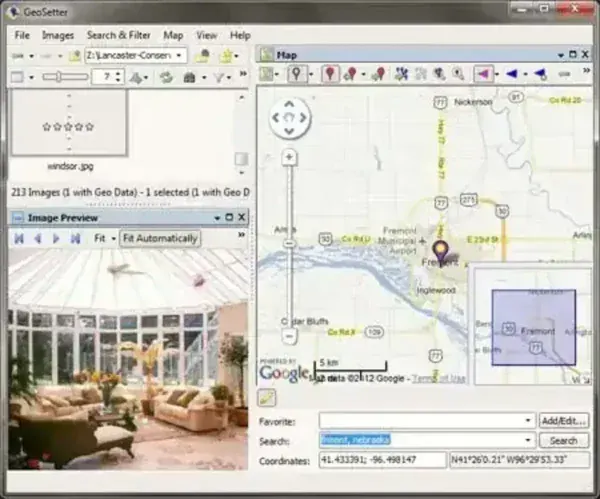
GeoSetter is a powerful tool designed for managing geographic data embedded in digital photos. It is especially useful for photographers who want precise control over where and how location information is stored inside their images.
Unlike basic EXIF viewers, it provides advanced tools for GPS synchronization, batch processing, and map based geotagging. This makes it ideal for managing large photo collections captured over multiple locations.
Key Features of GeoSetter
- Image Geotagging: Add, edit, or remove geographic coordinates (latitude, longitude, altitude) stored in EXIF metadata.
- Interactive Map Integration: Uses online maps (such as Google Maps) to visually place photos and fine tune GPS positions.
- EXIF / IPTC / XMP Editing: Edit camera information, copyright data, timestamps, keywords, and descriptions.
- Batch Processing: Apply geotags or metadata changes to multiple photos at once.
- GPS Track Log Support: Import GPX files and automatically match photos to locations based on time stamps.
- Wide Format Support: Works with JPEG, TIFF, and many RAW formats from popular camera manufacturers.
Common Use Cases
- Travel Photography: Organize photos by country, city, or exact GPS location.
- Outdoor & Field Research: Accurately document where images were taken for surveys or inspections.
- Real Estate & Mapping: Maintain accurate location metadata for property documentation.
- Photo Archiving: Clean up or remove GPS data before sharing images publicly.
Specifications
- Author's Website: Official Project Page
- Developer: Friedemann Schmidt
- Extracted Size: 28.3 MB
- License: Freeware
- Supported OS: Windows 11, 10, 8, 7
- Application Category: Portable Software
- Editor's Rating: ★★★★★
How to Make GeoSetter Portable
- Download GeoSetter ZIP and extract it to your USB flash drive.
- Create a new text file inside the GeoSetter folder and rename it to config.ini.
- Run GeoSetter.exe directly from the folder.
Frequently Asked Questions (FAQ)
Is GeoSetter free to use?
Yes, it is completely freeware with no feature limitations.
Can GeoSetter remove GPS data from photos?
Yes. You can completely remove geolocation data to protect privacy before sharing images online.
Does GeoSetter support RAW photo formats?
Yes. It supports many RAW formats from major camera manufacturers in addition to JPEG and TIFF.
Can I geotag photos using GPS track logs?
Yes, it can import GPX track logs and automatically assign locations based on photo timestamps.
Is GeoSetter portable?
Yes. By using the ZIP version and a simple config file, it can run fully portable from a USB drive.
Related Portable Tools
If you work with photo metadata or digital media, you may also find these portable tools useful:
- ExifDataView - Another tool to view EXIF Information
- IrfanView Portable – Lightweight image viewer with EXIF support
Final Thoughts
GeoSetter remains one of the most powerful free tools available for managing image geolocation and metadata. Its combination of map based geotagging, batch processing, and broad format support makes it ideal for both professionals and casual users.
When paired with a USB flash drive, it becomes a highly effective portable EXIF editor that allows you to manage photo metadata anywhere, without installing software on the host system.
