
Fotografix is a free portable photo editor for Windows that lets you edit photos, pictures, and other digital images without installing bulky software. Despite its lightweight size, it offers many of the tools found in professional image editing applications, including layers, selections, filters, brushes, and color adjustments. If you're looking for a fast alternative to larger non-free photo editing suites, like photochop, this portable image editor is well worth considering.
Fotografix | Free Portable Photo Editor
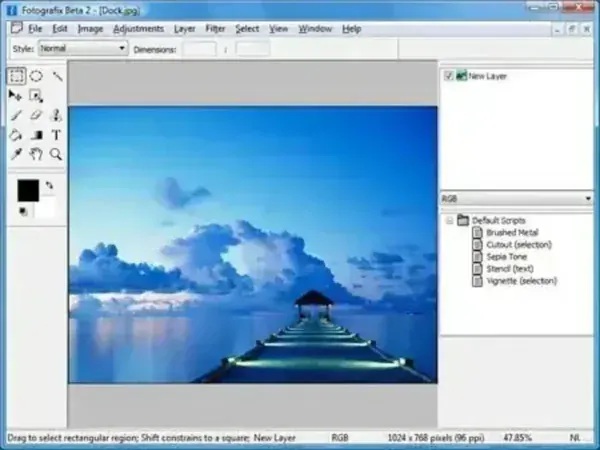
Fotografix is designed for photographers, graphic designers, students, and everyday users who need a simple yet capable image editing application. It launches quickly, consumes very little system memory, and runs directly from a USB flash drive, making it perfect for editing images on virtually any Windows computer.
Unlike basic paint programs, Fotografix supports layered editing, allowing you to make non-destructive changes while building complex compositions. Whether you're touching up vacation photos, creating graphics for a website, or designing social media images, it provides many of the essential editing tools without unnecessary complexity.
Key Features
- Edit photos, screenshots, digital artwork, and scanned images.
- Layer based image editing with transparency support.
- Selection tools including rectangular, elliptical, freehand, and magic wand.
- Crop, resize, rotate, and flip images.
- Brush, pencil, eraser, fill, gradient, clone stamp, and smudge tools.
- Brightness, contrast, hue, saturation, levels, and color adjustment tools.
- Blur, sharpen, emboss, noise reduction, and artistic filters.
- Undo and redo editing history.
- Supports common image formats including BMP, JPG, GIF, PNG, TIFF, and PSD.
- Portable application requiring no installation.
Why Choose Fotografix?
Many free image editors either offer only basic functionality or require significant system resources. Fotografix strikes a nice balance by providing advanced editing features in a remarkably small package. It works well for quick edits, image enhancements, graphic creation, and everyday photo corrections while remaining responsive even on older computers.
Because it runs portably, it's also an excellent addition to a USB toolkit for photographers, IT professionals, educators, and anyone who regularly works on multiple PCs.
Common Uses
- Crop and resize digital photos.
- Adjust brightness, contrast, and colors.
- Remove minor image imperfections.
- Create website graphics and banners.
- Edit screenshots before sharing.
- Prepare images for blogs and social media.
- Work with layered image compositions.
If you need a lightweight alternative with similar functionality, you might also like PhotoFiltre Portable, another excellent free image editing application.
Specifications | Official Site | Download
- Author's Website: Project Page
- Developer: L. Madhavan
- License: Freeware
- Supported Operating Systems: Windows
- Editor's Rating: ★★★★☆ (4 Stars)
- Download: Download Fotografix
Frequently Asked Questions
Is Fotografix free?
Yes. It is freeware and can be downloaded and used without charge.
Is Fotografix portable?
Yes. It can be run directly from a USB flash drive or other portable storage device without installing it on the host computer.
Does Fotografix support layers?
Yes. One of Fotografix's strongest features is its support for layer based image editing, making it suitable for more advanced photo editing projects.
What image formats are supported?
It supports many common image formats including JPG, PNG, GIF, BMP, TIFF, and Photoshop PSD files.
Is Fotografix a Photoshop replacement?
While it includes many familiar editing tools such as layers, selections, filters, and color adjustments, it is designed as a lightweight image editor rather than a complete replacement for Adobe Photoshop.
Final Thoughts
Fotografix proves that a powerful photo editor doesn't have to be large or complicated. Its combination of layer support, image enhancement tools, filters, and portability makes it an excellent choice for users who want a capable editing application without installing heavyweight software.
Whether you're editing family photos, creating graphics, or making quick image corrections on the go, this tool delivers an impressive set of features in a compact package. If you need an easy to use portable photo editor for Windows, it's definitely worth adding to your collection.
