
Snowbird 7 is a free portable file manager and Windows file search utility designed to help users quickly browse, organize, and locate files across local drives, removable storage devices, and network locations. Unlike Windows Explorer, Snowbird can efficiently handle very large folders while maintaining responsive performance. It also includes a powerful built-in search engine capable of finding files and even searching text within files without requiring indexing.
Snowbird 7 Portable File Manager and Windows Search Tool
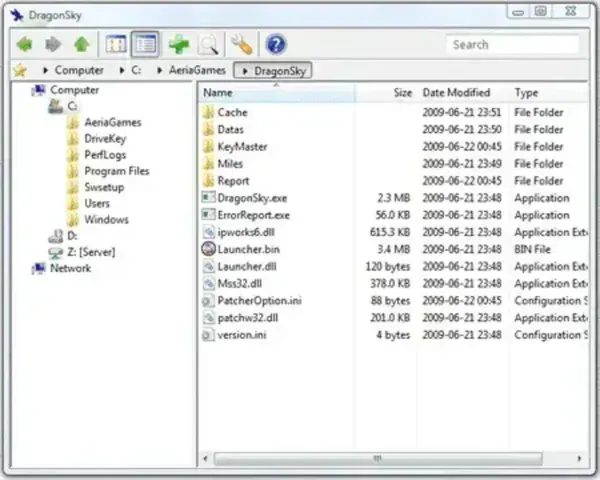
What is Snowbird 7?
Snowbird 7 is a lightweight file management application that combines advanced file browsing with fast file searching. The software was designed as an alternative to Windows Explorer, providing users with greater control over file operations while consuming very few system resources.
The application can browse local hard drives, USB flash drives, SSDs, network shares, and removable storage devices. It is particularly useful for users who frequently work with large collections of files and need faster search capabilities than those offered by the default Windows search system.
Because it is fully portable, Snowbird can run directly from a USB flash drive without installation, making it a useful addition to any portable toolkit.
Key Features
- Fast File Management: Browse, copy, move, rename, and delete files through an intuitive interface.
- Integrated Windows Search Tool: Search for files and folders instantly without requiring background indexing.
- Search Within Files: Locate specific text strings inside documents and other supported file types.
- Handles Large Directories: Designed to work efficiently even when browsing folders containing thousands of files.
- Pause and Resume File Transfers: Temporarily halt lengthy copy operations and continue later.
- Error Skipping: Skip problematic files during transfers without canceling the entire operation.
- Network Drive Support: Manage files stored on network shares and remote storage locations.
- Portable Operation: No installation required. Run directly from a USB flash drive or external drive.
- Low Resource Usage: Lightweight design minimizes CPU and memory consumption.
Why Use Snowbird 7 Instead of Windows Explorer?
Windows Explorer works well for basic file management tasks, but users dealing with large numbers of files often need more powerful tools. Snowbird offers improved search capabilities, better handling of large folders, and enhanced file transfer controls.
Some advantages include:
- Faster file searches without indexing.
- Ability to search inside file contents.
- More control over copy and move operations.
- Improved performance when working with large directories.
- Portable operation with no installation required.
Common Uses
- Managing USB flash drive contents while traveling.
- Searching large document collections for specific files or text.
- Maintaining network shares in business environments.
- Organizing software archives and portable application collections.
- Handling large backup folders without Explorer slowdowns.
How to Use Snowbird 7
- Download and extract Snowbird 7.
- Launch Snowbird.exe.
- Browse local, removable, or network drives using the navigation pane.
- Use the built-in search box to locate files by name or content.
- Copy, move, rename, or delete files as needed.
- Pause transfers or skip errors when managing large file operations.
Snowbird 7 vs Windows Explorer
| Feature | Snowbird 7 | Windows Explorer |
|---|---|---|
| Portable | ✔ Yes | ✖ No |
| Search Inside Files | ✔ Yes | Limited |
| No Indexing Required | ✔ Yes | ✖ Often Uses Indexing |
| Pause File Transfers | ✔ Yes | Limited |
| Handles Large Folders Efficiently | ✔ Yes | Varies |
Specifications and Download
- Developer: L. Madhavan
- Author Website: https://lmadhavan.com/ (Project appears discontinued)
- License: Freeware
- Category: File Management, Search Utilities
- Supported Operating Systems: Windows 11, 10, 8, 7, Vista, XP
- Portable: Yes
- Editor's Rating: ★★★★☆
- Download: Download Snowbird 7 Portable
Alternatives to Snowbird 7
If you are looking for similar portable file management tools, consider:
- Everything: Ultra-fast file search utility for Windows.
- FreeCommander: Dual-pane file manager with advanced features.
- Q-Dir: Multi-pane file explorer designed for power users.
- XYplorer Free: Tabbed file manager with extensive customization options.
- Total Commander: Popular file management solution for advanced users.
Frequently Asked Questions
Does Snowbird 7 require installation?
No. Snowbird 7 is completely portable and can run directly from a USB flash drive or local folder.
Can Snowbird search inside files?
Yes. It can locate specific text contained within supported file types without requiring a Windows search index.
Can it manage network drives?
Yes. Snowbird supports browsing and managing files stored on network locations and shared drives.
Is Snowbird still being developed?
The original developer website appears inactive, and development may have been discontinued. However, the software remains functional on modern Windows systems.
Final Thoughts
Snowbird 7 remains a useful portable file manager and Windows search tool for users who need more control than the standard Windows Explorer provides. Its ability to handle large folders, search inside files without indexing, manage network drives, and perform advanced file operations makes it particularly valuable for technicians, power users, and anyone maintaining large file collections.
Although development appears to have ended, the application continues to serve as a lightweight and effective portable file management solution that can easily be carried on a USB flash drive and used on virtually any Windows PC.
