EssentialPIM - Personal Information Manager
EssentialPIM is a Windows personal information manager that brings email, calendars, tasks, notes, contacts, and password records into one application. The developer now offers a free edition called EPIM Mail and a paid EPIM Pro edition with additional organization, backup, and synchronization features. Both desktop and portable use are supported, so you can choose to run the program from a USB drive rather than install it in the usual way.
Organize Calendars, Tasks, Contacts, and Notes
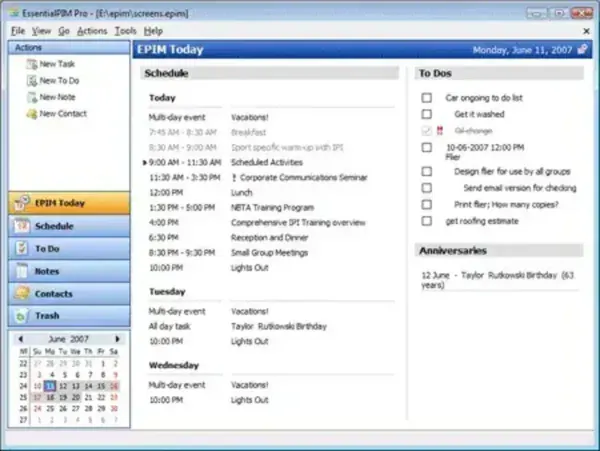
EssentialPIM combines several personal productivity tools in one workspace:
- Calendar: Organize appointments and events, review schedules, and manage date-based activities.
- Tasks: Create and organize to-do items, deadlines, and work lists.
- Contacts: Store contact details and organize people in an address book.
- Notes: Keep written information and reference material together with other personal data.
- Email: Manage supported email accounts from the application.
- Passwords: Store password records within the supported application features.
The available tools and advanced organization features vary by edition. EPIM Mail includes the core modules for everyday personal organization, while EPIM Pro adds more advanced options such as broader cloud-service integration, cross-linking, templates, and comprehensive automatic backup.
Free EPIM Mail and Paid EPIM Pro
The developer now distinguishes the free EPIM Mail edition from EPIM Pro:
- EPIM Mail: Free with no ads, subscriptions, or time limit. The developer lists email, calendar, tasks, notes, contacts, and password management among its core features. It is available for personal and commercial use.
- EPIM Pro: Offers a 30-day full-featured trial, followed by a paid annual subscription or perpetual license. It adds advanced organization, synchronization, backup, and productivity features.
- EPIM Pro Business: Adds shared database access and team collaboration features for workgroups.
You do not need to buy Pro to use the free EPIM Mail edition. Review the current comparison and licensing details on the developer's website before choosing an edition.
Portable Version and USB Drive Use
The developer's Windows installer includes both desktop and portable options. During setup, choose portable mode to run EPIM from a USB flash drive or another removable device. The developer states that the portable version keeps EPIM data and settings off the host computer.
Before moving an existing database, make a separate backup. The developer states that EPIM Mail and EPIM Pro use the same database format, so information is preserved when switching between those current editions. Do not assume that every much older EssentialPIM database or add-on is compatible without checking the current import and migration instructions.
Offline Use, Synchronization, and Data Protection
EssentialPIM stores data locally, and most core functions can be used without an internet connection. Internet access is needed for email, synchronization, online services, and software updates. EPIM Pro supports synchronization with supported cloud services and mobile devices; EPIM Mail includes a more limited feature set.
The developer describes AES-256 encryption for protecting EPIM data. Encryption and synchronization are separate concerns: keep a backup of your local database, use a strong device password, and review the destination and privacy terms before enabling any cloud service.
EssentialPIM Specifications and Download
- Developer: Astonsoft Ltd
- Product: EssentialPIM (EPIM)
- Free edition: EPIM Mail, free with no ads or time limit
- Paid edition: EPIM Pro, with a 30-day trial and paid license options
- Platform: Windows
- Deployment: Desktop installer with a portable mode option
- Main modules: Email, calendar, tasks, notes, contacts, and passwords
- Official download page: Download EPIM Mail or try EPIM Pro
- Feature comparison: EPIM edition features
- Editor's Rating: ★★★★☆ (4/5)
Frequently Asked Questions
Is EssentialPIM still free?
Yes. The current EPIM Mail edition is free with no ads, subscriptions, or time limit. EPIM Pro is a separate paid edition with a 30-day trial and additional features.
Can I run EssentialPIM from a USB flash drive?
Yes. The developer's Windows installer includes a portable mode option. Choose portable mode during setup to run EPIM from a USB drive or another removable device.
Does the portable version leave data on the host computer?
The developer states that the portable version leaves no EPIM data or settings on the host computer. Keep your own backup of the portable database, especially if it contains personal or business information.
Can I use EPIM without an internet connection?
Most local organization features work offline. Internet access is needed for email, synchronization, EPIM Cloud, online services, and software updates.
Can I switch between EPIM Mail and EPIM Pro?
The developer states that the current EPIM Mail and EPIM Pro editions use the same database format, so existing data is preserved when switching between them. Back up your database before changing editions.
Is EssentialPIM Worth Using?
EssentialPIM remains a capable all-in-one organizer for Windows users who want calendars, tasks, notes, contacts, and email in one place. The current free EPIM Mail edition is the relevant option if you want to avoid a paid subscription, while Pro is available for users who need its additional synchronization and organization features. Its portable mode is useful for carrying a local database on a USB drive, but remember that the data file itself still needs a reliable backup and careful protection.