
Day Text Converter is a small, legacy Windows utility designed to change selected text to uppercase or lowercase. The original listing describes a simple workflow: paste or type text, choose the required case, and copy the converted result. A third-party portable-software directory also records an option to save text to a TXT file, but current behavior has not been independently tested.
Legacy software notice: The developer website is reported as offline, and the old download links are no longer confirmed as available. Historical listings identify Day Text Converter 1.4 and list Windows versions through Windows 7, with no Unicode support noted. Compatibility with current Windows releases and non-ASCII text is unverified, so this page should be treated as a historical review rather than a verified current download.
Day Text Converter - Uppercase and Lowercase Text
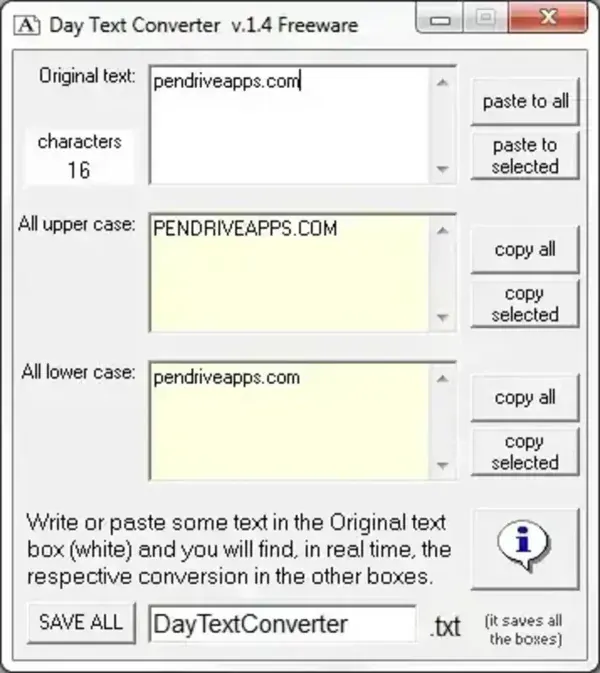
What Does Day Text Converter Do?
Text case conversion changes the capitalization of letters without requiring you to retype a sentence or paragraph. Day Text Converter was designed for basic uppercase and lowercase conversion, which can be useful when cleaning up pasted text, changing headings, or standardizing a short block of text.
Uppercase conversion changes supported letters to capitals, while lowercase conversion changes them to small letters. This is different from title case, sentence case, or more advanced text transformations. The available historical description does not establish that Day Text Converter supports those additional modes.
Portability and System Compatibility
The original PendriveApps listing described Day Text Converter as portable freeware. A historical third-party listing identifies version 1.4, a size of about 36 KB uncompressed, and support for older Windows versions through Windows 7. It also notes that settings are stored in the application folder and that Unicode support is absent. These are archival details, not confirmation that a copy will work correctly on a modern computer.
If you find an archived copy, test it with non-sensitive sample text first. Pay particular attention to accented characters, non-Latin writing systems, and text copied from modern applications. Do not assume that the utility preserves every character or encoding.
Download Availability
The old download link recorded in this listing is no longer verified, and the original developer site has been reported as offline by a third-party software directory. I cannot confirm a safe, current download source for Day Text Converter, so no replacement download is presented here.
For a current workflow, use a maintained text editor or word processor that provides a change-case command. If you handle sensitive text, prefer a local application you trust instead of pasting private content into an unfamiliar online converter.
Safety Notes
Small file size and a historical freeware label do not establish that an archived executable is safe. Avoid download mirrors that bundle installers or request unrelated software, scan files before running them, and do not use this legacy tool for important work unless you can verify the file source and output.
Day Text Converter Details
- Purpose: Convert text to uppercase or lowercase
- Historical version: 1.4, according to a third-party listing
- Historical license: Freeware
- Portability: Previously described as portable; not recently tested
- Historical platform support: Older Windows versions through Windows 7
- Known limitation in historical listing: Unicode support not listed
- Current status: Legacy software; official download and current compatibility unverified
