Access PassView: Recover Passwords from Legacy Access MDB Databases
Access PassView is a small Windows utility from NirSoft that displays the database password stored in certain password-protected Microsoft Access MDB files. It supports older Access 95, 97, 2000, and XP databases that use compatible Jet Database Engine formats. It is a narrow legacy recovery tool, not a general password utility, and it does not support the newer ACCDB database format.
Recover a Password from an Older MDB File
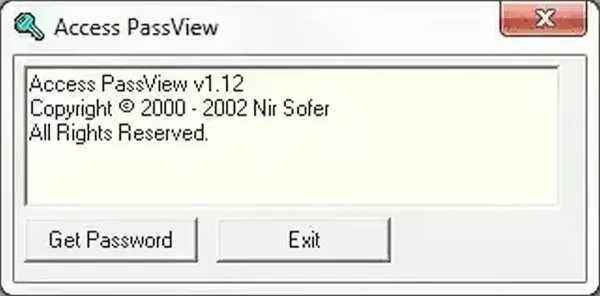
Microsoft Access databases can be protected with a database password. Access PassView was designed to display the main password stored in supported legacy MDB files. The developer documents compatibility with Microsoft Access 95, 97, 2000, and XP, along with Jet Database Engine 3.0 and 4.0 formats.
The utility does not recover every type of Access security credential. It displays the main database password, not user-level passwords, and it does not support modern ACCDB files. NirSoft also documents an 18-character limit for passwords used with Access 2000 and XP databases. These restrictions mean that the tool is useful only for a specific group of older files.
Use Only with Databases You Own or Administer
Database passwords protect information and should be treated as confidential. Use Access PassView only with files you own or are explicitly authorized to manage. Do not use it to access a database belonging to another person or organization without permission.
If a password is recovered for a legitimate migration, store it in an approved password manager and avoid leaving it in plain-text notes, screenshots, or exported reports. Keep the original MDB file unchanged and work from a backup. If the database contains business or personal information, follow the data owner's retention and access policies.
Credential-recovery utilities can trigger antivirus warnings because they inspect protected data. Download only from NirSoft's official website, verify the package, and review any security alert rather than assuming it is harmless.
Access PassView Specifications
- Developer: Nir Sofer (NirSoft)
- Version: 1.12
- License: Freeware
- Platform: Windows
- Supported formats: Password-protected MDB files from Access 95/97/2000/XP and Jet 3.0/4.0
- Main purpose: Display the main database password from supported legacy MDB files
- Limitations: No ACCDB support, no user-level password recovery, 18-character limit for Access 2000/XP passwords
- Deployment: Standalone executable
- Editor's Rating: ★★★★★ (5/5)
- Download: Get the ZIP package from the official NirSoft page
Modern Microsoft Access Security
For current Access databases, use the database's supported password and encryption features and keep a secure backup. If a database is part of an organization's workflow, coordinate access recovery with its administrator rather than trying an older utility that cannot read the newer file format.
Is Access PassView Still Useful?
Access PassView remains a focused recovery option for certain older MDB databases. Its narrow format support and old release make it unsuitable for newer Access files, but it may help with a legacy database when the user is authorized to access it. Keep a backup of the original file, protect any recovered password, and use current Access security features for new databases.