
SoftPerfect Network Scanner is a network administration utility for discovering devices, checking selected ports, and reviewing shared resources. It supports features such as SNMP queries, Wake-on-LAN, and remote shutdown. The current product is commercial software with a trial mode, and its features and supported platforms vary by version. Use it only on networks and devices you own or are authorized to administer. An open port is evidence of a responding service, not proof that the service is vulnerable or unsafe.
SoftPerfect Portable Network Scanner
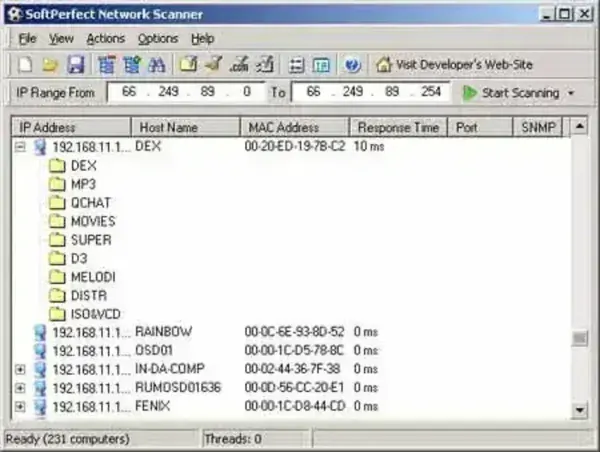
Softperfect's Scanner also allows you to mount shared folders as network drives, check for a user defined port and report back if one is open, resolve host names and autodetect your PC's local and external IP addresses.
What is SoftPerfect Network Scanner?
SoftPerfect Network Scanner is a network scanning tool designed to help users identify and analyze network devices and services. It is commonly used by network administrators, IT professionals, and individuals who need to manage and troubleshoot network issues. Some of its main features include:
- IP and SNMP Address Scanning: The software allows users to scan IP addresses and SNMP-enabled devices on a network to gather information about connected devices.
- Ping and Traceroute Functions: It includes tools for ping and traceroute, which can help diagnose connectivity issues and identify the path that network packets take between the source and destination.
- MAC Address Detection: SoftPerfect Network Scanner can detect the MAC addresses of devices on a network, which can be useful for network management and security purposes.
- Port Scanning: Checks selected ports for responses that may indicate available services. Firewalls, timeouts, and device configuration can affect results, and an open port alone does not establish whether a service is vulnerable.
- Remote Shutdown and Wake-On-LAN: It offers features to remotely shut down or wake up computers on the network, providing a level of control over connected devices.
- Customizable Reports: Users can generate customizable reports based on the scan results, helping them document and analyze the state of their network.
- Integration with External Tools: Can be integrated with third-party tools for additional functionality.
Softperfect Network Scanner Specs | Official Site | Download
- Authors Website: Project Page
- License: Commercial product with a free trial; the current trial limits the results display to 10 devices.
- Supported OS: Current releases are available for Windows, macOS, and Linux; check the official site for supported architectures and platform-specific feature differences.
- Download: Visit the official product page for the current trial and portable package options:
Softperfect Network Scanner Download
